How Much Are You Paying for Resources You're Not Using?
SpendZero scans your AWS account in 5 minutes and finds every zombie resource — unattached EBS volumes, orphaned snapshots, unused Elastic IPs, idle NAT Gateways, and more. No credit card. No agents. Free scan.
Run a Free Scan →Every AWS account has zombie resources — infrastructure that was provisioned months ago, forgotten, and is now silently draining your budget. Unattached EBS volumes from terminated instances. Snapshots of databases that no longer exist. Elastic IPs allocated for a staging environment that was decommissioned last quarter. Individually, each costs a few dollars. Combined, they routinely add up to $1,000–$5,000 per month for mid-size companies.
The worst part? These costs don't show up as a spike in your bill — they blend into the baseline, making them invisible unless you actively hunt for them. This guide shows you exactly how to find and delete every type of unused AWS resource, with CLI commands, Console steps, and automation scripts. We also show how SpendZero detects all of these automatically with 37+ checks across 25+ AWS services.
The True Cost of Zombie AWS Resources
Before diving into each resource type, here's what these forgotten resources actually cost. These are real AWS prices as of 2026 — not theoretical estimates.
| Resource Type | Unit Cost | Typical Waste Scenario | Monthly Cost |
|---|---|---|---|
| Unattached EBS Volume (100 GB gp3) | $0.08/GB/month | 10 orphaned volumes × 100 GB each | $80 |
| Unattached EBS Volume (500 GB io2) | $0.125/GB/month + IOPS | 3 high-performance volumes left behind | $187+ |
| Orphaned EBS Snapshots | $0.05/GB/month | 200 snapshots × 50 GB average | $500 |
| Unused Elastic IP | $3.65/month each | 15 unassociated EIPs | $55 |
| Idle NAT Gateway | $32.40/month + data | 2 NAT Gateways in unused VPCs | $65+ |
| Idle Load Balancer (ALB) | $16.20/month + LCU | 3 ALBs with zero target groups | $49+ |
| Unused RDS Instance (db.t3.medium) | ~$50/month | 1 forgotten dev database | $50 |
| Idle ElastiCache Node (cache.t3.medium) | ~$47/month | 1 unused Redis cluster | $47 |
Total for a typical mid-size AWS account: $1,000–$3,000/month in pure waste. We've seen enterprise accounts with $5,000–$15,000/month in zombie resources. The problem scales with account age and team size — the older your account and the more engineers who have provisioned resources, the more waste accumulates.
1. Unattached EBS Volumes
EBS volumes are the most common zombie resource on AWS. When you terminate an EC2 instance, EBS volumes are not deleted by default unless you explicitly set DeleteOnTermination: true. Most engineers don't — and most Terraform configs don't either unless someone adds delete_on_termination = true to the block device mapping.
How to Find Unattached EBS Volumes
AWS Console:
- Go to EC2 → Elastic Block Store → Volumes
- Filter by State: available
- Any volume in "available" state is not attached to any instance — it's costing you money for nothing
AWS CLI:
aws ec2 describe-volumes \
  --filters Name=status,Values=available \
  --query 'Volumes[*].{ID:VolumeId,Size:Size,Type:VolumeType,Created:CreateTime}' \
  --output table
Multi-region scan (all regions at once):
for region in $(aws ec2 describe-regions --query 'Regions[].RegionName' --output text); do
  echo "=== $region =="
  aws ec2 describe-volumes --region $region \
    --filters Name=status,Values=available \
    --query 'Volumes[*].[VolumeId,Size,VolumeType]' \
    --output table
done
How to Delete Unattached EBS Volumes
Before deleting: Create a snapshot first if you're unsure whether the data is needed. Snapshots are 60% cheaper than live volumes for the same data.
# Snapshot first (safety net)
aws ec2 create-snapshot --volume-id vol-0123456789abcdef0 --description "Backup before cleanup"

# Then delete the volume
aws ec2 delete-volume --volume-id vol-0123456789abcdef0
Bulk delete all unattached volumes in a region (use with caution):
aws ec2 describe-volumes \
  --filters Name=status,Values=available \
  --query 'Volumes[].VolumeId' --output text | \
  xargs -n1 aws ec2 delete-volume --volume-id
How to Prevent EBS Volume Orphans
- Terraform: Always set
delete_on_termination = truein yourebs_block_deviceorroot_block_deviceblocks - CloudFormation: Set
DeleteOnTermination: trueinBlockDeviceMappings - AWS Config Rule: Enable the
ec2-volume-inuse-checkmanaged rule to flag unattached volumes automatically - SpendZero: Automatically detects unattached volumes across all regions and accounts with one-click delete
2. Orphaned EBS Snapshots
Snapshots are cheap per-GB ($0.05/GB/month), but they accumulate fast. Automated backup policies, AMI creation workflows, and manual snapshots all create snapshots that outlive the resources they were made from. A 2-year-old account can easily have 500+ snapshots totalling terabytes of data.
How to Find Orphaned Snapshots
An orphaned snapshot is one where the source volume no longer exists. These are safe to evaluate for deletion.
# List all snapshots owned by your account
aws ec2 describe-snapshots --owner-ids self \
  --query 'Snapshots[*].{ID:SnapshotId,VolumeId:VolumeId,Size:VolumeSize,Date:StartTime,Desc:Description}' \
  --output table
Find snapshots whose source volume is deleted:
# Get all volume IDs currently in use
ACTIVE_VOLS=$(aws ec2 describe-volumes --query 'Volumes[].VolumeId' --output text)

# Get all snapshot volume references
aws ec2 describe-snapshots --owner-ids self \
  --query 'Snapshots[*].[SnapshotId,VolumeId,VolumeSize,StartTime]' \
  --output text | while read snap vol size date; do
    if ! echo "$ACTIVE_VOLS" | grep -q "$vol"; then
      echo "ORPHANED: $snap (from deleted volume $vol, ${size}GB, created $date)"
    fi
done
Snapshots Tied to Deregistered AMIs
When you deregister an AMI, its backing snapshots are not automatically deleted. This is one of the largest sources of snapshot waste.
# Find snapshots from deregistered AMIs
aws ec2 describe-snapshots --owner-ids self \
  --query 'Snapshots[?starts_with(Description, `Created by CreateImage`)].[SnapshotId,Description,VolumeSize,StartTime]' \
  --output table
Cross-reference these with active AMIs. If the AMI in the description no longer exists, the snapshot is safe to delete.
How to Delete Snapshots
# Delete a single snapshot
aws ec2 delete-snapshot --snapshot-id snap-0123456789abcdef0

# Delete all orphaned snapshots (after confirming the list above)
aws ec2 describe-snapshots --owner-ids self \
  --query 'Snapshots[].SnapshotId' --output text | \
  xargs -n1 aws ec2 delete-snapshot --snapshot-id
Snapshot Lifecycle Automation
- AWS Data Lifecycle Manager (DLM): Create lifecycle policies that auto-delete snapshots after N days. Set retention to 7–30 days for non-compliance workloads.
- Terraform: Use
aws_dlm_lifecycle_policyto enforce snapshot retention in code - SpendZero: Identifies orphaned snapshots (from deleted volumes and deregistered AMIs) and calculates exact monthly savings. One-click cleanup.
3. Unused Elastic IPs
AWS charges $0.005/hour ($3.65/month) for every Elastic IP that is not associated with a running instance. This pricing change (introduced in February 2024) means even Elastic IPs attached to stopped instances now cost money. The intent is to encourage releasing IPs back to the shrinking IPv4 pool.
How to Find Unused Elastic IPs
AWS Console:
- Go to EC2 → Network & Security → Elastic IPs
- Look for IPs where the Association ID column is empty — these are unassociated
- Also check IPs associated with stopped instances — these now cost money too
AWS CLI:
# Find all unassociated Elastic IPs
aws ec2 describe-addresses \
  --query 'Addresses[?AssociationId==`null`].{IP:PublicIp,AllocationId:AllocationId,Domain:Domain}' \
  --output table
Multi-region:
for region in $(aws ec2 describe-regions --query 'Regions[].RegionName' --output text); do
  EIPS=$(aws ec2 describe-addresses --region $region \
    --query 'Addresses[?AssociationId==`null`].PublicIp' --output text)
  if [ -n "$EIPS" ]; then
    echo "=== $region: $EIPS"
  fi
done
How to Release Elastic IPs
# Release by allocation ID
aws ec2 release-address --allocation-id eipalloc-0123456789abcdef0
Important: Before releasing, verify the IP isn't referenced in DNS records, firewall whitelists, or third-party service configurations. Releasing an IP means you lose it permanently — you cannot get the same IP address back.
4. Idle NAT Gateways
NAT Gateways cost $0.045/hour ($32.40/month) plus $0.045/GB of data processed. They're one of the most expensive "set and forget" resources on AWS. If you have VPCs that are no longer actively used — old staging environments, decommissioned microservices — their NAT Gateways keep billing you.
How to Find Idle NAT Gateways
# List all NAT Gateways and their state
aws ec2 describe-nat-gateways \
  --query 'NatGateways[?State==`available`].{ID:NatGatewayId,VPC:VpcId,Subnet:SubnetId,Created:CreateTime}' \
  --output table
Then check CloudWatch for the BytesOutToDestination metric. If a NAT Gateway has processed zero or near-zero bytes over the last 14 days, it's idle:
aws cloudwatch get-metric-statistics \
  --namespace AWS/NATGateway \
  --metric-name BytesOutToDestination \
  --dimensions Name=NatGatewayId,Value=nat-0123456789abcdef0 \
  --start-time $(date -u -v-14d +%Y-%m-%dT%H:%M:%S) \
  --end-time $(date -u +%Y-%m-%dT%H:%M:%S) \
  --period 86400 --statistics Sum
How to Delete Idle NAT Gateways
aws ec2 delete-nat-gateway --nat-gateway-id nat-0123456789abcdef0After deletion, release the associated Elastic IP (NAT Gateways always have one) to stop the EIP charge as well.
5. Idle Load Balancers
Application Load Balancers (ALBs) cost a minimum of $16.20/month even with zero traffic, plus LCU charges based on new connections, active connections, bandwidth, and rule evaluations. Classic Load Balancers cost $18/month minimum. Network Load Balancers cost $16.20/month minimum.
How to Find Idle Load Balancers
# ALBs/NLBs with no target groups
aws elbv2 describe-load-balancers \
  --query 'LoadBalancers[].{Name:LoadBalancerName,ARN:LoadBalancerArn,Type:Type,Created:CreatedTime}' \
  --output table

# Check each ALB for registered targets
aws elbv2 describe-target-groups \
  --load-balancer-arn arn:aws:elasticloadbalancing:... \
  --query 'TargetGroups[].{Name:TargetGroupName,Targets:LoadBalancerArns}'
Also check CloudWatch RequestCount for ALBs — if it's zero for 14+ days, the load balancer is idle regardless of target group configuration.
6. GP2 to GP3 Migration (20% Savings)
This isn't a zombie resource, but it's one of the easiest wins: GP3 volumes are 20% cheaper than GP2 with better baseline performance (3,000 IOPS and 125 MB/s throughput included vs GP2's 100 IOPS/GB scaling model). AWS even provides a free, zero-downtime migration path.
Find All GP2 Volumes
aws ec2 describe-volumes \
  --filters Name=volume-type,Values=gp2 \
  --query 'Volumes[*].{ID:VolumeId,Size:Size,State:State,Attached:Attachments[0].InstanceId}' \
  --output table
Migrate GP2 to GP3 (Zero Downtime)
# Modify a single volume
aws ec2 modify-volume --volume-id vol-0123456789abcdef0 --volume-type gp3

# Bulk migrate all GP2 volumes in a region
aws ec2 describe-volumes \
  --filters Name=volume-type,Values=gp2 \
  --query 'Volumes[].VolumeId' --output text | \
  xargs -n1 -I {} aws ec2 modify-volume --volume-id {} --volume-type gp3
The migration happens live — no instance restart required. It takes a few minutes per volume depending on size.
7. Other Zombie Resources to Check
Idle RDS Instances
Check CloudWatch DatabaseConnections metric. If an RDS instance has had zero connections for 14+ days, it's a candidate for deletion or at minimum stopping. Stopped RDS instances auto-restart after 7 days — use snapshots + deletion instead of stop for long-term savings.
Unused ElastiCache Clusters
Check CurrConnections and CacheHits metrics. A Redis cluster with zero hits is pure waste — typically $47–$200/month depending on node type.
Idle Redshift Clusters
Check QueriesCompletedPerSecond. If it's zero, nobody is querying this warehouse. Redshift clusters are expensive — even a single dc2.large node costs $180/month.
Unused CloudFront Distributions
Check Requests metric. Zero-request distributions still incur charges for HTTPS certificate management and the distribution configuration itself.
The Manual Approach vs Automated Detection
You can run the CLI commands above for each resource type, across each region, in each AWS account. For a single-account, single-region setup, this takes about 30 minutes. For a realistic multi-account, multi-region enterprise setup, it's a full-day project that needs to be repeated monthly.
| Factor | Manual (CLI/Console) | Automated (SpendZero) |
|---|---|---|
| Time to scan | 30 min (single region) to 8 hours (multi-account) | 5 minutes (all accounts, all regions) |
| Resource types checked | 1 at a time, manually | 37+ checks across 25+ services simultaneously |
| Multi-region | Must loop through each region manually | All regions scanned automatically |
| Multi-account | Must switch roles/profiles per account | AWS Organizations integration — all accounts at once |
| Cost calculation | Must look up pricing and calculate manually | Exact dollar savings calculated per resource |
| Remediation | CLI commands, one at a time | One-click actions with confirmation and audit logging |
| Recurring monitoring | Must re-run scripts monthly | Continuous monitoring with Slack/email alerts |
| Rightsizing detection | Requires CloudWatch analysis per instance | 14-day CPU/memory analysis with recommendations |
| Cost | Free (your engineer's time) | Free scan, no credit card required |
How SpendZero Finds All of This Automatically
SpendZero runs 37+ automated waste detection checks across 25+ AWS services — covering every resource type described in this guide plus many more. Here's what the scan covers:
What SpendZero Checks
| Category | Checks Included | Typical Savings |
|---|---|---|
| Idle Resources | Idle EC2 instances (1–2% CPU), RDS with zero connections, ElastiCache with zero cache hits, Redshift with no queries, NAT Gateways processing zero bytes, Load Balancers with no healthy targets | $500–$5,000/month |
| Rightsizing | EC2 instance type optimization (14-day analysis), RDS sizing, ElastiCache sizing, Redshift sizing, Lambda memory optimization, ECS task resource optimization | $300–$3,000/month |
| Storage Waste | Unattached EBS volumes, orphaned snapshots from deleted instances/AMIs, GP2→GP3 migration opportunities, volume size and age analysis | $200–$2,000/month |
| Reserved Capacity Gaps | EC2 Reserved Instance gap analysis, RDS RI opportunities, ElastiCache RI opportunities, Savings Plans recommendations | $1,000–$10,000/month |
| Network Waste | Unused Elastic IPs, idle NAT Gateways, CloudFront distributions serving zero requests | $100–$500/month |
How It Works
- Connect your AWS account — takes 5 minutes. SpendZero uses a read-only IAM role (no write access for scanning). No agents to install.
- Automatic scan — SpendZero scans all regions, all services, and calculates exact dollar savings per resource
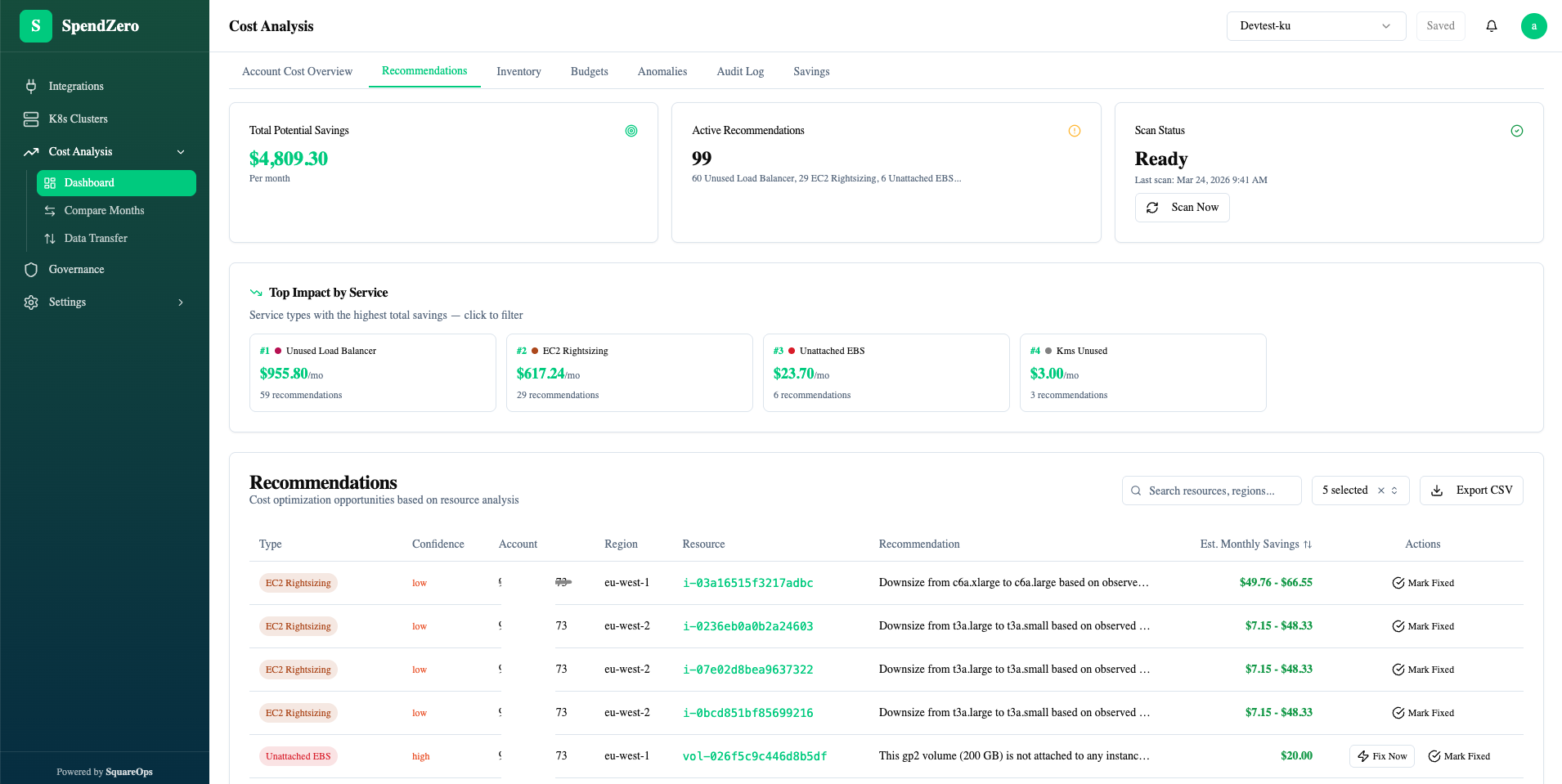
- Review findings — dashboard shows every zombie resource, its monthly cost, and the recommended action
- One-click remediation — stop idle instances, delete unattached volumes, resize databases, migrate GP2→GP3 — all with confirmation prompts and full audit logging
- Ongoing monitoring — continuous scanning catches new waste as it appears. Budget alerts via Slack or email when spending thresholds are exceeded.
Security: SpendZero uses read-only IAM access with least-privilege permissions. No access to application data, database contents, or S3 objects. AWS STS temporary credentials expire automatically. All API communication is TLS-encrypted.
Stop Paying for Resources You're Not Using
Run a free SpendZero scan and see exactly how much you're wasting — in 5 minutes, across all regions and accounts, with zero risk.
Run Free Scan →Building a Monthly Cleanup Routine
Whether you use SpendZero or manual scripts, zombie resources are a recurring problem — not a one-time fix. Engineers create new resources every sprint. Staging environments get abandoned. Projects get cancelled. Without a systematic cleanup process, waste regenerates within weeks.
Recommended Monthly Checklist
| Week | Task | Time (Manual) | Time (SpendZero) |
|---|---|---|---|
| Week 1 | Scan for unattached EBS volumes and orphaned snapshots | 45 min | Automatic |
| Week 1 | Check for unused Elastic IPs and idle NAT Gateways | 20 min | Automatic |
| Week 2 | Review idle EC2, RDS, ElastiCache instances (14-day metrics) | 1–2 hours | Automatic |
| Week 2 | Evaluate rightsizing opportunities for running instances | 2–3 hours | Automatic |
| Week 3 | Check Reserved Instance coverage gaps | 1 hour | Automatic |
| Week 3 | Review GP2→GP3 migration opportunities | 30 min | Automatic |
| Week 4 | Generate cost optimization report for leadership | 2 hours | 1-click export |
For companies spending $10K+/month on AWS, this monthly routine typically saves 20–40% within the first quarter. The key is consistency — one cleanup doesn't fix the problem permanently. New waste appears every month as infrastructure evolves.
Need help building a cost optimization practice? Learn about our FinOps and cloud cost management services — or start with a free SpendZero scan to see exactly what you're wasting today.