Why AWS Infrastructure Mistakes Are So Costly
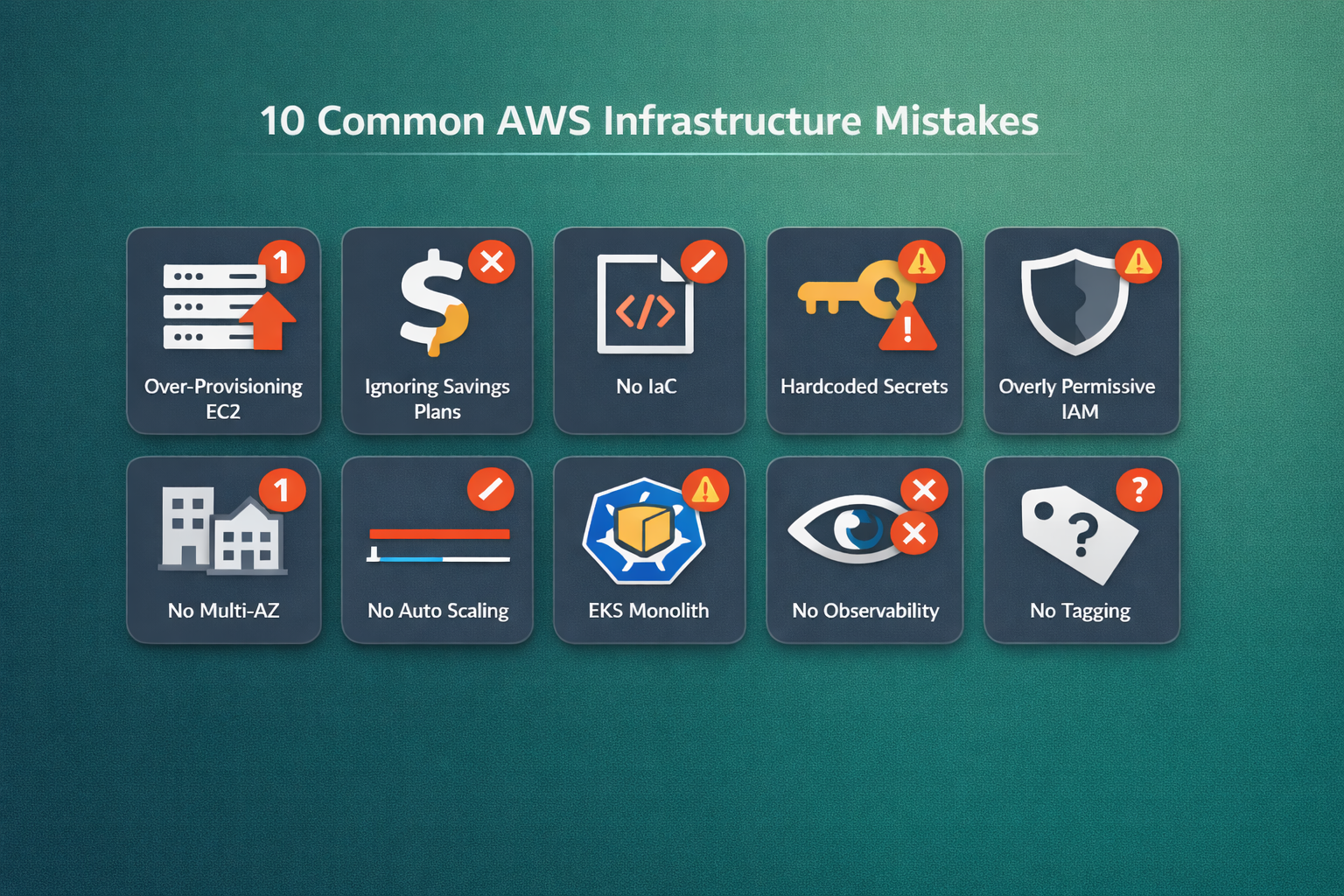
Most teams don't realize their AWS infrastructure is bleeding money and accumulating security debt until the monthly bill arrives—or worse, an incident hits production. After auditing hundreds of AWS accounts across startups and enterprises, we've identified the 10 most common AWS infrastructure mistakes that cost organizations thousands of dollars every month and leave them exposed to outages and breaches.
According to Gartner, through 2027, 60% of organizations will face major cloud cost overruns due to mismanaged infrastructure. The good news? Every one of these mistakes is fixable—often within days. Here's what they are and exactly how to fix each one.
1. Over-Provisioning EC2 Instances
The Mistake
Teams pick large EC2 instance types during initial setup—"just to be safe"—and never revisit the decision. We routinely find m5.2xlarge instances running workloads that would comfortably fit on a t3.medium. In one recent audit, 43% of a client's EC2 fleet was running below 10% average CPU utilization.
Why It Hurts
- A single
m5.2xlargein us-east-1 costs ~$280/month. At3.mediumcosts ~$30/month. That's a 9x cost difference per instance. - Multiply across 20-50 instances and you're burning $5,000–$12,000/month unnecessarily.
- Over-provisioned instances also mask performance problems—you never learn where the real bottlenecks are.
The Fix
Use AWS Compute Optimizer and CloudWatch metrics to right-size every instance.
- Enable AWS Compute Optimizer across all accounts. It analyzes 14 days of CloudWatch data and recommends optimal instance types.
- Review CPU, memory, and network utilization in CloudWatch. If average utilization is below 30%, downsize.
- Use Graviton-based instances (e.g.,
t4g.medium,m7g.large) for up to 40% better price-performance on compatible workloads. - Implement a quarterly right-sizing review as a standard operating procedure.
# Terraform: Use Graviton instances for better price-performance
resource "aws_instance" "app_server" {
  ami           = data.aws_ami.al2023_arm64.id
  instance_type = "t4g.medium"  # Graviton-based, ~20% cheaper than t3.medium

  metadata_options {
    http_tokens = "required"  # Enforce IMDSv2
  }

  tags = {
    Name        = "app-server"
    Environment = "production"
    Team        = "platform"
    CostCenter  = "engineering"
  }
}
2. Ignoring Reserved Instances and Savings Plans
The Mistake
Running all workloads on On-Demand pricing when you have predictable, steady-state usage. We see this in over 70% of AWS accounts we audit—teams pay full price for instances that run 24/7/365.
Why It Hurts
- On-Demand pricing is the most expensive option AWS offers.
- Compute Savings Plans can reduce costs by up to 66% compared to On-Demand.
- For a team spending $10,000/month on EC2, this mistake alone costs $40,000–$79,000 per year in unnecessary spend.
The Fix
Layer your purchasing strategy: Savings Plans for baseline, Spot for fault-tolerant, On-Demand for bursts.
- Use AWS Cost Explorer's Savings Plans recommendations to identify your steady-state compute baseline.
- Purchase Compute Savings Plans (more flexible than EC2 Savings Plans) for your baseline workloads.
- Use Spot Instances for batch processing, CI/CD runners, and stateless microservices. Spot can save up to 90%.
- Reserve On-Demand capacity only for unpredictable burst workloads.
- Review and adjust commitments quarterly as your usage patterns evolve.
3. No Infrastructure as Code (Terraform/OpenTofu)
The Mistake
Building and modifying AWS resources manually through the Console. It feels faster initially, but within months you end up with an environment that nobody can fully explain, reproduce, or recover. We call these "snowflake environments"—every one is unique and fragile.
Why It Hurts
- Configuration drift: Manual changes create inconsistencies between environments (dev vs staging vs production).
- No audit trail: You can't git-blame the AWS Console. When something breaks, there's no history of what changed or why.
- Disaster recovery becomes impossible: If a region goes down, can you rebuild your entire infrastructure from scratch? Without IaC, the answer is almost always no.
- Onboarding slows down: New engineers can't understand the infrastructure by reading code—they have to click through hundreds of Console screens.
The Fix
Adopt Terraform or OpenTofu for all infrastructure. No exceptions.
- Start with your most critical production resources. Import existing resources using
terraform importor tools like Terraformer. - Organize code into modules: networking, compute, databases, monitoring.
- Store state in S3 with DynamoDB locking—never local state files.
- Enforce code review for all infrastructure changes via pull requests.
- Use Atlantis or Spacelift for automated Terraform plan/apply in CI/CD.
# Terraform: Remote state configuration (always use this, never local state)
terraform {
  backend "s3" {
    bucket         = "mycompany-terraform-state"
    key            = "production/infrastructure.tfstate"
    region         = "us-east-1"
    dynamodb_table = "terraform-locks"
    encrypt        = true
  }
}

4. Hardcoding Secrets Instead of Using AWS Secrets Manager
The Mistake
Storing database passwords, API keys, and tokens directly in application code, environment variables baked into AMIs, or (worst case) committed to Git repositories. We've seen production database credentials sitting in plain text in Dockerfiles and .env files on S3.
Why It Hurts
- Security breach risk: Hardcoded secrets are the #1 cause of credential leaks. GitHub scans detect millions of leaked secrets every year.
- Rotation is impossible: You can't rotate a credential that's hardcoded in 15 different places without redeploying everything.
- Compliance violations: SOC 2, ISO 27001, and HIPAA all require proper secrets management.
The Fix
Use AWS Secrets Manager or SSM Parameter Store for every secret. Zero exceptions.
- Migrate all secrets to AWS Secrets Manager (for credentials needing rotation) or SSM Parameter Store SecureString (for simpler key-value secrets).
- Enable automatic rotation for RDS database credentials using Secrets Manager's built-in Lambda rotation.
- Use IAM roles to grant applications access to secrets—never pass credentials through environment variables in container definitions.
- In Kubernetes on EKS, use the AWS Secrets Store CSI Driver to mount secrets directly into pods.
- Set up GitHub secret scanning or tools like truffleHog in your CI pipeline to catch accidental commits.
# Terraform: Create a secret with automatic rotation
resource "aws_secretsmanager_secret" "db_credentials" {
  name                    = "production/rds/credentials"
  recovery_window_in_days = 7
}

resource "aws_secretsmanager_secret_rotation" "db_rotation" {
  secret_id           = aws_secretsmanager_secret.db_credentials.id
  rotation_lambda_arn = aws_lambda_function.secret_rotation.arn

  rotation_rules {
    automatically_after_days = 30
  }
}
5. Overly Permissive IAM Policies
The Mistake
Attaching AdministratorAccess or *:* wildcard policies to application roles, CI/CD pipelines, and even individual developers. The reasoning is always the same: "We'll tighten it later." Later never comes.
Why It Hurts
- A compromised application with
AdministratorAccesscan delete your entire AWS account's resources in minutes. - Wildcard permissions violate the principle of least privilege—the foundational AWS security best practice.
- Audit and compliance teams will flag this immediately during SOC 2 or ISO assessments.
- Lateral movement during a breach becomes trivial with overly broad permissions.
The Fix
Implement least-privilege IAM from day one. Use IAM Access Analyzer to audit existing policies.
- Enable IAM Access Analyzer in every account to identify overly permissive policies and unused permissions.
- Use IAM Access Analyzer policy generation to create least-privilege policies based on actual CloudTrail activity.
- Replace long-lived access keys with IAM roles everywhere—EC2 instance profiles, ECS task roles, EKS IRSA (IAM Roles for Service Accounts).
- Enforce MFA for all human IAM users and require it for sensitive actions via IAM policy conditions.
- Implement AWS Organizations SCPs (Service Control Policies) to set permission guardrails across all accounts.
6. Skipping Multi-AZ and Disaster Recovery
The Mistake
Running databases, application servers, and load balancers in a single Availability Zone. Teams often skip Multi-AZ to save money during early stages and forget to enable it as the application grows and becomes business-critical.
Why It Hurts
- A single AZ outage—which happens periodically—takes down your entire application.
- RDS Single-AZ means database failover requires manual intervention and can take 30+ minutes.
- Without Multi-AZ, your SLA commitments to customers become impossible to meet.
- The cost difference for Multi-AZ RDS is roughly 2x—but the cost of a production outage is orders of magnitude higher.
The Fix
Enable Multi-AZ for all production databases and distribute workloads across at least 2 AZs.
- Enable Multi-AZ for all production RDS instances. For high-read workloads, add read replicas in different AZs.
- Deploy EC2/ECS/EKS workloads across at least 2 Availability Zones using Auto Scaling Groups or EKS managed node groups.
- Use Application Load Balancers configured across multiple AZs with health checks.
- For critical systems, implement cross-region disaster recovery using AWS Backup, S3 Cross-Region Replication, and Aurora Global Database.
- Run disaster recovery drills at least twice a year. Document and test your RTO/RPO targets.
7. Not Using Auto Scaling Groups
The Mistake
Running a fixed number of EC2 instances regardless of traffic patterns. Some teams manually add instances before expected traffic spikes and forget to remove them afterward. Others simply over-provision to handle peak load at all times.
Why It Hurts
- Over-provisioning for peak: If peak traffic is 3x your average, you're paying 3x all day for capacity you use a few hours per day.
- Under-provisioning risk: Without auto scaling, unexpected traffic spikes cause degraded performance or outages.
- Manual scaling is error-prone: Humans forget to scale down. We've seen instances running for months after a traffic event ended.
The Fix
Implement Auto Scaling Groups with target tracking policies for all stateless workloads.
- Create Auto Scaling Groups for all EC2-based workloads with sensible min/max/desired values.
- Use target tracking scaling policies—the simplest and most effective approach. Set a target CPU utilization (e.g., 60%) and let AWS handle the rest.
- For EKS workloads, use Karpenter (preferred over Cluster Autoscaler) for faster, more efficient node provisioning.
- Implement predictive scaling if you have recurring traffic patterns (e.g., business hours, weekly peaks).
- Always set scale-in protection for instances processing long-running jobs.
# Terraform: Auto Scaling Group with target tracking
resource "aws_autoscaling_group" "app" {
  name                = "app-asg"
  desired_capacity    = 2
  min_size            = 2
  max_size            = 10
  vpc_zone_identifier = var.private_subnet_ids
  target_group_arns   = [aws_lb_target_group.app.arn]

  mixed_instances_policy {
    instances_distribution {
      on_demand_percentage_above_base_capacity = 30
      spot_allocation_strategy                 = "capacity-optimized"
    }
    launch_template {
      launch_template_specification {
        launch_template_id = aws_launch_template.app.id
        version            = "$Latest"
      }
      override {
        instance_type = "t4g.medium"
      }
      override {
        instance_type = "t4g.large"
      }
    }
  }
}

resource "aws_autoscaling_policy" "cpu_target" {
  name                   = "cpu-target-tracking"
  autoscaling_group_name = aws_autoscaling_group.app.name
  policy_type            = "TargetTrackingScaling"

  target_tracking_configuration {
    predefined_metric_specification {
      predefined_metric_type = "ASGAverageCPUUtilization"
    }
    target_value = 60.0
  }
}
8. Running Monoliths on EKS Without Right-Sizing
The Mistake
Migrating a monolithic application to Kubernetes on EKS without setting proper resource requests and limits, or running EKS for workloads that don't need container orchestration at all. We see teams spinning up a 3-node m5.xlarge EKS cluster to run a single application that would work fine on a single EC2 instance or ECS Fargate.
Why It Hurts
- EKS control plane costs $73/month just for the cluster—before any worker nodes.
- Without resource requests/limits, pods either starve for resources or consume everything on the node, causing evictions and instability.
- Over-provisioned node groups waste compute. Under-provisioned ones cause scheduling failures.
- EKS operational complexity is significant—if your team doesn't have Kubernetes expertise, the overhead can be crushing.
The Fix
Right-size your Kubernetes workloads and evaluate whether EKS is the right choice.
- Set resource requests and limits for every pod. Use Goldilocks or Kubernetes VPA (Vertical Pod Autoscaler) in recommendation mode to find optimal values.
- Use Karpenter instead of Cluster Autoscaler for smarter, faster node provisioning that matches actual pod resource needs.
- Consider ECS Fargate for simpler workloads that don't need the full Kubernetes feature set—it eliminates node management entirely.
- For monolithic apps, evaluate whether a simple EC2 + ALB + Auto Scaling Group setup would be more cost-effective and easier to operate.
- Use Graviton-based node groups (
m7g,c7g) on EKS for up to 40% better price-performance.

9. Neglecting CloudWatch Alarms and Observability
The Mistake
Running production workloads without proper monitoring, alerting, or centralized logging. Teams find out about outages from customers instead of from their monitoring stack. We've audited accounts with zero CloudWatch alarms configured—not even basic CPU or disk alerts.
Why It Hurts
- Slow incident detection: Without alerts, MTTD (Mean Time to Detect) goes from minutes to hours.
- Blind troubleshooting: Without centralized logs and metrics, debugging production issues becomes guesswork.
- Capacity planning is impossible: You can't optimize what you can't measure.
- Compliance risk: Most compliance frameworks require monitoring and audit logging.
The Fix
Implement a layered observability stack: metrics, logs, traces, and alerting.
- Set up CloudWatch Alarms for critical metrics at minimum:
- EC2: CPU > 80%, StatusCheckFailed
- RDS: CPU > 80%, FreeStorageSpace < 20%, DatabaseConnections > 80% of max
- ALB: 5xx errors > 1%, TargetResponseTime > 2s, UnHealthyHostCount > 0
- EKS: Node NotReady, Pod CrashLoopBackOff, PersistentVolume near capacity
- Enable CloudTrail in all regions for API audit logging. Send logs to a centralized S3 bucket with immutable retention.
- Use CloudWatch Container Insights for EKS or deploy Prometheus + Grafana via the SquareOps managed observability stack.
- Implement distributed tracing with AWS X-Ray or OpenTelemetry for microservices.
- Route alerts to Slack/PagerDuty/OpsGenie via SNS topics—CloudWatch alarms are useless if nobody sees them.
10. No Tagging Strategy for Cost Allocation
The Mistake
Creating AWS resources without consistent tags. When the monthly bill arrives, nobody can answer basic questions: "Which team is responsible for this $3,000 charge?" "Is this resource for production or a forgotten dev experiment?" "Which project should this cost be allocated to?"
Why It Hurts
- No cost visibility: Without tags, AWS Cost Explorer shows you what you're spending but not why or who.
- Zombie resources persist: Untagged resources are impossible to attribute, so nobody takes ownership of cleaning them up.
- Chargeback/showback fails: Finance teams can't allocate cloud costs to business units without proper tagging.
- Automation breaks: Many cost-saving automations (like shutting down dev instances at night) depend on tags to identify targets.
The Fix
Enforce a mandatory tagging policy using AWS Organizations Tag Policies and SCPs.
- Define a minimum required tag set:
Environment: production, staging, developmentTeam: engineering, data, platformProject: project name or codeCostCenter: financial allocation codeManagedBy: terraform, manual, cloudformation
- Enforce tags using AWS Organizations Tag Policies and SCPs that deny untagged resource creation.
- In Terraform, use
default_tagsin the provider block to automatically apply tags to every resource. - Activate Cost Allocation Tags in the Billing Console so tags appear in Cost Explorer and Cost & Usage Reports.
- Run a weekly untagged resource report using AWS Config rules and remediate.
# Terraform: Enforce default tags on all resources
provider "aws" {
  region = "us-east-1"

  default_tags {
    tags = {
      Environment = var.environment
      Team        = var.team
      Project     = var.project
      CostCenter  = var.cost_center
      ManagedBy   = "terraform"
    }
  }
}
AWS Infrastructure Checklist: Quick Reference
Use this checklist to audit your own AWS environment. If you can't check off every item, you have work to do.
| Area | Checklist Item | Priority |
|---|---|---|
| Cost | All EC2 instances right-sized using Compute Optimizer | High |
| Cost | Savings Plans or RIs purchased for steady-state workloads | High |
| Cost | Consistent tagging strategy enforced via Tag Policies | High |
| Cost | Cost Allocation Tags activated in Billing Console | Medium |
| Security | No hardcoded secrets—all in Secrets Manager or SSM | Critical |
| Security | IAM least-privilege enforced, no wildcard policies | Critical |
| Security | MFA enabled for all human IAM users | Critical |
| Security | CloudTrail enabled in all regions | High |
| Reliability | Multi-AZ enabled for all production databases | Critical |
| Reliability | Auto Scaling Groups configured for all stateless workloads | High |
| Reliability | Disaster recovery plan documented and tested | High |
| Operations | All infrastructure managed via Terraform/OpenTofu | High |
| Operations | CloudWatch alarms set for critical metrics | High |
| Operations | Centralized logging and distributed tracing in place | Medium |
| Kubernetes | Resource requests and limits set for every pod | High |
| Kubernetes | Karpenter or Cluster Autoscaler configured | Medium |
How SquareOps Helps Teams Avoid These Mistakes
At SquareOps, we've helped hundreds of teams build secure, cost-efficient, and reliable AWS infrastructure. Our approach includes:
- Free AWS Infrastructure Audit: We'll review your account and identify exactly which of these mistakes are costing you money and putting you at risk.
- Terraform Module Library: Battle-tested, open-source Terraform modules that encode AWS best practices by default. Check out our GitHub.
- DevOps Managed Services: Ongoing management of your AWS infrastructure, CI/CD pipelines, Kubernetes clusters, and observability stack.
- Cost Optimization Engagements: Typical clients see 30-50% reduction in their monthly AWS bill within the first quarter.
If your team is dealing with any of these infrastructure mistakes—or you're not sure where you stand—talk to us about a free AWS infrastructure audit. We'll give you a clear picture of what needs to change and help you fix it.