AWS publishes an official Terraform sample for Security Agent, which means you can stand the whole thing up as code rather than clicking through the console. That matters because agent spaces, IAM roles and domain verification are exactly the kind of configuration you want reviewable in a pull request and reproducible across accounts.
This guide covers the three IAM roles Security Agent uses and what each is for, the setup sequence, how domain verification works, and the parts of the configuration that are easy to get wrong. It assumes you already know what AWS Security Agent does and where it fits alongside manual testing.
The Three IAM Roles
This is the part that confuses teams first, because the names sound similar and they do genuinely different jobs.
| Role | What it does |
|---|---|
| Application Role | Used when creating the Security Agent application. The service assumes it to grant web app users permission to call Security Agent APIs. Trusted by securityagent.amazonaws.com, using the managed policy AWSSecurityAgentWebAppPolicy. |
| Penetration Test Service Role | Specified at agent space creation as a list of available roles; web app users pick one when starting a test. The service assumes it to reach your AWS resources during testing. Trusted by securityagent.amazonaws.com with a source account condition. |
| Actor Role | Authenticates and authorises requests to your target application — for example an API Gateway API. Provided during agent space creation; the agent assumes it to interact with your app. |
The inline policy on the Penetration Test Service Role in AWS's own sample grants iam:GetRole, iam:SimulatePrincipalPolicy, and three CloudWatch Logs actions — logs:CreateLogGroup, logs:CreateLogStream and logs:PutLogEvents.
iam:SimulatePrincipalPolicy is worth pausing on. It lets the agent reason about what a principal is permitted to do rather than blindly probing, which is how it evaluates privilege boundaries without brute force.
Three Stages, All as Code
AWS's sample module splits deployment into parts you can run independently.
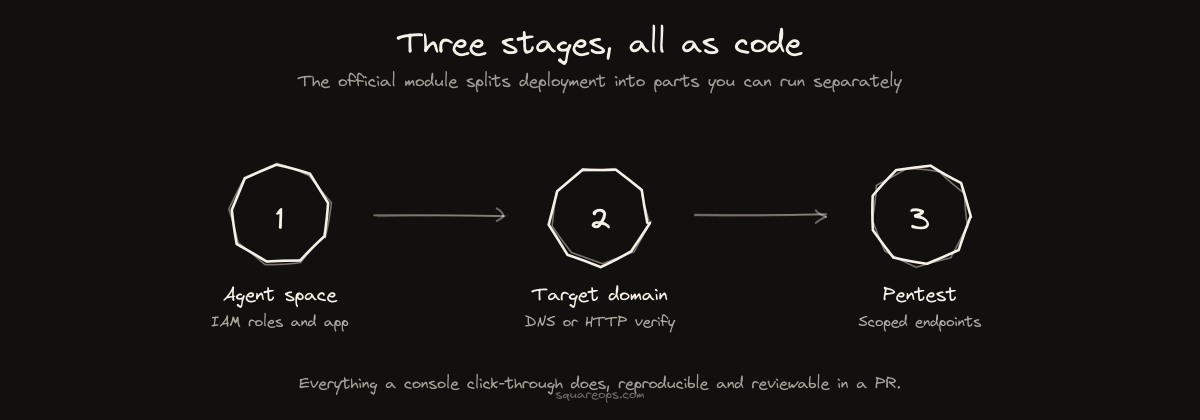
Stage one deploys the application, the IAM roles and an agent space. You configure the agent space name and description in terraform.tfvars, then note the agent_space_id and app_role_arn outputs — later stages need them.
Stage two registers a target domain. Terraform creates it and returns verification details you can read with terraform output target_domain_verification_details.
Stage three creates the pentest itself, with create_pentest, a pentest_title and a list of target_endpoints.
Splitting it this way matters operationally: domain verification is asynchronous and gated on DNS, so you do not want it blocking the same apply that creates your roles.
Agent Spaces Are Per-Application
An agent space is not an account-level container. AWS's guidance is explicit that it should be specific to each application you want to test, and the name is what users see in the web application.
Practically, name it after the application, not the environment or the team. If you are managing several, the Terraform module makes this a loop rather than repeated console work — which is the main argument for doing it as code at all.
Each agent space exposes three capability cards once created: design review, code review and penetration testing. Penetration testing has to be enabled explicitly.
Domain Verification
Security Agent will only test verified domains. Two methods are supported: DNS_TXT and HTTP_ROUTE. The domain must be live and hosting the application you intend to test.
- Route 53 domains in the same account get one-click verification — AWS creates the DNS record and completes verification for you.
- Other DNS providers require copying the verification token, adding the TXT record at your registrar, then triggering verification.
The detail that saves the most time: subdomains of a verified domain do not need individual verification. Verify the apex once and your staging, API and regional subdomains are covered. Teams frequently verify a dozen subdomains before discovering this.
Optional Configuration Worth Doing
The setup wizard treats these as optional. In practice they determine whether results are useful.
- VPC access — required for testing private applications. Without it you are limited to what is publicly reachable.
- CloudWatch logging — configure log groups for pentest runs. This is your audit trail of what the agent did, which you will want when someone asks.
- Credentials — Secrets Manager or a Lambda function supplies test credentials. Skip this and you get unauthenticated testing only, which misses most of the real risk.
- S3 context — buckets holding additional application artefacts the agent can read for context.
- GitHub connection — gives the agent your source for application context, enables automated code review on pull requests, and produces remediation PRs. AWS recommends it, and it is the single largest quality difference between a configured and unconfigured agent space.
Access Model
Two options at setup. IAM-only access is the quick path for administrators with console access. IAM Identity Center integration is what you want if users without AWS console access need to start tests or design reviews — which is usually the case once security or QA teams get involved.
Decide this before you create the agent space rather than after.
Where the Cost Lands
Security Agent is billed at $50 per task-hour, and a typical 24-hour evaluation runs up to about $1,200. Deploying the infrastructure costs nothing; running tests does.
That pricing model has a scheduling implication. Because cost scales with task-hours rather than seats, running a tightly scoped test against a specific service is much cheaper than pointing it at everything. Scope your target_endpoints deliberately.
One constraint to plan around: Security Agent is available in six regions — N. Virginia, Oregon, Ireland, Frankfurt, Sydney and Tokyo. There is no India region. If you have data residency requirements, resolve that before building a process around it.
Fitting It Into an Existing Terraform Estate
Treat the sample as a reference rather than a drop-in. In a real estate you will want the agent space and roles in your existing module structure, with remote state, tagging conventions and whatever naming standard you already enforce. Our notes on Terraform best practices at scale and state management for teams cover the structural side.
Two things worth building in from the start:
Keep the pentest resource separate from the platform resources. Agent spaces and roles are long-lived; pentests are transient. Mixing them means every test run churns your platform state.
Put the domain verification output somewhere visible. Verification failing silently because nobody added the TXT record is the most common reason a first run does not happen.
Where This Fits in a Security Programme
Standing up Security Agent gives you continuous automated coverage. It does not replace certified manual testing for audit evidence — AWS says as much itself, and the distinction matters if you are working toward SOC 2 or ISO 27001.
The pattern that works is agent runs on every significant release, feeding findings into your pipeline, with a scoped manual engagement once a year for the evidence an auditor accepts.
If you want Security Agent deployed and tuned inside your existing Terraform estate — or the manual testing that sits alongside it — see our Terraform consulting and VAPT services, or talk to our team. We publish our AWS Terraform modules publicly, so you can see how we structure this kind of thing before committing.