The AI Cost Crisis: Why GPU Spending Is Out of Control
AI workloads have created a new category of cloud spending that traditional cost management approaches cannot handle. According to recent industry research, 98% of organizations now prioritize AI cost management, yet only 51% are confident they are getting positive ROI from their AI investments. The gap between spending and value is widening as teams scale from proof-of-concept experiments to production deployments.
The numbers tell the story:
- $85,000/month — Average AI cloud spend per organization, growing at 36% year-over-year
- 10-50x more expensive — GPU instances versus equivalent CPU instances
- $98/hour — A single p5.48xlarge instance (8x H100 GPUs), over $70,000/month if left running
Teams that successfully scaled general cloud workloads with standard cloud cost management practices are discovering that those same approaches fall short for AI infrastructure. AI workload cloud cost management requires a different mindset, different tools, and different organizational processes. The stakes are higher, the optimization techniques are more specialized, and the organizational challenges are more complex because AI teams are often the fastest-growing cost center with the least cost management discipline.
Understanding AI Cloud Cost Drivers
Before optimizing AI costs, you need to understand where the money goes. AI workloads have a fundamentally different cost profile compared to traditional cloud applications.
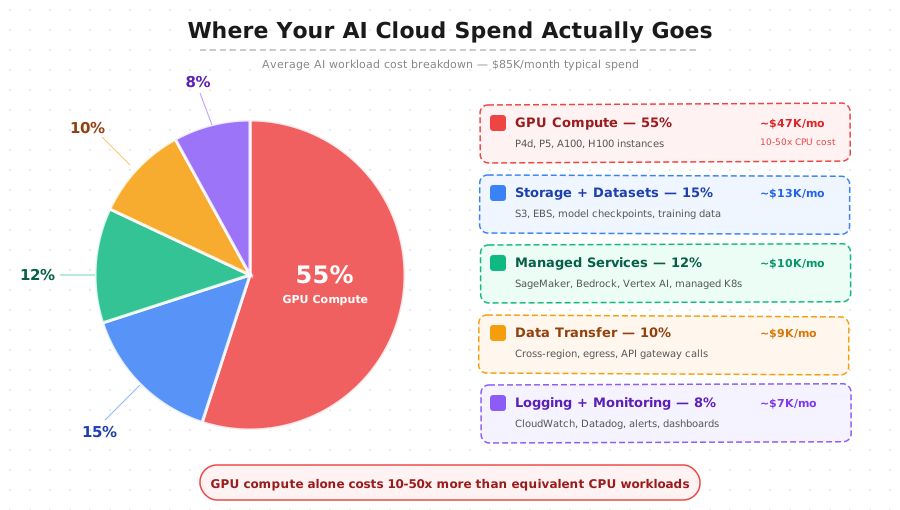
The breakdown for a typical organization spending $85K/month on AI infrastructure:
- GPU Compute — 55% (~$47K/mo) — P4d, P5, A100, H100 instances. A 20% improvement here saves more than eliminating every other cost category entirely.
- Storage + Datasets — 15% (~$13K/mo) — Training datasets, model checkpoints, multiple model versions in production.
- Managed Services — 12% (~$10K/mo) — SageMaker, Bedrock, Vertex AI, managed K8s. Premium markups over raw compute.
- Data Transfer — 10% (~$9K/mo) — Cross-region replication, model artifact distribution, API gateway traffic.
- Logging + Monitoring — 8% (~$7K/mo) — CloudWatch, Datadog, alerts, dashboards.
Why Traditional FinOps Falls Short for AI
Traditional FinOps focuses on right-sizing, reserved capacity, and eliminating idle resources. These still matter, but they miss critical cost drivers unique to GPU computing:
- Unpredictable usage patterns — Training jobs run for hours or days, then stop entirely. This does not match steady-state reserved instance planning.
- Low GPU utilization — GPU utilization within running instances is often below 30% because frameworks cannot always saturate all available compute.
- Experimentation multiplier — Teams run hundreds of training experiments to find the right hyperparameters, each consuming full GPU resources but producing models that get discarded.
These patterns require AI-specific strategies that go beyond what tools like SpendZero handle for general cloud workloads. The optimization levers are different, and the potential savings are much larger in absolute terms.
GPU Instance Selection: Choosing the Right Hardware
The most impactful cost decision in AI workload management is selecting the right GPU instance type. This single decision can represent a 10x or greater cost difference for the same workload. Choosing a p5.48xlarge when a g5.2xlarge would suffice wastes over $96 per hour. Conversely, under-provisioning GPU memory causes training jobs to fail hours into execution, wasting both time and the compute already consumed.
Training Workloads
Large language model training from scratch requires the most expensive GPU instances and represents the highest cost risk. Key considerations:
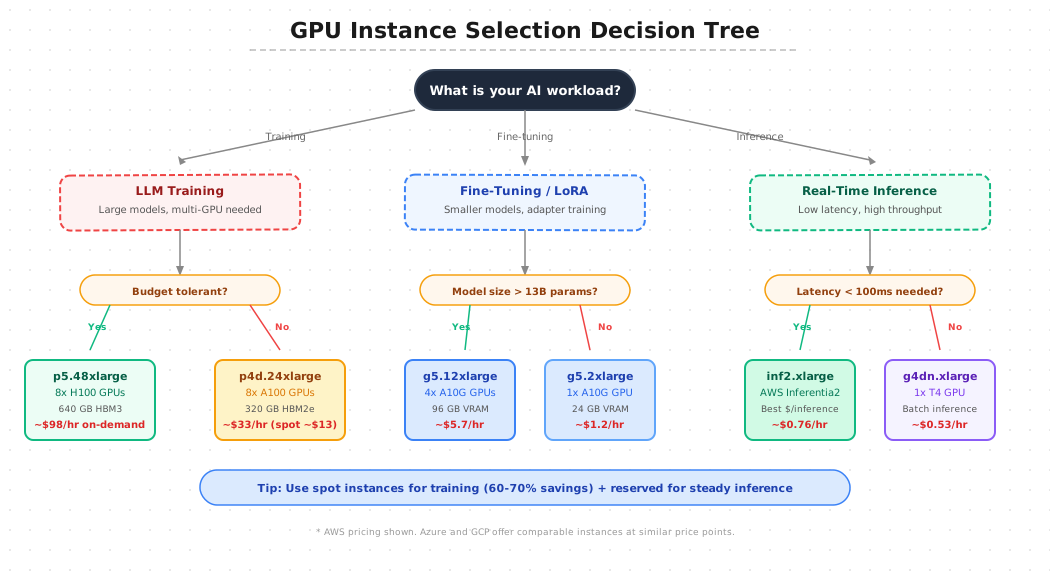
- H100 (p5.48xlarge) — 640 GB HBM3 across 8 GPUs with NVLink. Current standard for large-scale training at ~$98/hr on-demand.
- A100 (p4d.24xlarge) — 320 GB HBM2e at ~$33/hr on-demand. Available as spot at 60-70% discount (~$13/hr).
- Spot instance math — A 72-hour training job: $2,376 on-demand vs $936 on spot = $1,440 saved per run.
Since most training frameworks support checkpointing, spot instances are practical for all but the most time-sensitive training runs.
Fine-Tuning and LoRA
Fine-tuning requires significantly less GPU memory than full training. Match your instance to your model size:
- Models under 13B parameters — Single A10G GPU (g5.2xlarge at $1.20/hr) is sufficient.
- Models up to 70B parameters — Multi-GPU setup like g5.12xlarge (4x A10G at $5.70/hr).
- LoRA advantage — Freezes base model weights, trains only small adapter matrices. Reduces GPU memory needs by 60-80%. A 4-hour LoRA job on g5.2xlarge costs under $5, versus $132 on p4d.24xlarge.
Track fine-tuning experiments in a centralized registry so teams reuse successful adapter configurations instead of repeating expensive experiments.
Inference Workloads
Production inference has fundamentally different requirements than training — treating them the same is a common and expensive mistake:
- Latency-sensitive (real-time) — AWS Inferentia2 (inf2.xlarge at $0.76/hr) delivers best cost per inference for supported architectures.
- Batch inference — T4 instances (g4dn.xlarge at $0.53/hr) provide adequate performance at the lowest cost point.
- Cost impact — Choosing dedicated inference hardware over general-purpose GPU instances can mean a 3-5x difference in cost per request.
Cross-Cloud GPU Comparison
AWS, Azure, and GCP all offer comparable GPU instances at similar price points, but availability varies by region and GPU type:
- Azure — ND H100 v5 series (comparable to AWS p5)
- GCP — A3 machine series with H100 GPUs
- Multi-cloud strategy — Teams on managed Kubernetes can route training jobs to whichever provider has the best spot pricing, saving an additional 15-20% through price arbitrage.
FinOps for AI Workloads: A Practical Framework
Building a FinOps practice for AI requires evolving through maturity stages. Trying to skip stages leads to incomplete implementations that do not deliver sustainable results.
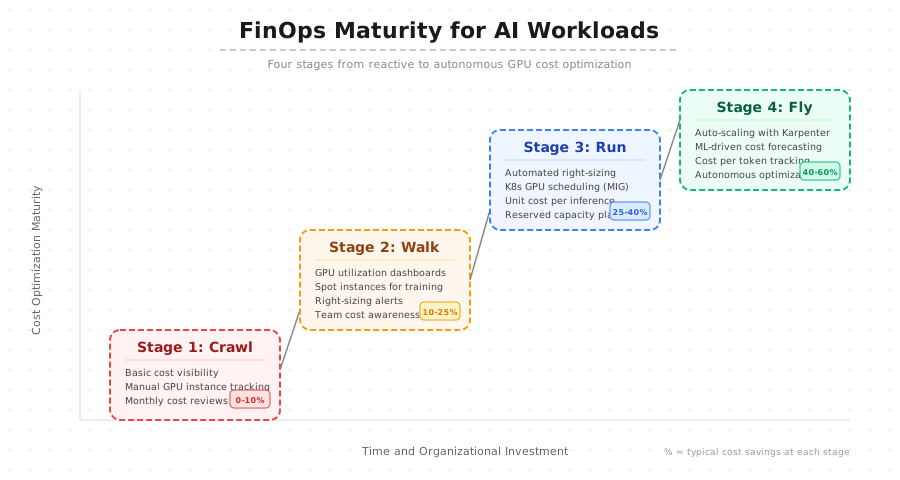
Stage 1: Crawl (0-10% Savings)
The starting point is basic cost visibility. Most organizations cannot answer "how much does it cost to train model X?" because GPU costs are buried in aggregate cloud bills. Actions for this stage:
- Implement resource tagging for every GPU instance (project, team, model name, workload type)
- Set up daily cost reports broken down by these dimensions
- Start catching expensive instances left running after training jobs complete
Stage 2: Walk (10-25% Savings)
With visibility in place, implement the highest-impact optimizations:
- Spot instances for training — Saves 60-70% on compute for interruptible jobs
- GPU utilization dashboards — Using DCGM metrics exported to Prometheus and Grafana. Any instance below 30% utilization is a right-sizing candidate.
- Automatic idle shutdown — CloudWatch alarms or Kubernetes job TTL controllers kill GPU instances after training completes
Stage 3: Run (25-40% Savings)
Optimization becomes automated and data-driven:
- NVIDIA MIG partitioning — Split a single A100 into up to 7 isolated GPU instances for inference workloads that do not need a full GPU
- Unit economics tracking — Cost per training run, cost per inference request, cost per token generated
- Reserved capacity — Commit for steady-state inference workloads with predictable utilization (30-60% savings vs on-demand)
- Model cost tradeoffs — Choose smaller models that cost less to serve when accuracy difference is marginal
Stage 4: Fly (40-60% Savings)
Autonomous cost optimization at the most mature stage:
- Karpenter auto-provisioning — Provisions exact GPU instance type per workload, decommissions within minutes of job completion
- ML-driven cost forecasting — Predicts next month's GPU spend based on training pipeline schedule
- Cost per token tracking — Real-time unit economics for every model in production, enabling automated model-switching based on cost thresholds
Spot, Reserved, and On-Demand: The GPU Purchasing Strategy
A well-optimized AI infrastructure uses all three purchasing models simultaneously, allocated by workload type.
Spot Instances — for training and fine-tuning (60-70% savings):
- Training workloads are inherently interruptible (frameworks support checkpointing)
- Job duration is generally known from dataset size and model complexity
- Save checkpoints every 30-60 minutes
- Use fault-tolerant distributed training configurations
- Queue jobs to restart automatically on new spot instances when interrupted
Reserved Instances — for steady-state inference (30-60% savings):
- 1-year or 3-year commitments for production inference with predictable demand
- Calculate your baseline inference compute (minimum capacity needed 24/7)
- Reserve exactly that amount — nothing more
On-Demand — for everything else (minimize this):
- Unpredictable demand spikes
- Short development experiments and prototype testing
- Review on-demand GPU usage weekly to identify workloads that should shift to spot or reserved
For teams struggling to build this discipline, cloud cost management tools can automate purchasing recommendations based on historical usage patterns.
Token Cost Management for LLM Applications
For organizations serving LLM-based applications, token cost management has become a critical discipline. Whether using hosted APIs (OpenAI, Anthropic, Google) or self-hosting on your own GPU infrastructure, the cost per token directly impacts unit economics. A product at $0.02 per user interaction is viable; the same product at $0.50 per interaction is not.
Step 1: Measure your current costs
- Self-hosted — GPU instance cost divided by tokens-per-second throughput in production
- Hosted APIs — Published price per token multiplied by actual usage volume
- Breakeven point — Self-hosting typically becomes cheaper above 10-15 million tokens per day for a given model
Step 2: Implement token-level tracking
- Tag every API call with the calling feature, user tier, and business context
- Answer questions like "how much does our summarization feature cost per user per month?"
- Make informed product decisions about unlimited usage vs usage caps
Step 3: Optimize token consumption (30-50% savings possible)
- Prompt engineering — Shorter, more precise prompts without sacrificing output quality
- Response length limits — Prevent unnecessarily verbose model output
- Semantic caching — Serve repeated or near-repeated requests from cache instead of running inference
- Intelligent routing — Send simple requests to smaller, cheaper models (7B) while reserving large models for complex tasks. This is one of the most effective cost optimizations available.
Kubernetes GPU Optimization: Karpenter, KEDA, and MIG
Kubernetes is the standard orchestration platform for AI workloads because it provides the scheduling, isolation, and autoscaling that GPU workloads demand. Without proper configuration, GPU resources are allocated statically and wasted consistently. Three technologies together can reduce GPU infrastructure costs by 40-70% compared to static provisioning.
Karpenter for GPU Auto-Scaling
Karpenter provisions the right GPU instance type based on pending pod requirements:
- Evaluates GPU memory, GPU count, and instance family constraints from pod resource requests
- Provisions the cheapest option that meets workload requirements
- Decommissions nodes within minutes of pod completion — preventing idle GPU waste (the single largest source of AI cloud waste)
- Configure provisioners with the full range of GPU instance types sorted by cost preference
KEDA for Event-Driven GPU Scaling
KEDA scales GPU deployments based on external metrics rather than just CPU/memory:
- Scale triggers — Inference queue depth, API request rate, or custom business metrics
- Scale down — When queue drains, GPU pods scale to zero (no idle compute)
- Cooldown periods — Set 5-10 minutes for GPU workloads since instance provisioning is slower than CPU. Frequent scale-down/up wastes startup time and cost.
- Pair with Karpenter — Scaling decisions automatically translate into optimal instance selection
NVIDIA MIG for GPU Sharing
Multi-Instance GPU partitions a single A100 or H100 into up to 7 isolated GPU instances with dedicated memory and compute:
- Without MIG — 7 inference models on 7 full A100s = 7 x $33/hr = $231/hr
- With MIG — All 7 on a single partitioned A100 = $33/hr total
- Cost reduction — 60-80% for inference workloads that do not require a full GPU
The platform engineering team configures MIG profiles in the Kubernetes GPU device plugin, and workloads request specific MIG slice sizes through resource requests.
Monitoring and Observability for AI Costs
You cannot optimize what you cannot measure, and GPU workloads are notoriously difficult to measure accurately. Standard cloud monitoring misses GPU-specific metrics that determine whether your GPUs are actually being used efficiently. AI cost monitoring requires metrics at three levels.
Infrastructure level:
- GPU utilization (target: above 70% for training, above 50% for inference)
- GPU memory utilization and bandwidth saturation
- Instance uptime vs active compute time
- Spot instance interruption rates
Workload level:
- Cost per training run (GPU-hours x per-hour cost)
- Cost per epoch
- Training time vs wall clock time (identifies data loading bottlenecks wasting GPU compute)
- Inference cost per request
Business level:
- Cost per user served by AI features
- Revenue generated per dollar of AI compute
- Model cost efficiency (accuracy per dollar of training compute)
Export GPU metrics from DCGM to your monitoring and observability stack. Set up automated weekly reports with trend lines shared with both engineering leadership and finance to maintain cross-functional alignment on AI investment priorities.
Building an AI Cost Governance Model
Technical optimization only works when supported by organizational governance. Without clear policies, teams will continue spinning up the most expensive GPU instances because the path of least resistance is to choose the most powerful option.
Policies to implement:
- GPU instance approval — Any instance above $10/hr requires team lead approval with justification
- Namespace GPU quotas — Prevent any single team from monopolizing GPU capacity in Kubernetes
- Budget alerts — Notifications at 50%, 75%, and 90% of monthly GPU budgets to both engineering and management
Infrastructure separation:
- Development GPU pool — Shared, uses cheapest available instances (T4 or A10G). Requests for expensive hardware require justification.
- Production inference — Sized from actual load testing data (not estimates), committed to reserved pricing after 30+ days of validated usage.
Accountability structure:
- Assign a cost owner per team who reviews spending weekly and identifies optimization opportunities
- Run quarterly cost reviews where each team presents their AI cost metrics and optimization efforts
- Surface best practices across teams through these reviews
If your organization is scaling AI workloads and needs help building cost-efficient GPU infrastructure, contact our team. We help companies implement MLOps and AI infrastructure that delivers performance without runaway costs, using Kubernetes-native GPU optimization, automated cost governance, and FinOps practices designed for AI workloads.