AWS us-east-1 has had two major outages in seven months: about 15 hours in October 2025 and about 28 hours in May 2026. Running across Availability Zones protects you from a failure like May's, but only if you are truly spread out. Only a second region protects you from a failure like October's. The right plan is to pick a recovery tier for each workload, based on what an hour of downtime costs you, and then test it.
Picture a payments company that runs in us-east-1 across three zones. It did everything the textbook says. On 20 October 2025 it still could not launch new servers or scale its containers for most of a working day. The problem was not one zone. It was the region. This guide is about planning for both kinds of failure.
What Happened in the Two Outages
The two events had very different causes. That is why one design does not cover both.
| October 2025 | May 2026 | |
|---|---|---|
| When | 19 to 20 October 2025 | 7 to 8 May 2026 |
| Cause | A software race condition left DynamoDB's regional address with an empty DNS record | Overheating in one data centre cut power to servers in one zone, use1-az4 |
| Scope | Region-wide, with knock-on effects in other regions | One Availability Zone |
| Length | About 14.5 hours, per AWS's own summary | About 28 hours to full resolution |
| What broke | DynamoDB, new EC2 launches, Lambda, ECS, EKS, Fargate, load balancers, STS | EC2 and EBS in the zone, plus services on top such as ElastiCache, MSK, OpenSearch and Redshift |
In October, existing EC2 servers kept running, but new ones could not start. Teams that relied on autoscaling to recover were stuck. AWS also reported that console sign-in through its central sign-in page failed in regions outside us-east-1 for a short time.
In May, more than 150 cloud services reported problems, including Coinbase, which lost core trading functions for over five hours. Some companies, like Arkose Labs and Temporal, failed over to another region and carried on.
Multi-AZ vs Multi-Region: What Each One Covers
An Availability Zone is one or more data centres with their own power and cooling. A region is a group of zones in one area. Each design protects against a different kind of failure.
- Multi-AZ protects you from a zone failure. This would have covered most of the May outage. But only if your app was already running in healthy zones, with spare capacity. AWS warned that new capacity in the other zones could take longer than usual to get.
- Multi-AZ does not protect you from a regional failure. In October every zone in the region shared the same broken DNS record. Spreading across zones did not help.
- Managed services are not immune. ElastiCache, MSK and others run on EC2 and EBS underneath. When the zone went down, they went down with it.
- Multi-region covers both. It also costs the most and is the hardest to run, so use it where the business needs it.
The Four DR Strategies on AWS
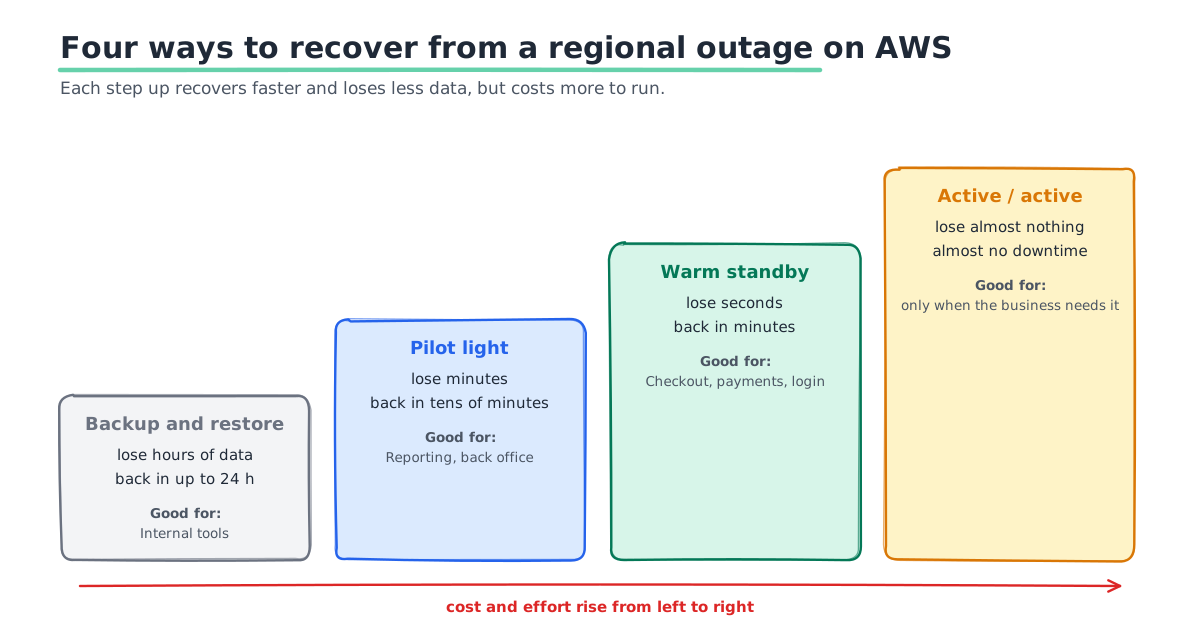
AWS's Well-Architected Framework describes four disaster recovery strategies. Each step up costs more and recovers faster.
| Strategy | Data you could lose (RPO) | Time to recover (RTO) | Cost |
|---|---|---|---|
| Backup and restore | Hours | Up to 24 hours | Lowest |
| Pilot light | Minutes | Tens of minutes | Low |
| Warm standby | Seconds | Minutes | Medium to high |
| Multi-site active/active | Near zero | Near zero | Highest |
- Backup and restore. You copy backups to a second region and rebuild from them when needed.
- Pilot light. Your data is always copied to the second region, but no app servers run there until you need them.
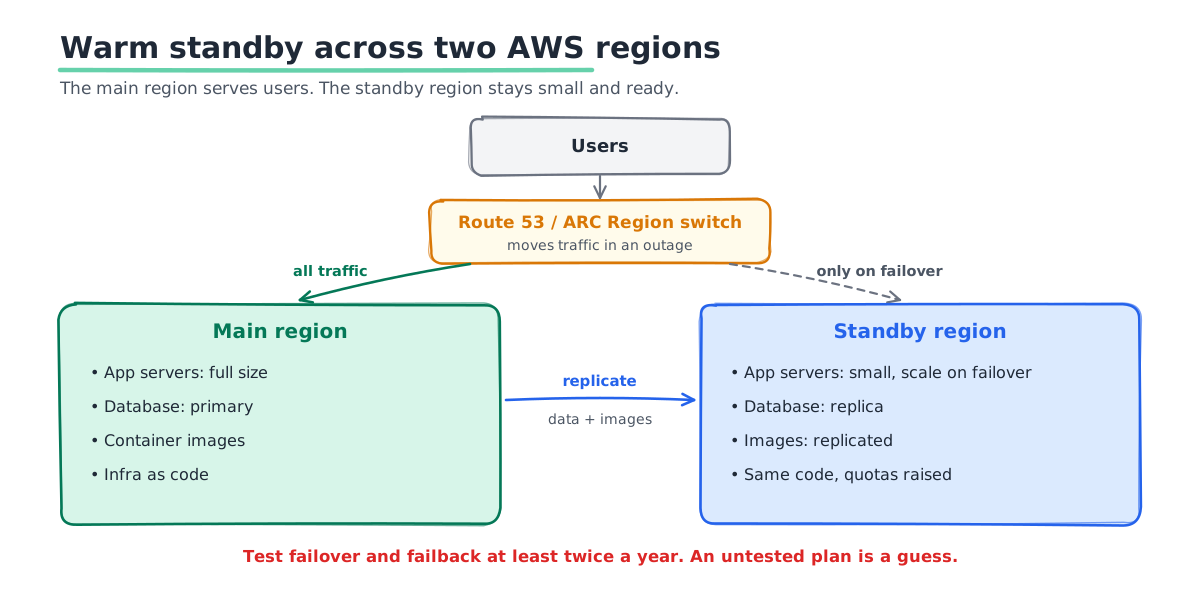
- Warm standby. A small but working copy of the whole app runs in the second region all the time. It can take traffic at once and then scale up.
- Active/active. Both regions serve real traffic all the time. AWS calls this the most complex option and says to choose it only when the business needs it.
Pick a Tier for Each Workload
You do not need one tier for everything. Start with one question for each workload: what does an hour of downtime cost?
- Customer-facing money paths. Checkout, payments, trading and login usually need warm standby.
- Important but not urgent systems. Reporting, search and back-office apps often fit pilot light.
- Internal tools. Wikis, test servers and admin tools can live with backup and restore.
Here is a simple example. Say an hour down costs you $20,000 in lost sales and refunds. A warm standby costs $3,000 a month. One long outage a year pays for the whole year of standby. If an hour down costs $500, backup and restore is the sensible choice.
What DR Costs on AWS
We cannot give you one number, because it depends on your data size and how much you keep running. These are the parts that drive the bill.
- Storage in the second region. Every tier pays for a second copy of your backups or data.
- Data transfer between regions. AWS charges per GB copied across regions. Busy databases can make this a large line.
- Databases that run all the time. Pilot light and warm standby keep replica databases running in the second region.
- App servers that run all the time. Only warm standby and active/active pay for these. Warm standby keeps them small until a failover.
- Time to test. Drills take engineering hours. Budget for them like any other work.
There is a cheaper middle option for server-based apps. AWS Elastic Disaster Recovery copies your servers to another region all the time but keeps them switched off. AWS says it can reach recovery targets close to warm standby, at a cost closer to pilot light.
Building a Pilot Light or Warm Standby on AWS
Most teams start with pilot light for data and warm standby for their main app. These are the parts you need.
- Copy the data all the time. Use Aurora Global Database or RDS cross-region read replicas for SQL. Use DynamoDB global tables, and S3 replication for files.
- Define the second region in code. Use Terraform or CloudFormation, so you can build it the same way every time.
- Copy your container images. Turn on ECR replication so images exist in both regions before you need them.
- Raise limits in advance. Ask AWS to raise your EC2 and service quotas in the second region now. You will not want to wait for this during an outage.
- Control the switch. Route 53 health checks can move traffic. ARC Region switch can run the whole failover as a plan, step by step. It runs from a healthy region, so a broken region does not block it.
- Remove hidden us-east-1 links. Use regional STS endpoints. Keep emergency admin access that does not rely on one region's console sign-in.
Test It, or It Does Not Exist
A DR plan you have never run is a guess. Run a failover drill at least twice a year, and after every big change. Measure how much data you would really lose and how long recovery really takes. Then compare those numbers with your targets.
Test the way back too. Moving traffic back to the main region, called failback, is often harder than failing over. Write both steps into a runbook that someone new could follow at 3 am.
If a full drill feels too risky at first, start smaller. Walk through the runbook as a team on paper. Then fail over one low-risk service. Build up to the full app over a few quarters.
A Real Example: Falcon's DR Site in Hyderabad
Falcon builds credit card management software for banks. Its bank partners needed 99.99% uptime and a tested disaster recovery site. SquareOps built the primary setup across several Availability Zones in the main region. We then set up a passive DR site in the AWS Hyderabad region, in a separate seismic zone.
RDS and DocumentDB copy data to Hyderabad all the time, across regions. The setup helped Falcon meet PCI DSS and bank security audit requirements. You can read the full Falcon case study.
Mistakes We See
- Calling multi-AZ a DR plan. It is high availability. It does not survive a regional failure.
- Relying on autoscaling during an outage. In October new servers could not start. Keep enough capacity running already.
- Forgetting the boring parts. Secrets, DNS, certificates and third-party allow-lists often break failover.
- Never testing failback. Teams fail over, then stay stuck in the DR region for weeks.
- Building active/active too early. It doubles the work. Most teams get more value from a tested warm standby.
For the day-to-day side of keeping systems up, see our guide to managed cloud operations for high availability.
Get a DR Plan You Can Prove
SquareOps designs, builds and tests disaster recovery on AWS with your team. We can review your current setup against both outages and tell you which workloads need a second region. See our AWS disaster recovery services, or talk to our SRE team about a DR review.