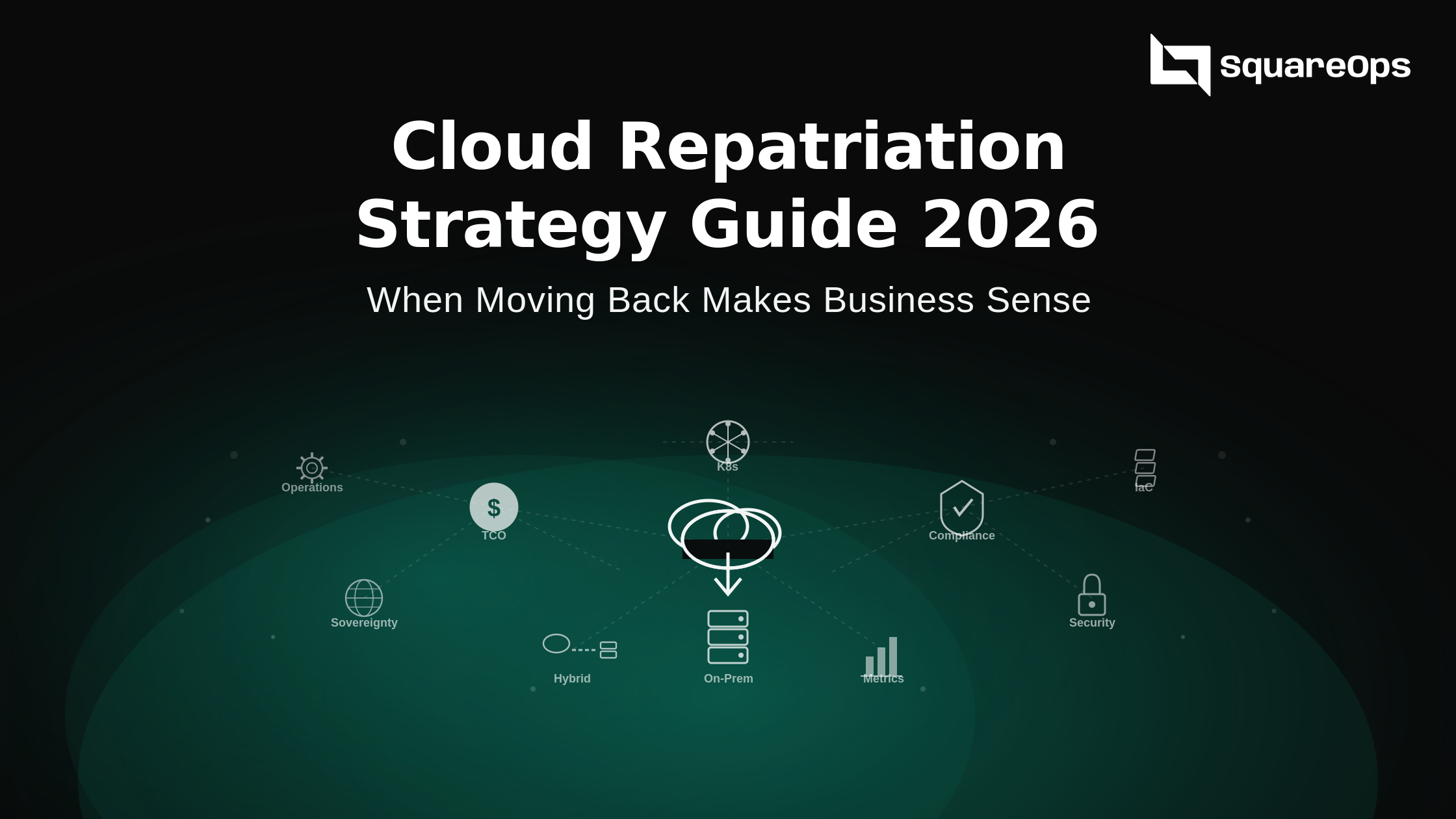
What Is Cloud Repatriation and Why Is It Trending in 2026?
Cloud repatriation is the process of moving workloads, applications, or data from public cloud environments back to on-premises infrastructure or private clouds. It is sometimes called reverse cloud migration, and the trend has accelerated significantly in the last two years. Unlike the initial wave of cloud migration driven by executive mandates or vendor promises, repatriation decisions are typically backed by years of real operational data that clearly demonstrates where cloud economics break down for specific workload types.
According to IDC research, approximately 80% of organizations have already repatriated or plan to repatriate some workloads from public cloud. This is not a rejection of cloud computing — it is a maturation of cloud strategy where teams have enough real-world cost and performance data to make informed placement decisions.
The shift is being driven by three converging factors:
- Cloud bill shock at scale — Organizations that migrated aggressively during 2020-2022 are now seeing their cloud bills stabilize at levels that exceed original projections.
- Regulatory pressure — Frameworks like DORA (Digital Operational Resilience Act) in Europe are creating mandatory data residency requirements that public cloud deployments sometimes struggle to meet.
- Kubernetes maturity — Modern managed Kubernetes platforms have made it possible to run cloud-native workloads on-premises without losing the developer experience teams expect.
Cloud repatriation strategy 2026 is no longer about choosing between cloud and on-prem. It is about building a workload placement framework that puts each application where it delivers the best combination of cost efficiency, performance, and compliance.
Key Drivers Behind Cloud Repatriation Decisions
Understanding why organizations repatriate helps determine whether it is the right move for your infrastructure. The drivers fall into five categories, each carrying different weight depending on your industry and workload profile.
Rising Cloud Costs at Scale
The most common driver is cost, and the numbers are difficult to ignore. Broadcom research shows that private cloud infrastructure can deliver 40-50% lower TCO compared to public cloud for steady-state workloads. For a mid-market company spending $500,000 annually on cloud infrastructure, a 40% reduction represents $200,000 per year in savings that compounds over a three-to-five-year planning horizon.
This cost gap widens further as organizations scale. Consider a company running 50 instances on-demand in AWS:
- 50 instances at $400/month = $240,000/year on compute alone
- Add storage, networking, egress, and support — total often exceeds $500K+/year
- The same capacity on owned hardware, amortized over three years, typically costs 30-40% less
Tools like SpendZero help quantify these differences before making the move, so teams can validate the business case with real numbers rather than vendor estimates.
Data Sovereignty and Regulatory Compliance
According to Nutanix research, 57% of organizations need their infrastructure within a single country to meet regulatory requirements. Key compliance drivers include:
- DORA — Enforceable across EU financial services since January 2025, mandates operational resilience standards that some public cloud deployments find difficult to satisfy.
- HIPAA, SOX, PCI-DSS — Healthcare and financial institutions face strict data handling requirements that are simpler to enforce on owned infrastructure.
- FedRAMP — Government contractors require specific infrastructure certifications that limit public cloud options.
- Upcoming regulations — Stricter data governance frameworks are expected across additional industries by 2027.
For these organizations, repatriation is not a cost optimization exercise but a compliance necessity that carries board-level urgency.
Performance and Latency Requirements
Certain workloads perform measurably better on dedicated hardware:
- High-frequency trading — Needs sub-millisecond latency that multi-tenant cloud environments cannot guarantee.
- GPU inference for real-time AI — Benefits from bare-metal access without hypervisor overhead that cloud instances introduce.
- Database-heavy applications — Large working sets see meaningful throughput improvements on locally attached NVMe storage versus network-attached EBS or persistent disk volumes.
Vendor Lock-in Concerns
Organizations that have built heavily on proprietary managed services find switching increasingly difficult. Common lock-in points include:
- AWS Lambda, DynamoDB, Aurora Serverless
- Azure Cosmos DB, Azure Functions
- Google Cloud Spanner, BigQuery
This dependency creates an asymmetric negotiation position where cloud providers can adjust pricing knowing that migration costs would exceed any short-term savings from switching. Teams pursuing a cloud repatriation strategy often cite reducing this dependency as a strategic objective alongside direct cost reduction.
Predictable Workload Profiles
Cloud computing delivers the most value for elastic, unpredictable workloads. Applications with consistent resource consumption — running at similar capacity 24/7 with minimal burst requirements — are paying a premium for elasticity they never use. Typical candidates for repatriation include:
- Internal enterprise applications with stable user bases
- Data processing pipelines with predictable throughput
- Core business systems running at steady capacity
These steady-state workloads are the strongest candidates because their resource requirements can be accurately sized for dedicated hardware.
Cloud Repatriation vs Hybrid Cloud: Understanding the Difference
Repatriation and hybrid cloud are related but distinct strategies. Full repatriation means moving all or most workloads back to on-premises infrastructure. Hybrid cloud, which 73% of enterprises are planning according to recent surveys, keeps some workloads in public cloud while running others on-premises using a unified management layer.
In practice, most organizations pursuing reverse cloud migration end up with a hybrid architecture. The practical reality is that certain workloads genuinely benefit from cloud economics while others belong on dedicated infrastructure.
Best kept in cloud:
- CDN and edge distribution
- AI/ML model training on spot instances
- Burst capacity for seasonal demand
- Disaster recovery across geographic regions
Best moved on-premises:
- Steady-state databases with predictable IOPS
- Predictable compute workloads at consistent capacity
- GPU inference serving (dedicated hardware is cheaper than cloud GPU instances)
- Applications subject to strict data residency requirements
The Repatriation Decision Scoring Matrix
Making the repatriation decision without a structured framework leads to either premature moves or missed optimization opportunities. This scoring matrix evaluates five weighted factors to produce an actionable recommendation.
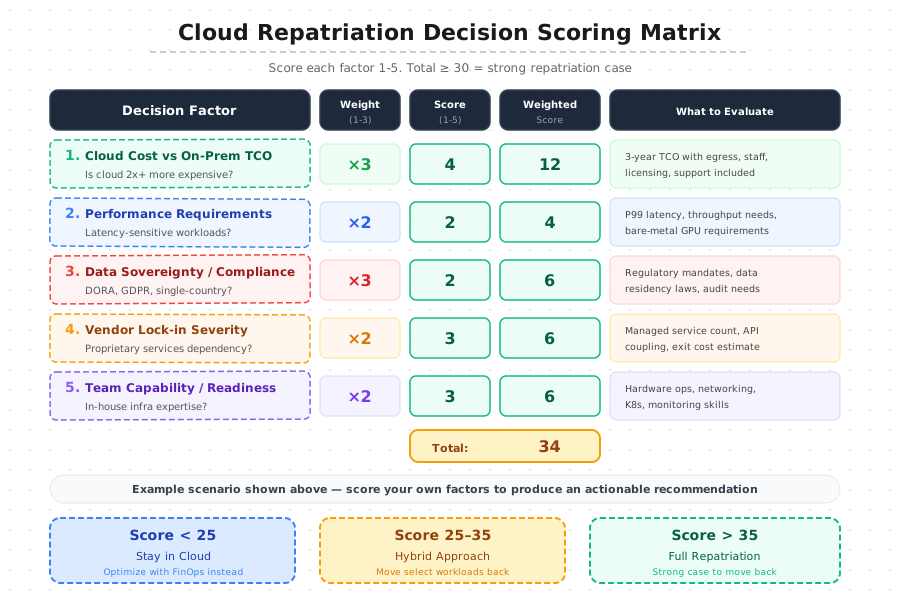
Score each factor on a scale of 1 to 5, where 1 means the factor does not apply and 5 means it is a critical driver. Multiply by the weight to get the weighted score. The total determines your recommended path:
- Score < 25 — Stay in cloud. Cloud cost optimization through FinOps practices would deliver better ROI than repatriation.
- Score 25-35 — Hybrid approach. Move select workloads back while keeping others in cloud.
- Score > 35 — Strong repatriation case. Comprehensive move-back is justified.
Cost and data sovereignty carry the highest weight (3x) because they represent the most common and impactful drivers. This is not a one-time exercise — run the scoring matrix quarterly as cloud pricing changes, regulatory requirements evolve, and your workload profiles shift.
TCO Analysis: Cloud vs On-Premises for Steady-State Workloads
The most critical input to any repatriation decision is a realistic total cost of ownership comparison. Most failed repatriation projects share a common root cause: the TCO analysis underestimated the full cost of on-premises operations or overestimated cloud costs by ignoring available optimization levers.
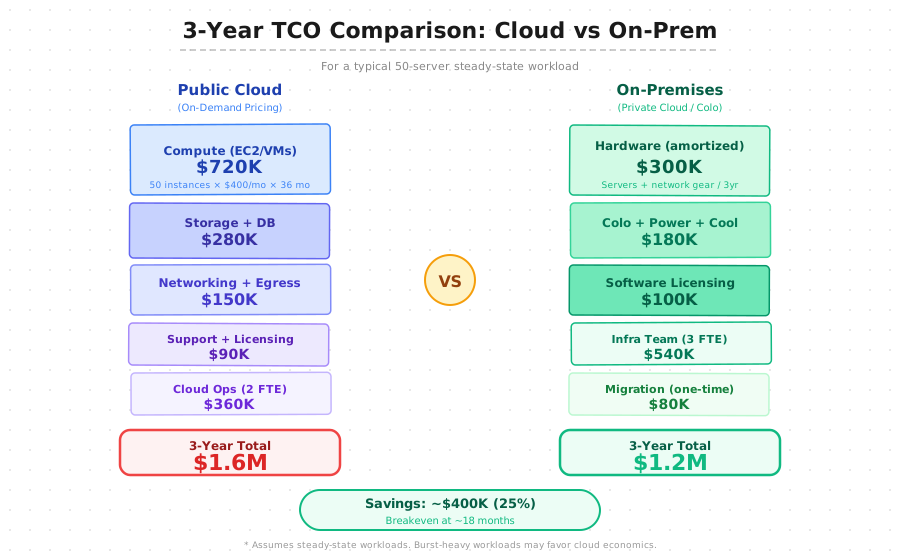
A complete TCO comparison must include all cost categories on both sides.
Cloud-side costs to include:
- Compute instances (on-demand, reserved, and savings plan pricing)
- Storage volumes and IOPS costs
- Data transfer and egress charges
- Managed service premiums (RDS, ElastiCache, managed Kafka)
- Support plan costs
- Loaded cost of cloud operations staff
On-premises costs to include:
- Hardware purchase amortized over 3-5 years
- Colocation or data center costs (power, cooling, physical security)
- Software licensing (hypervisors, operating systems, management tools)
- Infrastructure operations staff (typically 1.5x the cloud team size)
- Network connectivity (redundant ISP links, direct connect circuits)
- One-time migration cost
For a typical 50-server steady-state workload, the three-year comparison shows public cloud at approximately $1.6M versus on-premises at approximately $1.2M — roughly 25% savings with a breakeven point around 18 months. These numbers shift based on your specific workload profile, geographic location, power costs, and staff compensation, which is why running the calculation with your own data is essential.
Common TCO Mistakes to Avoid
- Forgetting egress costs — Can add 8-15% to the cloud bill for data-intensive workloads.
- Underestimating on-prem staffing — Particularly for 24/7 operations coverage.
- Missing hardware refresh cycles — Servers need replacement every 3-5 years.
- Ignoring software licensing true-ups — Annual renewals add up.
- Overlooking capital opportunity cost — Cash tied up in hardware cannot be deployed elsewhere.
Using a cloud migration partner who has done these analyses across multiple organizations helps avoid these blind spots.
Building Your Repatriation Execution Plan
Once the decision framework confirms that repatriation makes sense, the execution plan determines whether the move delivers the expected benefits. A poorly executed repatriation can cost more than staying in the cloud.
Phase 1: Assessment and Planning (Weeks 1-4)
Start with a complete workload inventory that classifies each application by its cloud dependency level:
- Low dependency — Applications using only compute, storage, and basic networking. Straightforward to move.
- Medium dependency — Applications with some managed service usage that has open-source equivalents (e.g., RDS → self-managed PostgreSQL).
- High dependency — Deep integrations into proprietary services like DynamoDB, Cloud Spanner, or Azure Service Bus. Requires re-architecting before migration.
Build a dependency map showing how applications communicate, what shared services they consume, and which data stores they access. During this phase, finalize your target architecture — whether you are building a private cloud using managed Kubernetes on bare metal, setting up colocation, or deploying to an existing data center.
Phase 2: Infrastructure Preparation (Weeks 3-8)
Provision hardware, configure networking, and establish connectivity. Key setup tasks:
- Set up VPN or AWS Direct Connect (or Azure ExpressRoute) for secure, low-latency communication during transition
- Install and configure your Kubernetes platform on bare metal or VMs
- Deploy storage layer (Ceph, MinIO, or commercial storage solution)
- Set up monitoring stack (Prometheus, Grafana, alerting)
- Adapt CI/CD pipelines for on-premises deployment
- Configure Terraform or Crossplane for on-premises infrastructure using the same GitOps workflows your team already uses
This consistency between cloud and on-prem tooling is critical for maintaining operational velocity during and after the transition.
Phase 3: Migration Execution (Weeks 6-16)
Migrate workloads in priority order using a wave-based approach. Each wave should contain 3-5 related applications that can be tested together. Recommended wave ordering:
- Wave 1 — Stateless applications with no persistent data dependencies
- Wave 2 — Stateful workloads with well-defined backup and restore procedures
- Wave 3+ — Complex applications with multiple service dependencies
For each wave, follow this traffic-shifting sequence:
- Deploy the application to the on-premises Kubernetes cluster
- Run parallel operations with traffic splitting (10% on-prem, 90% cloud)
- Validate performance and data consistency
- Gradually shift traffic: 25% → 50% → 75% → 100%
- Monitor for 48-72 hours at full traffic
- Decommission cloud resources
This parallel-run approach adds cost during the transition but dramatically reduces risk. Budget for 2-4 months of parallel running costs depending on the number of waves.
Phase 4: Optimization and Steady State (Ongoing)
After migration completes, the optimization phase begins — and this is where many organizations drop the ball. Key activities:
- Right-size on-premises resources based on actual utilization data from the first 30-60 days
- Compare actual consumption against initial capacity planning assumptions
- Tune Kubernetes resource requests and limits
- Adjust storage tiers and optimize network configurations
- Implement monitoring and observability practices for long-term efficiency
Kubernetes Hybrid Architecture for Gradual Repatriation
Kubernetes has fundamentally changed the repatriation equation and is the single technology that has made cloud repatriation practical at scale. Before Kubernetes, moving workloads between cloud and on-premises meant:
- Re-engineering deployment processes
- Rewriting automation scripts
- Retraining operations teams on entirely different tooling
- Often rewriting application code for different service discovery and networking patterns
With Kubernetes as the abstraction layer, the same container images, Helm charts, and GitOps workflows work identically regardless of where the cluster runs.
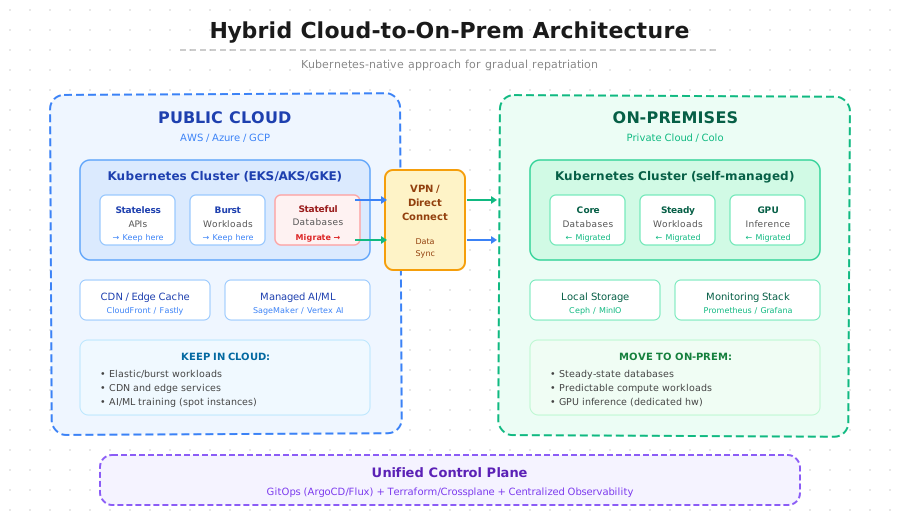
The hybrid architecture uses a unified control plane across both environments:
- GitOps (ArgoCD/Flux) — Manages deployments to both cloud and on-premises clusters from the same Git repository
- Terraform / Crossplane — Provisions infrastructure resources in both environments using the same declarative approach
- Centralized observability — Prometheus federation, Grafana, and unified alerting give operations teams a single view across all clusters
What Stays in Cloud
- Stateless API services — Scale horizontally based on demand; autoscaling is native in cloud
- Burst workloads — Batch processing jobs with variable resource needs
- CDN and edge caching — Distributed by nature, leverages cloud provider edge networks
- AI/ML training jobs — Benefit from spot instance pricing for large-scale training runs
These workloads leverage the elastic nature of cloud computing where you only pay for what you use.
What Moves On-Premises
- Core databases — Predictable storage and IOPS requirements; locally attached NVMe delivers better performance at lower cost
- Steady-state compute — Workloads running at consistent capacity 24/7; paying cloud premiums for elasticity you never use
- GPU inference — Dedicated GPU hardware (NVIDIA A100/H100) amortized over three years costs significantly less than cloud GPU instances
- Data-regulated workloads — Anything with strict data residency requirements moves to infrastructure you physically control
The Connection Layer
The bridge between environments uses VPN or dedicated connectivity (AWS Direct Connect, Azure ExpressRoute, Google Cloud Interconnect). Key components:
- Data sync — Change data capture (CDC) pipelines keep replicas consistent across environments during transition
- Traffic management — DNS-based weighted routing gradually shifts traffic between cloud and on-premises endpoints
- Service mesh — Enables service-to-service communication across environments transparently
This approach allows you to move workloads one at a time while maintaining service availability.
Maintaining Cloud-Native Benefits After Repatriation
The biggest risk in repatriation is losing the operational practices that made cloud adoption valuable. Cloud-native development is not about where your infrastructure runs — it is about how your team builds, deploys, and operates software.
Developer Experience
Developers should not need to know or care whether their application runs in cloud or on-premises. The following should work identically in both environments:
- Same
kubectlcommands and Helm charts - Same CI/CD pipeline triggers and workflows
- Same monitoring dashboards and alerting
- Same log aggregation and search
If repatriation forces developers to change their workflows, you have an architecture problem to solve before proceeding. Platform engineering teams should build internal developer platforms that abstract away the infrastructure layer entirely.
Infrastructure as Code
Every component of your on-premises infrastructure should be defined as code — this is not optional. Without IaC, on-premises infrastructure management regresses to the manual processes that drove organizations to cloud in the first place.
- Terraform — Infrastructure provisioning for servers, networking, storage
- Ansible — OS-level configuration and compliance enforcement
- ArgoCD — Application deployment via GitOps
- Git — Single source of truth for all infrastructure and application definitions
Observability and SRE Practices
Implement the same SRE practices on-premises that you used in cloud. Your monitoring and observability stack should be consistent across environments:
- Metrics — Prometheus with federation across clusters
- Logs — Loki or Elasticsearch for centralized log aggregation
- Traces — Jaeger or Tempo for distributed tracing
- Dashboards — Grafana for unified visualization
- Practices — SLOs, error budgets, incident management, blameless postmortems
Risks and How to Mitigate Them
Every repatriation project carries risks. Understanding and planning for them is the difference between a successful move and a costly reversal.
Underestimating Operational Complexity
Running infrastructure on-premises requires capabilities that cloud providers handle transparently:
- Hardware maintenance and firmware updates
- Physical security and access controls
- Power management and redundancy
- Network operations and capacity planning
If your team has spent the last five years operating exclusively in cloud, budget for training, hiring, or partnering with a DevOps consulting firm that can bridge the gap. Many organizations find that engaging an external partner for the initial 6-12 months helps their internal team ramp up without production incidents.
Scope Creep During Migration
Repatriation projects frequently expand beyond their original scope. What starts as moving three database clusters becomes a full infrastructure overhaul when teams discover undocumented dependencies or shadow IT services. Control this risk by:
- Maintaining a strict workload registry
- Migrating in small, well-defined waves
- Refusing to add new workloads to migration scope without re-running the business case
Performance Regression
Applications tuned for cloud infrastructure may perform differently on-premises. Key differences to test for:
- Network latencies between services change
- Storage IOPS characteristics differ between EBS and local NVMe
- DNS resolution patterns shift
Run comprehensive performance testing before and after each migration wave. Define clear rollback triggers in advance — if P99 latency increases by more than 15% or error rates exceed your SLO threshold, roll back and investigate before proceeding.
Losing Elastic Capacity
On-premises infrastructure has a fixed capacity ceiling, and this is the most frequently cited concern. If your workloads have any burst component, seasonal traffic patterns, or growth trajectories that could exceed current capacity within 12-18 months, plan for cloud bursting:
- Excess traffic automatically routes to cloud-based instances when on-premises capacity is exhausted
- Kubernetes federation with Karpenter or Cluster Autoscaler makes this transparent to applications
- This bursting capability must be designed, tested, and validated before it is needed — not improvised during a traffic spike
Compliance Gaps During Transition
The transition period creates a window where your cloud security posture may be inconsistent. Mitigate by:
- Working with your compliance team before migration to define transition-period controls
- Documenting acceptable risk windows and audit trail requirements
- Having your SOC 2/ISO 27001 auditor review the migration plan before execution, not after
- Ensuring access controls are fully replicated before decommissioning cloud resources
When Repatriation Is Not the Right Choice
Repatriation is not always the answer, even when cloud costs seem high. Stay in cloud and optimize instead if:
- Workloads are genuinely elastic — Scaling between 10 and 100 instances based on demand; cloud autoscaling efficiency outweighs the per-unit cost premium.
- Team lacks infrastructure ops experience — And hiring or training is not feasible within your timeline. The operational risk of running on-premises exceeds the cost savings.
- Deep proprietary service dependencies — 30+ managed services in use; re-engineering cost may exceed several years of cloud spend.
In these cases, a rigorous cloud cost management program using FinOps practices can often reduce cloud spend by 30-40% without any infrastructure migration. Common optimization opportunities include:
- Eliminating unused resources and zombie instances
- Right-sizing oversized instances based on actual utilization
- Committing to reserved capacity or savings plans
- Optimizing storage tiers (moving cold data to cheaper storage classes)
- Implementing automated cost governance and tagging policies
Address these optimization opportunities first, then re-evaluate the repatriation business case with the optimized baseline.
Building a Vendor-Neutral Cloud Strategy for 2026
Whether you repatriate workloads or optimize your cloud deployment, the strategic goal should be the same: building an infrastructure architecture that gives you the freedom to place workloads wherever they deliver the best value.
This means investing in portability at every layer:
- Compute — Use Kubernetes as your abstraction so workloads move between environments without code changes
- Infrastructure — Use Terraform or Crossplane for cloud-agnostic provisioning
- Data — Use open-source databases (PostgreSQL, MySQL) instead of proprietary managed databases where possible
- Applications — Build as stateless containers with externalized configuration
- Architecture — Implement cloud-native architectures that run identically across environments, and test portability regularly
The organizations that will navigate the next decade of infrastructure evolution most successfully are those that treat cloud and on-premises as complementary tools in a unified platform — not competing paradigms. The real question is which workload belongs where, and having the technical capability to move workloads when the answer changes.
Cloud repatriation, when executed with the right decision framework, realistic TCO analysis, and careful execution planning, is simply one expression of this mature approach to infrastructure management.
If you are evaluating repatriation for your organization, contact our team for a vendor-neutral infrastructure assessment. We help organizations build workload placement strategies that optimize for cost, performance, and compliance — regardless of whether the answer is cloud, on-premises, or a hybrid of both.