Kubernetes 1.37 shipped on 26 August 2026 and reached Amazon EKS on 1 October 2026. Most of it is good news: the metrics API and pod certificates are finally stable, and HPA can now scale to zero. But 1.37 also removes kubelet flags, retires feature gates and changes how SELinux volumes are mounted. Any of these can stop a node or leave Pods stuck. This guide covers what changed, what can break, and how to check your cluster and its add-ons before you upgrade.
Kubernetes 1.37 at a Glance
The release is named "Garhwal". It carries 67 changes in total: 16 moved to stable, 23 to beta and 27 entered alpha, according to the official release post.
| Item | Date |
|---|---|
| Upstream release | 26 August 2026 |
| Available on Amazon EKS | 1 October 2026 |
| End of EKS standard support | 1 December 2027 |
| End of EKS extended support | 1 December 2028 |
| Upstream end of life | 28 October 2027 |
| Next release (1.38) | Planned for 16 December 2026 |
If you run EKS, 1.37 gives you the longest runway of any version on offer. A cluster that moves to 1.37 now stays in standard support, at $0.10 per hour, until December 2027.
What Is New in Kubernetes 1.37
These are the changes most teams will notice. We have grouped them by what they mean for you, not by feature stage.
Now stable
- Metrics API. The
metrics.k8s.ioAPI, which feeds CPU and memory numbers tokubectl topand the HPA, is stable after about nine years in beta. - Pod certificates and ClusterTrustBundles. Pods can get short-lived certificates from the cluster, and you can share trusted CA bundles in a standard way. This cuts down on home-built cert plumbing.
- Storage version migration. The cluster can rewrite stored objects to the newest API version on its own. That makes future API removals less risky.
- KYAML output.
kubectl get -o kyamlprints a stricter form of YAML that avoids common indentation and type mistakes. - DRA device taints. You can taint a GPU or other device so only Pods that tolerate it get scheduled there.
- HPA tolerance per object. Each HPA can set its own scale-up and scale-down tolerance instead of the cluster-wide 10%.
Now beta and on by default
- HPA scale to zero. An HPA that scales on external or object metrics can set
minReplicas: 0. Idle workloads cost nothing until demand returns. You still need a metrics adapter, which EKS does not install. - Gang scheduling. Related Pods are placed together only when there is room for the whole group. This matters for distributed training and HPC jobs.
- Native histograms. Prometheus native histogram support makes latency metrics cheaper to store.
What Can Break When You Upgrade to 1.37
New features are opt-in. Removals are not. Read this section before you touch a production cluster. The details below come from the Amazon EKS 1.37 release notes and the upstream changelog.
| Change | What breaks | What to check |
|---|---|---|
| SELinux mount labelling on by default | Pods that share a volume with different SELinux labels stay in ContainerCreating | CSI drivers with seLinuxMount: true and Pods that share their volumes |
| Deprecated cAdvisor kubelet flags removed | The kubelet will not start | Custom AMIs, bootstrap scripts and extra kubelet arguments |
| Retired feature gates removed | A component that still sets one will not start | Feature gate flags on the kubelet and control plane (self-managed clusters) |
eventRecordQPS: 0 now means no limit | Nodes can flood the API server with events | Kubelet config; set 5 if you relied on the old behaviour |
| Some cAdvisor metrics removed | Dashboards and alerts go quiet with no error | Prometheus rules using container_cpu_load_average_10s, container_tasks_state and similar |
| EKS Auto Mode consolidation default | New node pools consolidate as "Balanced", so Pods move less often | Set consolidationPolicy on your own node pools if you need the old behaviour |
| kube-dns and IPVS mode deprecated | Nothing yet, but both are on the way out | Plan moves to CoreDNS and to nftables mode for kube-proxy |
A few of these deserve more detail.
SELinux volume mounts
This is the change most likely to surprise you. In 1.37 the kubelet mounts a volume with one SELinux label instead of relabelling every file. A mount can carry only one label. So if two Pods on the same node share a volume but use different labels or privilege levels, the second Pod cannot start.
Nodes without SELinux are not affected. If yours enforce it, find the drivers first:
kubectl get csidriver -o custom-columns=NAME:.metadata.name,SELINUXMOUNT:.spec.seLinuxMount
Then make sure Pods that share a volume use the same SELinux level. If a privileged and an unprivileged Pod share one, set seLinuxChangePolicy: Recursive on the unprivileged Pod. That keeps the old behaviour.
Kubelet flags and metrics
The EKS-optimized AMIs do not set the removed cAdvisor flags, so standard managed nodes start fine. Custom AMIs are the risk. Grep your launch templates and bootstrap scripts before you roll nodes.
The removed metrics hit everyone, on any AMI. A Prometheus rule that points at a missing series does not fail. It simply stops matching. Search your rules and dashboards for the old names now, or you may lose an alert without knowing it.
Self-managed control planes
If you run kubeadm or your own control plane, you have more to check. 1.37 removes a batch of retired feature gates, a kube-controller-manager flag and an admission plugin. A component started with any of them will refuse to boot. EKS manages these for you, so EKS users can skip this step.
The Part Most Upgrade Checks Miss: Add-ons
When a Kubernetes upgrade goes wrong, the cause is often not Kubernetes itself. It is an add-on that was never tested on the new version.
Most clusters run a stack of add-ons: an ingress controller, cert-manager, external-dns, a CSI driver, an autoscaler, a service mesh and a monitoring agent. Each one has its own supported Kubernetes range. Many use APIs or kubelet behaviour that change between versions.
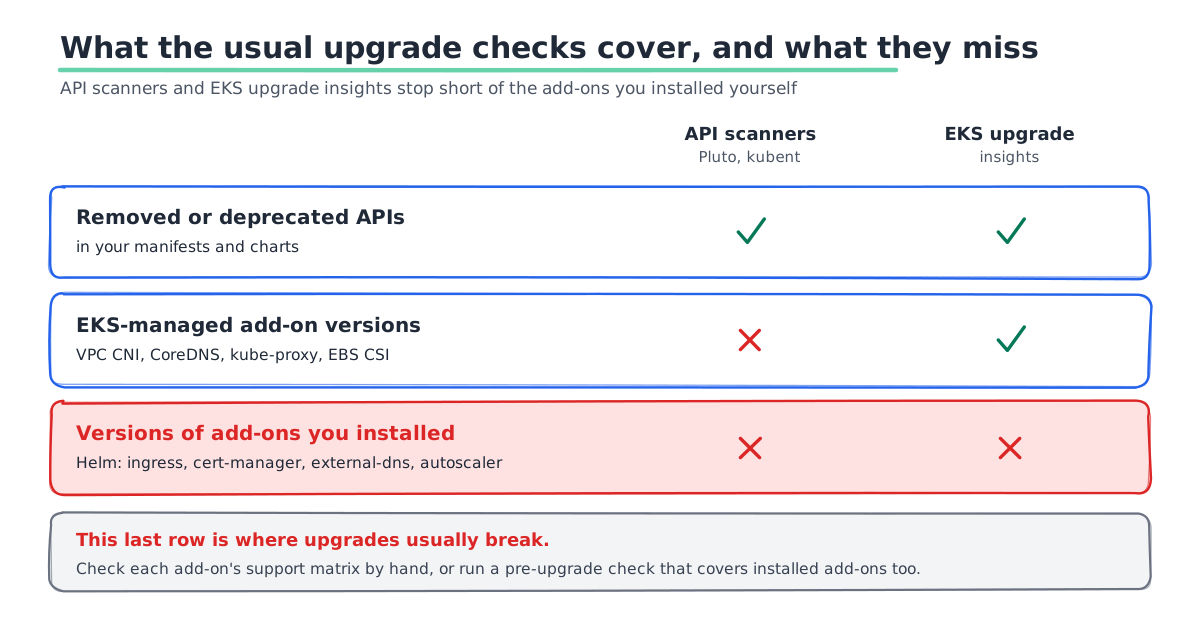
The common tools do not cover all of this:
- API deprecation scanners such as Pluto and kubent check your manifests for removed APIs. They do not tell you whether an add-on's own version supports the new release.
- EKS upgrade insights check deprecated API calls and the versions of EKS-managed add-ons, such as the VPC CNI, CoreDNS and kube-proxy. Add-ons you installed yourself with Helm sit outside that check.
That gap is where upgrades fail. The ingress controller that stops routing, or the cert-manager version that no longer issues certificates, usually came from Helm, not from EKS.
How to check your add-ons by hand
- List every add-on. Run
helm list -Aandaws eks list-addons --cluster-name <cluster>. Note the chart and app version of each. - Check each one's support matrix. Most projects publish which Kubernetes versions each release supports. Mark anything that does not list 1.37.
- Upgrade add-ons first where you can. Move each one to a version that supports both your current and your target release, then upgrade Kubernetes.
- Test in staging. Upgrade a staging cluster with the same add-on set and run your smoke tests before production.
How Atmosly runs this check for you
Atmosly, our Kubernetes platform, runs a pre-upgrade check before you change a cluster's version. It shows what is likely to break on the target release. That covers deprecated and removed Kubernetes APIs your workloads still use, and it also checks the add-ons installed in the cluster, not just core Kubernetes. You get one report to work through before the upgrade instead of a spreadsheet of add-on support matrices.
The check does not replace testing. You should still upgrade staging first. But it turns the add-on audit from a day of reading release notes into a list you can act on.
How to Upgrade an EKS Cluster to 1.37
EKS moves the control plane up one minor version at a time. A cluster on 1.34 needs three upgrades to reach 1.37: 1.35, then 1.36, then 1.37. Each hop has its own breaking changes, so check the notes for each one. For example, 1.35 drops cgroup v1 by default and 1.36 stops running gitRepo volumes.
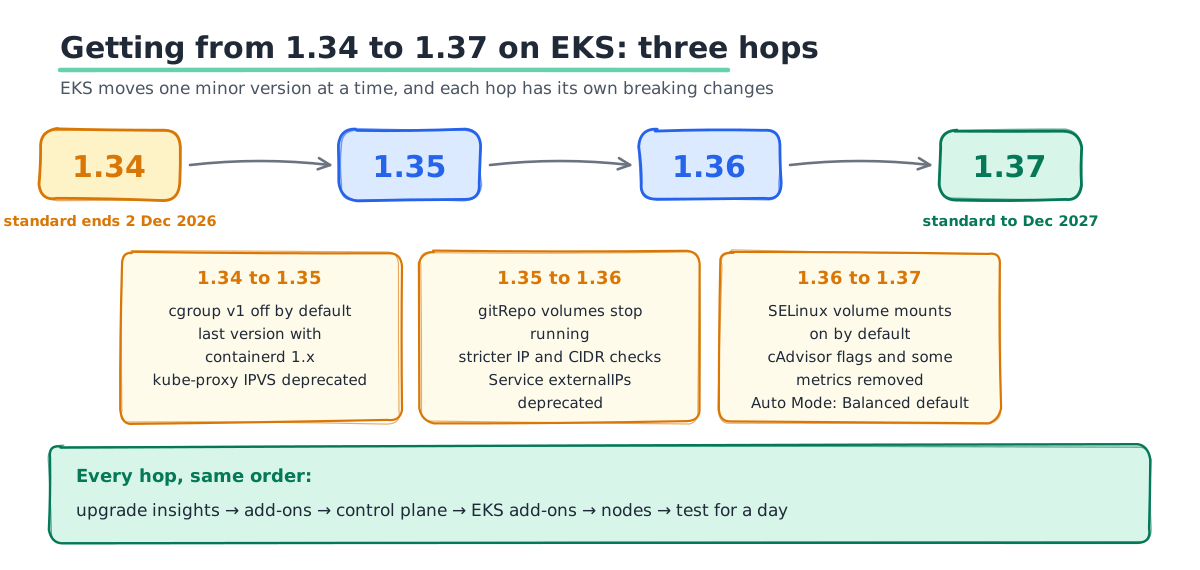
- Run the pre-checks. Fix every error in EKS upgrade insights, then run your add-on check.
- Upgrade add-ons to versions that support both the current and target release.
- Upgrade the control plane one version.
- Update EKS-managed add-ons to match the new version.
- Roll your nodes to the new AMI, with Pod disruption budgets in place.
- Test and watch for a day before the next hop.
aws eks list-insights --cluster-name <cluster> --region <region>

aws eks update-cluster-version --name <cluster> --kubernetes-version 1.37
If something goes wrong, EKS now lets you roll the control plane back one version within 7 days. Nodes and add-ons must be rolled back by you first. Our EKS upgrade guide covers each step, the full version calendar and the rollback limits in detail.
Should You Upgrade Now or Wait for 1.38?
Kubernetes 1.38 is planned for 16 December 2026, and EKS has recently added each new version five to six weeks after upstream. On that pattern, 1.38 would reach EKS around late January 2027.
Waiting rarely pays off. Here is how we would decide:
- On 1.33 or older: upgrade now. You are paying the extended support fee of $0.60 per cluster per hour, six times the standard rate.
- On 1.34: upgrade soon. Standard support ends on 2 December 2026, and the higher fee starts that day.
- On 1.35 or 1.36: you have time. Move to 1.37 on your normal schedule and skip nothing.
If you are coming from an older release, our Kubernetes 1.34 guide covers the changes in that version.
Get Your Clusters to 1.37 Safely
An upgrade that skips the add-on check is the one that breaks production. SquareOps is an AWS Advanced Consulting Partner with the EKS Service Delivery designation. Our engineers audit your clusters and add-ons, plan each version hop and run the upgrade with a tested rollback plan. Talk to our Kubernetes team about moving your clusters to 1.37.