Kubernetes, the popular container orchestrator, is a rapidly evolving platform. There are new version releases every few months, each bringing new features, bug fixes, and security updates. To stay up to date, users need to upgrade their Elastic Kubernetes Service (EKS). While upgrading your Elastic Kubernetes Service (EKS) is a critical practice that requires best practices, we have put this article together to help you learn the best practices of Elastic Kubernetes Service (EKS) upgrades. It also looks at where an internal developer platform such as Atmosly fits: provisioning EKS clusters, node groups and add-ons through guardrails, and deploying workloads onto them.
Amazon EKS and Kubernetes Version Releases
Often abbreviated as K8s, Kubernetes is an open-source platform designed to automate the deployment, scaling, and operation of application containers. It allows you to build, deploy, and manage containerized applications efficiently and at scale. Kubernetes eliminates many of the manual processes involved in deploying and scaling containerized applications, making it easier to manage applications in a dynamic environment.
Kubernetes provides a robust platform for managing containerized applications at scale. Amazon Elastic Kubernetes Service (EKS) on the other hand is a fully managed Kubernetes service that makes it easy to deploy, manage, and scale containerized applications using Kubernetes on Amazon Web Services (AWS). With Amazon EKS, you can run Kubernetes on AWS without installing, operating, and maintaining your own Kubernetes control plane or nodes. Amazon EKS provides a highly available and scalable Kubernetes control plane. You pay a per-cluster hourly fee for that control plane — higher while a version is in extended support — plus the compute and storage your Kubernetes clusters consume.
The Need for Kubernetes Version Releases
As Kubernetes evolves, new features, enhancements, and bug fixes are introduced in each new version. These updates address issues, improve performance, and introduce new capabilities to the platform. Amazon EKS must follow the upstream Kubernetes release cycle to ensure that its users have access to the latest features and improvements.
The Kubernetes community releases new minor versions (such as 1.29) approximately once every four months. Amazon Elastic Kubernetes Service (EKS) follows the upstream release and deprecation cycle for these minor versions, ensuring compatibility and support for its users.
Standard and Extended Support
When a new Kubernetes version becomes available in Amazon EKS, it is recommended to proactively update your clusters to use the latest available version. Each minor version in Amazon EKS is under standard support for the first 14 months after its release. After the standard support period ends, the version enters extended support for the next 12 months. During extended support, you can stay at a specific Kubernetes version for a longer period, but at an additional cost per cluster hour.
If you haven't updated your cluster before the extended support period ends, your cluster is auto-upgraded to the oldest currently supported extended version. It's important to stay aware of the support timelines for each Kubernetes version to ensure your clusters remain supported.
Creating Clusters with Specific Versions
When creating an Amazon EKS cluster, you can choose the Kubernetes version. It's recommended to use the latest available version to take advantage of the latest features and improvements. However, if your application requires a specific version, you can select an older version during cluster creation.
Available Versions and Release Calendar
Amazon EKS offers multiple Kubernetes versions in both standard and extended support. Users can choose from a range of versions to meet their specific requirements. The release calendar for each version provides important dates such as the upstream release date, Amazon EKS release date, end of standard support, and end of extended support.
Versions in Standard Support
The lists and table below are a snapshot from mid-2024, when this guide was first written, and show how the standard and extended support windows overlap. At that time Amazon EKS standard support included:
- 1.30
- 1.29
- 1.28
- 1.27
- 1.26
Versions in Extended Support
And these versions were in Amazon EKS extended support:
- 1.25
- 1.24
- 1.23
Release Dates and Support Timelines
The table below shows the release and support dates for those versions. Every version in it is now past the end of extended support, so treat it as a worked example of the support lifecycle and check the Amazon EKS Kubernetes version calendar for the versions currently offered:
| Kubernetes Version | Upstream Release Date | Amazon EKS Release Date | End of Standard Support | End of Extended Support |
|---|---|---|---|---|
| 1.30 | April 17, 2024 | May 23, 2024 | July 23, 2025 | July 23, 2026 |
| 1.29 | December 13, 2023 | January 23, 2024 | March 23, 2025 | March 23, 2026 |
| 1.28 | August 15, 2023 | September 26, 2023 | November 26, 2024 | November 26, 2025 |
| 1.27 | April 11, 2023 | May 24, 2023 | July 24, 2024 | July 24, 2025 |
| 1.26 | December 9, 2022 | April 11, 2023 | June 11, 2024 | June 11, 2025 |
| 1.25 | August 23, 2022 | February 22, 2023 | May 1, 2024 | May 1, 2025 |
| 1.24 | May 3, 2022 | November 15, 2022 | January 31, 2024 | January 31, 2025 |
| 1.23 | December 7, 2021 | August 11, 2022 | October 11, 2023 | October 11, 2024 |
Kubernetes EKS Upgrade Process Best Practices
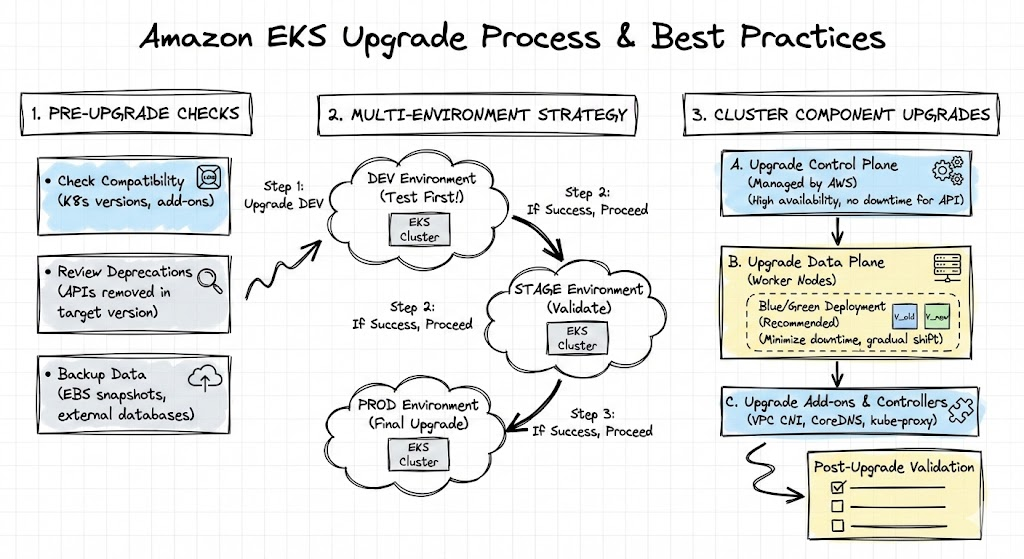
To start with, let's focus on the technical aspects of the Kubernetes EKS upgrade process. The upgrade processes are in phases; before, during, and post upgrade processes as would be shown in the subsequent section. Before upgrades, there are tasks required of you, during upgrades, there are things you must do as well and after the upgrades, you must do some routine tasks to ensure that EKS is well-upgraded and running effectively with the current or updated version.
In Amazon EKS, both the control and data planes should run the same Kubernetes minor version for smooth operation. AWS manages and upgrades the control plane, while you are responsible for updating the worker nodes in the data plane. Below are basic explanations of control and node plane before we get into details;
- Control Plane Upgrade: Upgrading the EKS control plane involves deploying a new control plane version and migrating your existing configuration and settings. The upgrade process is managed by AWS and typically does not require direct user intervention. However, you can use the AWS Management Console, AWS CLI, or AWS SDKs to trigger the upgrade manually if needed.
- Node Group Upgrade: Upgrading the node groups in your EKS cluster involves updating the underlying EC2 instances to a newer Amazon EKS-optimized AMI that corresponds to the target Kubernetes version. This process can be automated using tools like eksctl or managed node groups.
Before Upgrading your EKS cluster
- Understand Deprecation Policies: Familiarize yourself with the Kubernetes deprecation policy to anticipate changes that may affect your applications.
- Review the Kubernetes Change Log: Thoroughly review the Kubernetes change log alongside Amazon EKS Kubernetes versions to understand potential impacts.
- Assess Cluster Add-Ons Compatibility: Review and update your existing cluster add-ons for compatibility with the new Kubernetes version.
- Enable Control Plane Logging: Capture issues during the upgrade process for troubleshooting by enabling control plane logging.
Upgrading Your Cluster
- Plan Sequential Upgrades: For multiple version updates, plan a series of sequential upgrades to minimize downtime and risks.
- Upgrade Control Plane: Initiate the control plane upgrade through the AWS API or console.
- Review Add-Ons Compatibility: Ensure all Kubernetes add-ons and custom controllers are compatible with the new version.
- Upgrade Kubectl: Update your kubectl version to match the new Kubernetes version.
- Upgrade Data Plane (Worker Nodes): Upgrade your worker nodes to the same Kubernetes minor version as the control plane.
- Use eksctl for Management: Consider using eksctl to simplify and manage your EKS cluster upgrades.
- Validate and Test: Perform tests in a non-production environment or through automated tests to ensure compatibility and stability.
Post-Upgrade
- Update Add-Ons: Ensure all Kubernetes components and add-ons are updated to match the new Kubernetes version. Remember that if they are not updated, they will likely not function well with the new version.
- Monitor and Maintain: Regularly monitor your upgraded cluster for any issues and maintain compatibility with new versions. You can do these by reviewing your resource allocation, pod placement, and network configuration.
Step-by-Step Technical Guide to EKS Upgrades
Planning the Upgrade
- Review Release Notes: Start by reviewing the release notes for the new Kubernetes version to understand the changes and new features.
- Check Compatibility: Ensure that your current configurations and add-ons are compatible with the new Kubernetes version.
- Backup Data: Before proceeding with the upgrade, backup your EKS cluster data using AWS Backup or other backup solutions.
Upgrading the Cluster Control Plane
- Upgrade one minor version at a time: EKS only upgrades the control plane to the next minor version, so plan a series of upgrades if you are several versions behind.
# With eksctl
eksctl upgrade cluster --name <cluster> --region <region> --approve

# Or with the AWS CLI
aws eks update-cluster-version --name <cluster> --kubernetes-version <target-version>
- Verify the upgrade: Confirm the control plane reports the new version.
aws eks describe-cluster --name <cluster> --query cluster.version --output text
kubectl version
- Update kubectl: Keep the kubectl on your workstation and CI runners within one minor version of the cluster.
Upgrading Worker Nodes
- Drain Nodes: Before upgrading the worker nodes, drain them to ensure that no pods are running on them.
kubectl drain <node-name> --ignore-daemonsets
- Update Node AMI: Update the Amazon Machine Image (AMI) for your worker nodes to the latest version that supports the new Kubernetes version.
- Upgrade Node Group: Use the eksctl command-line tool to upgrade the node group to the new Kubernetes version.
# Upgrade a managed node group to the control plane version
eksctl upgrade nodegroup --cluster <cluster> --name <nodegroup> --region <region> --kubernetes-version <target-version>
- Verify Upgrade: After upgrading the node group, verify that the worker nodes are running the new Kubernetes version.
kubectl get nodes
Rolling Update for Pods
- Uncordon Nodes: After upgrading the worker nodes, uncordon them to allow pods to be scheduled on them again.
kubectl uncordon <node-name>
- Rolling Update for Pods: Kubernetes will automatically start rolling updates for pods running on the upgraded nodes. Monitor the progress of the rolling update using the following command:
kubectl get pods --all-namespaces -o wide
Upgrade Add-Ons
Manual Upgrades
Some add-ons require manual intervention to upgrade. This typically involves following the specific documentation for the add-on you're using. The documentation will outline the upgrade steps, which may include:
- Downloading new binaries or container images.
- Updating configuration files.
- Restarting the add-on pods or deployments.
Examples of Add-Ons Requiring Manual Upgrades:
- Custom metrics collectors not included as EKS add-ons.
- Third-party monitoring tools not natively supported by EKS.
- Self-managed tools deployed on your cluster (e.g., cert-manager).
Important Note: Before performing a manual upgrade, ensure you understand the specific steps involved and any potential downtime associated with the process. It's recommended to test the upgrade process in a non-production environment first.
Upgrading EKS-Managed Add-Ons
For add-ons managed by Amazon EKS (such as the Amazon VPC CNI, CoreDNS, kube-proxy or the EBS CSI driver), you can use the update-addon API to simplify upgrades. This command streamlines the upgrade by handling tasks like fetching new container images and restarting pods.
Here's how to use the update-addon command:
aws eks update-addon --cluster-name <cluster-name> --addon-name <addon-name> --addon-version <new-version>Explanation of Arguments:
- <cluster-name>: This refers to the name of your specific EKS cluster.
- <addon-name>: This specifies the name of the EKS add-on you want to upgrade (e.g., vpc-cni, coredns, kube-proxy or aws-ebs-csi-driver). List the versions compatible with your target release with aws eks describe-addon-versions --addon-name coredns --kubernetes-version <target-version>.
- <new-version>: This indicates the desired version you're upgrading to (check available versions in the EKS documentation).
Monitoring and Testing
- Monitor Cluster Health: Use the Kubernetes dashboard or other monitoring tools to monitor the health of your cluster after the upgrade.
- Test Applications: Ensure your applications work correctly with the new Kubernetes version.
Rollback (If Necessary)
- Backup Configuration: Before upgrading, back up your manifests, Helm values and cluster resources (for example with Velero).
- The control plane cannot be downgraded: Once an EKS control plane is upgraded it stays on the new version. That is why the staging test matters; if production breaks, you fix forward or, in the worst case, restore workloads into a new cluster on the previous version.
- Roll back worker nodes and workloads: Node groups can be recreated on the previous AMI release, and application changes rolled back to their previous versions.
Following these steps will help you successfully upgrade your EKS cluster to the new Kubernetes version. Remember to always back up your data and configurations before proceeding with any upgrades.
Where Atmosly Fits
Atmosly provisions EKS clusters, node groups and add-ons from a catalog through guardrails you define, and imports the clusters you already run so they are managed the same way. Add-ons are version-pinned, so every change to them is deliberate, recorded in one audit trail and revertible. The version-by-version upgrade work in this guide still applies — a governed platform keeps the clusters you upgrade consistent with each other.
Conclusion
Upgrading Amazon EKS is not just a maintenance activity — it's a strategic investment in security, performance, and reliability.
By following these EKS upgrade best practices — planning ahead, validating compatibility and automating the repeatable steps — you keep transitions between Kubernetes versions predictable, with minimal downtime. To provision and govern those EKS clusters from one platform, try Atmosly.