Introduction
In modern cloud-native applications, Kubernetes has demonstrated robust capabilities for managing containerized applications at scale. However, this widespread adoption has also brought significant security challenges. Some common Kubernetes security challenges include misconfigurations, network security, image security, access control, and runtime security. Meanwhile, mastering and implementing Kubernetes admission controllers can help you secure your Kubernetes, as shown in this article.
Understanding Kubernetes Admission Controllers
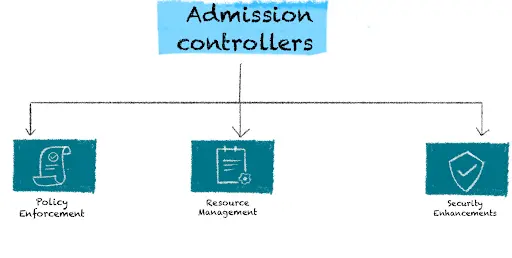
Admission controllers play a pivotal role in Kubernetes security by providing a mechanism to enforce security policies dynamically and consistently across the cluster. They are plug-ins that intercept requests to the Kubernetes API server after the request is authenticated and authorized but before it is persisted to the etcd database. This strategic position allows admission controllers to enforce custom policies on objects being created or updated.
The role of admission controllers includes:
- Policy Enforcement: Ensuring that all resources adhere to predefined security policies before they are accepted into the cluster.
- Resource Management: Modifying or rejecting requests based on organizational policies, ensuring resource configurations comply with best practices.
- Security Enhancements: Automatically injecting security-related configurations, such as network policies or resource limits, to enhance the overall security posture of the cluster.
Guidelines for securing your Kubernetes with Admission Controllers
- Understanding the Fundamentals: Gaining a deep understanding of Kubernetes architecture and the potential security risks.
- Identifying Security Requirements: Defining the specific security needs of your organization and how admission controllers can help meet these requirements.
- Configuring Admission Controllers: Setting up and configuring admission controllers to enforce security policies effectively.
- Continuous Monitoring and Improvement: Regularly reviewing and updating security policies and configurations to adapt to new threats and organizational changes.
By mastering the use of admission controllers, teams can significantly enhance the security posture of their Kubernetes clusters, ensuring robust protection against a wide array of threats. This journey not only involves technical proficiency but also a strategic approach to continuously evolving security practices.
How Admission Controllers Work and Their Significance in Ensuring Security and Integrity
Admission controllers operate in the following workflow:
- Interception of Requests: When a request is made to the Kubernetes API server, it first passes through the authentication and authorization stages.
- Evaluation by Admission Controllers: Post-authentication, the request reaches the admission controllers. Each controller evaluates the request against its specific set of policies. Kubernetes supports two types of admission controllers:
- Validating Admission Controllers: These controllers validate the request and either allow or reject it based on the policies defined.
- Mutating Admission Controllers: These controllers can modify the request before it is persisted to the etcd database. For example, they can add or modify labels, annotations, or resource limits.
- Policy Enforcement: Based on the evaluations, the admission controllers enforce security policies. If a request violates any policies, it is rejected with an appropriate error message. If it passes, the request proceeds to be committed to the etcd database.
Significance of Admission Controllers in Ensuring Security and Integrity
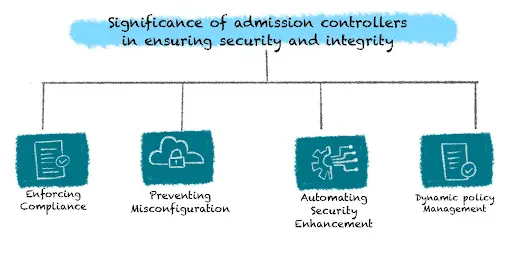
Admission controllers play a crucial role in maintaining the security and integrity of Kubernetes clusters. Here are some key aspects of their significance:
- Enforcing Compliance: Admission controllers ensure that all resources within the cluster comply with organizational policies and standards. For example, they can enforce that all images used come from trusted registries or that specific labels are present on resources for monitoring and management purposes.
- Preventing Misconfigurations: By intercepting and validating requests before they are committed, admission controllers help prevent common misconfigurations that could lead to security vulnerabilities or operational issues.
- Automating Security Enhancements: Admission controllers can automatically inject security-related configurations, such as network policies, resource quotas, or sidecar containers for logging and monitoring, ensuring consistent application of security practices.
- Dynamic Policy Management: They allow for dynamic and fine-grained policy management. Policies can be updated or added without requiring changes to the application code, making it easier to adapt to evolving security requirements.
For instance, the PodSecurity admission controller can enforce Pod Security Standards on pods, ensuring they run with the least privilege necessary. Similarly, the ResourceQuota admission controller can prevent resource starvation by enforcing limits on resource usage across namespaces.
By leveraging admission controllers, organizations can significantly bolster their Kubernetes security posture, ensuring that their clusters remain secure, compliant, and resilient to threats. This proactive approach to security helps maintain the integrity and reliability of the applications running within the Kubernetes ecosystem.
Challenges of Using Admission Controllers
Complexity of Configuration:
- Initial Setup: Configuring admission controllers can be complex, requiring a deep understanding of Kubernetes policies and the specific needs of the organization.
- Custom Webhooks: Developing and maintaining custom webhook admission controllers adds an additional layer of complexity, necessitating robust development and testing practices.
- Policy Management: As the number of policies and controllers increases, managing and coordinating them can become challenging, requiring careful planning and documentation.
Potential Performance Impact:
- Processing Overhead: Admission controllers add processing overhead to the API server, as each request must be evaluated and potentially modified or rejected.
- Latency: In environments with a high volume of API requests, the added latency from admission controller evaluations can impact overall system performance.
- Scalability: Ensuring that admission controllers scale effectively with the cluster can be challenging, particularly for custom webhook controllers that may require additional infrastructure and resources.
Compatibility Issues:
- Version Compatibility: As Kubernetes evolves, ensuring that admission controllers remain compatible with new versions can require ongoing updates and maintenance.
- Integration with Other Tools: Admission controllers must be carefully integrated with other security and management tools to avoid conflicts and ensure cohesive policy enforcement.
- Dependencies: Custom webhook admission controllers may have dependencies on external systems or services, introducing potential points of failure and complexity in deployment and maintenance.
Addressing the Challenges in Using Admission Controllers
Simplifying Configuration:
- Templates and Examples: Utilize existing templates and community examples to streamline the initial setup and configuration of admission controllers.
- Automation Tools: Leverage automation tools and scripts to simplify the deployment and management of admission controllers and their configurations.
- Documentation: Maintain thorough documentation for all admission controller configurations and policies to facilitate understanding and management.
Mitigating Performance Impact:
- Optimized Webhooks: Optimize custom webhook admission controllers to minimise processing time and reduce latency.
- Load Balancing: Implement load balancing for custom webhook servers to distribute the processing load and enhance performance.
- Monitoring: Continuously monitor the performance impact of admission controllers and adjust configurations as needed to balance security and performance.
Ensuring Compatibility:
- Regular Updates: Stay current with Kubernetes releases and update admission controllers and policies to ensure compatibility with new versions.
- Testing: Implement comprehensive testing practices to validate admission controller configurations in staging environments before deploying to production.
- Community Engagement: Engage with the Kubernetes community to stay informed about best practices, updates, and tools that can aid in managing admission controllers.
Types of Admission Controllers
Kubernetes ships with a set of built-in admission plugins compiled into the API server, plus two dynamic hooks — MutatingAdmissionWebhook and ValidatingAdmissionWebhook — that call services you run. Since Kubernetes 1.30, ValidatingAdmissionPolicy also lets you write validation rules in CEL without running a webhook at all. Every request passes through two phases: mutating admission controllers run first, then validating admission controllers check the final object.
Mutating Admission Controllers
Mutating admission controllers are typically used to set default values, modify configurations, or inject additional components (such as sidecar containers) into the objects. They intercept requests to the Kubernetes API server and can add, update, or remove fields in the objects before they are persisted in etcd.
How Mutating Admission Controllers Work:
- When a request is made to create or update an object in the Kubernetes cluster, the request is first authenticated and authorized.
- The request is then intercepted by mutating admission controllers.
- Each mutating admission controller evaluates the request and may modify the object by adding or altering fields according to predefined rules or policies.
- After all mutating admission controllers have processed the request, the modified object is passed to the next stage, which may include further validation.
Examples of Mutating Admission Controllers:
- MutatingAdmissionWebhook: Calls external webhooks to modify objects based on custom logic, such as injecting a sidecar or adding labels.
- DefaultStorageClass: Sets the default StorageClass on PersistentVolumeClaims that do not request one.
- LimitRanger: Applies default CPU and memory requests and limits from a namespace LimitRange (and validates against it).
- ServiceAccount: Assigns the default ServiceAccount to pods that do not name one and mounts its token.
How to Set Up Mutating Admission Controllers
Setting up a mutating webhook means running a webhook server in the cluster, giving it a TLS certificate the API server trusts, and registering it with a MutatingWebhookConfiguration. The example below adds a mutated: "true" label to every new pod.
Step 1: Confirm the Admission Plugins Are Enabled
MutatingAdmissionWebhook and ValidatingAdmissionWebhook are enabled by default in current Kubernetes releases. On managed services (EKS, GKE, AKS) you cannot edit the API server flags, but both are already on. On a self-managed kubeadm cluster, check the static pod manifest:
# /etc/kubernetes/manifests/kube-apiserver.yaml (kubeadm clusters)
spec:
  containers:
  - command:
    - kube-apiserver
    - --enable-admission-plugins=NodeRestriction,MutatingAdmissionWebhook,ValidatingAdmissionWebhook
Step 2: Run the Webhook Server
The webhook is an HTTPS endpoint that receives an AdmissionReview (API version admission.k8s.io/v1) and answers with the same uid, an allowed decision and, for mutations, a base64-encoded JSONPatch. It can be written in any language. This response adds the label; the patch decodes to [{"op":"add","path":"/metadata/labels/mutated","value":"true"}]:
{
  "apiVersion": "admission.k8s.io/v1",
  "kind": "AdmissionReview",
  "response": {
    "uid": "<uid copied from request.uid>",
    "allowed": true,
    "patchType": "JSONPatch",
    "patch": "W3sib3AiOiJhZGQiLCJwYXRoIjoiL21ldGFkYXRhL2xhYmVscy9tdXRhdGVkIiwidmFsdWUiOiJ0cnVlIn1d"
  }
}
Package the server as a container image and run it behind a Service:
apiVersion: apps/v1
kind: Deployment
metadata:
  name: pod-labeler
  namespace: webhooks
spec:
  replicas: 2
  selector:
    matchLabels:
      app: pod-labeler
  template:
    metadata:
      labels:
        app: pod-labeler
    spec:
      containers:
      - name: webhook
        image: registry.example.com/pod-labeler:1.0.0
        ports:
        - containerPort: 8443
        volumeMounts:
        - name: tls
          mountPath: /tls
          readOnly: true
      volumes:
      - name: tls
        secret:
          secretName: webhook-server-tls
---
apiVersion: v1
kind: Service
metadata:
  name: pod-labeler
  namespace: webhooks
spec:
  selector:
    app: pod-labeler
  ports:
  - port: 443
    targetPort: 8443
The API server only calls webhooks over TLS, and the certificate must carry the Service DNS name as a subject alternative name. For a test cluster a self-signed certificate works (OpenSSL 1.1.1 or later); in production, issue it with cert-manager:
openssl req -x509 -newkey rsa:2048 -nodes -days 365 \
  -keyout webhook.key -out webhook.crt \
  -subj "/CN=pod-labeler.webhooks.svc" \
  -addext "subjectAltName=DNS:pod-labeler.webhooks.svc"

kubectl create secret tls webhook-server-tls \
  --cert=webhook.crt --key=webhook.key -n webhooks
Step 3: Create the MutatingWebhookConfiguration
Register the webhook with the API server. The namespaceSelector keeps it away from system namespaces and from its own namespace, so a broken webhook cannot block its own recovery:
apiVersion: admissionregistration.k8s.io/v1
kind: MutatingWebhookConfiguration
metadata:
  name: pod-labeler
webhooks:
- name: pod-labeler.example.com
  admissionReviewVersions: ["v1"]
  sideEffects: None
  failurePolicy: Fail
  timeoutSeconds: 5
  clientConfig:
    service:
      name: pod-labeler
      namespace: webhooks
      path: /mutate
    caBundle: <CA_BUNDLE>
  rules:
  - apiGroups: [""]
    apiVersions: ["v1"]
    operations: ["CREATE"]
    resources: ["pods"]
  namespaceSelector:
    matchExpressions:
    - key: kubernetes.io/metadata.name
      operator: NotIn
      values: ["kube-system", "webhooks"]
Replace <CA_BUNDLE> with the base64-encoded CA certificate that signed the webhook's certificate, then apply the file with kubectl apply -f:
# For the self-signed certificate above, the CA bundle is the certificate itself
base64 < webhook.crt | tr -d '\n'
Step 4: Test and Validate
Create a test pod and confirm the label was added:
kubectl run test-pod --image=nginx -n default
kubectl get pod test-pod -n default --show-labels
You should see mutated=true among the pod's labels.
Step 5: Monitor and Maintain
- Track webhook latency and errors: the API server exposes admission webhook metrics, and a slow webhook slows every matching request.
- Run at least two replicas, and keep the webhook's certificate, configuration and code updated as Kubernetes versions change.
Validating Admission Controllers
Validating admission controllers, on the other hand, are responsible for validating the objects without modifying them. They intercept requests to the Kubernetes API server and enforce policies by accepting or rejecting objects based on predefined rules. These controllers ensure that objects meet certain criteria and adhere to organizational policies before they are persisted in etcd.
How Validating Admission Controllers Work:
- After a request passes through the mutating admission controllers, it is intercepted by validating admission controllers.
- Each validating admission controller evaluates the request against a set of validation rules or policies.
- If an object violates any of these rules, the validating admission controller rejects the request, and an error response is returned to the user.
- If all validating admission controllers approve the request, the object is admitted and persisted in etcd.
Examples of Validating Admission Controllers:
- ValidatingAdmissionWebhook: Calls external webhooks to validate objects based on custom logic. Policy engines such as OPA Gatekeeper and Kyverno plug in here.
- ValidatingAdmissionPolicy: Evaluates CEL expressions inside the API server, with no webhook to run (GA since Kubernetes 1.30).
- PodSecurity: Enforces the Pod Security Standards (Privileged, Baseline, Restricted) per namespace. It replaced PodSecurityPolicy, which was removed in Kubernetes 1.25.
- ResourceQuota: Rejects requests that would push a namespace over its quota.
How to Set Up Validating Admission Controllers
For simple rules, start with ValidatingAdmissionPolicy: it needs no server, certificate or extra latency. Use a validating webhook when the decision needs logic CEL cannot express or data from outside the cluster.
Step 1: Write a ValidatingAdmissionPolicy
This policy rejects any pod without a team label, in namespaces labelled environment=production:
apiVersion: admissionregistration.k8s.io/v1
kind: ValidatingAdmissionPolicy
metadata:
  name: require-team-label
spec:
  failurePolicy: Fail
  matchConstraints:
    resourceRules:
    - apiGroups: [""]
      apiVersions: ["v1"]
      operations: ["CREATE", "UPDATE"]
      resources: ["pods"]
  validations:
  - expression: "has(object.metadata.labels) && 'team' in object.metadata.labels"
    message: "Every pod must carry a 'team' label."
---
apiVersion: admissionregistration.k8s.io/v1
kind: ValidatingAdmissionPolicyBinding
metadata:
  name: require-team-label
spec:
  policyName: require-team-label
  validationActions: ["Deny"]
  matchResources:
    namespaceSelector:
      matchLabels:
        environment: production
Step 2: Or Use a Validating Webhook
The webhook setup mirrors the mutating one: the same Deployment, Service and certificate, registered with a ValidatingWebhookConfiguration that points at a /validate path:
apiVersion: admissionregistration.k8s.io/v1
kind: ValidatingWebhookConfiguration
metadata:
  name: pod-validator
webhooks:
- name: pod-validator.example.com
  admissionReviewVersions: ["v1"]
  sideEffects: None
  failurePolicy: Fail
  timeoutSeconds: 5
  clientConfig:
    service:
      name: pod-validator
      namespace: webhooks
      path: /validate
    caBundle: <CA_BUNDLE>
  rules:
  - apiGroups: [""]
    apiVersions: ["v1"]
    operations: ["CREATE"]
    resources: ["pods"]
  namespaceSelector:
    matchExpressions:
    - key: kubernetes.io/metadata.name
      operator: NotIn
      values: ["kube-system", "webhooks"]
To reject a request, the webhook returns allowed: false with a status message the user will see:
{
  "apiVersion": "admission.k8s.io/v1",
  "kind": "AdmissionReview",
  "response": {
    "uid": "<uid copied from request.uid>",
    "allowed": false,
    "status": {
      "code": 403,
      "message": "Every pod must carry a 'team' label."
    }
  }
}
Step 3: Test and Validate
kubectl create namespace prod-test
kubectl label namespace prod-test environment=production

# Rejected: no team label
kubectl run no-label --image=nginx -n prod-test

# Admitted
kubectl run with-label --image=nginx -n prod-test --labels=team=payments
The first pod should be rejected with the policy's message; the second should be admitted.
Step 4: Monitor and Maintain
- Roll new policies out with
validationActions: ["Warn", "Audit"]first, then switch toDenyonce existing workloads comply. - Keep policies in version control and review them as Kubernetes versions change.
Comparison between Mutating and Validating Admission Controllers:
- Mutating Admission Controllers:
- Can modify objects.
- Used for setting defaults, injecting configurations, or altering fields.
- Run first.
- Examples: MutatingAdmissionWebhook, DefaultStorageClass, LimitRanger.
- Validating Admission Controllers:
- Cannot modify objects.
- Used for enforcing policies and validating objects.
- Run after all mutations, so they see the final object.
- Examples: ValidatingAdmissionWebhook, ValidatingAdmissionPolicy, PodSecurity, ResourceQuota.
Common Built-in Admission Controllers
Here are some of the commonly used built-in admission controllers:
- AlwaysPullImages: Forces every new pod to pull its images, so a pod cannot reuse a private image cached on the node without credentials.
- DefaultStorageClass: Sets the default storage class for PVCs that do not specify one.
- DenyServiceExternalIPs: Rejects new uses of the
externalIPsfield on Services. - EventRateLimit: Limits the rate at which event objects are accepted.
- LimitRanger: Applies and enforces LimitRange defaults and limits.
- NamespaceLifecycle: Rejects objects in namespaces that do not exist or are being deleted, and prevents deletion of the default, kube-system and kube-public namespaces.
- NodeRestriction: Limits each kubelet to modifying its own Node object and the pods bound to it.
- PodNodeSelector: Enforces node selection policies for pods per namespace.
- PodSecurity: Enforces Pod Security Standards from namespace labels.
- PodTolerationRestriction: Restricts pod tolerations based on namespace policies.
- Priority: Resolves
priorityClassNameinto a pod priority for scheduling and preemption. - ResourceQuota: Enforces namespace resource quotas.
- RuntimeClass: Applies the pod overhead defined by the pod's RuntimeClass.
- ServiceAccount: Assigns a default ServiceAccount to pods and mounts its token.
- StorageObjectInUseProtection: Ensures that PersistentVolumes and PersistentVolumeClaims are not removed while in use.
Implementing Admission Controllers for Enhanced Security
Here is how admission control supports three common security controls: network policies, Pod Security Standards, and resource quotas.
Configuring Network Policies
Network policies are used to control the communication between pods in a cluster. While not an admission controller themselves, their enforcement can be ensured through validating admission controllers.
Step-by-Step Guide:
- Enable Network Policies: Make sure your CNI enforces them (for example Calico or Cilium). Managed services like GKE, EKS, and AKS support them when configured with a policy-capable network plugin.
- Define a Network Policy: For example, to allow ingress only from pods within the same namespace:
apiVersion: networking.k8s.io/v1
kind: NetworkPolicy
metadata:
  name: allow-same-namespace
  namespace: production
spec:
  podSelector: {}
  policyTypes:
  - Ingress
  ingress:
  - from:
    - podSelector: {}
- Apply the Network Policy:
kubectl apply -f allow-same-namespace.yaml
Enforcing Pod Security Standards with Pod Security Admission
PodSecurityPolicy was deprecated in Kubernetes 1.21 and removed in 1.25. Its replacement is the built-in PodSecurity admission controller, configured with namespace labels rather than policy objects:
kubectl label namespace production \
  pod-security.kubernetes.io/enforce=restricted \
  pod-security.kubernetes.io/enforce-version=latest \
  pod-security.kubernetes.io/warn=restricted
Start with warn and audit labels, fix the workloads that trigger warnings, then add enforce. The full rollout is covered in how to implement Pod Security Standards in Kubernetes.
Setting Up Resource Quotas
Resource quotas ensure that namespaces don't exceed specified resource limits, helping to prevent resource exhaustion. The ResourceQuota admission controller rejects any request that would exceed them.
apiVersion: v1
kind: ResourceQuota
metadata:
  name: compute-quota
  namespace: production
spec:
  hard:
    requests.cpu: "10"
    requests.memory: 20Gi
    limits.cpu: "20"
    limits.memory: 40Gi
    pods: "50"
kubectl apply -f compute-quota.yaml
Best Practices for Using Admission Controllers
To maximize the effectiveness of admission controllers in securing your Kubernetes clusters, it is essential to follow best practices. This section outlines key strategies for using admission controllers effectively, including regular audits, monitoring, and testing of configurations, as well as integrating them into your CI/CD pipeline for automated security checks.
Regular Audits and Reviews
Conduct Periodic Audits:
- Audit Policies: Regularly review and update admission controller policies to ensure they align with evolving security requirements and organizational policies.
- Access Reviews: Periodically review access controls and permissions associated with admission controllers to ensure they are only accessible to authorized personnel.
Configuration Management:
- Version Control: Store all admission controller configurations in a version-controlled repository to track changes and enable rollbacks if necessary.
- Change Management: Implement a change management process for updating admission controller configurations, ensuring that changes are reviewed and tested before deployment.
Security Posture Assessment:
- Policy Effectiveness: Assess the effectiveness of current policies by evaluating their impact on security incidents and compliance with security standards.
- Security Audits: Perform regular security audits of your Kubernetes clusters to identify potential vulnerabilities and areas for improvement.
Monitoring and Alerting
Enable Logging and Monitoring:
- Admission Controller Logs: Enable and monitor logs for all admission controllers to track their activities and detect any anomalies or unauthorized changes.
- Cluster Monitoring: Use monitoring tools like Prometheus and Grafana to keep an eye on cluster health and resource usage, correlating with admission controller activities.
Set Up Alerts:
- Policy Violations: Configure alerts for policy violations detected by admission controllers to ensure immediate attention and remediation.
- Resource Utilization: Monitor resource quotas and limits, setting up alerts for any breaches or unusual patterns in resource usage.
Testing Admission Controller Configurations
Implement Comprehensive Testing:
- Unit Testing: Develop unit tests for custom webhook admission controllers to validate their logic and behavior.
- Integration Testing: Perform integration testing to ensure that admission controllers interact correctly with other components in the cluster.
Test in Staging Environments:
- Staging Deployment: Deploy and test admission controller configurations in a staging environment that mirrors production to identify and resolve issues before they impact live services.
- Simulated Scenarios: Create simulated scenarios to test how admission controllers handle various requests, ensuring they enforce policies as expected.
Integrating Admission Controllers into CI/CD Pipelines
Automate Security Checks:
- Pre-deployment Validation: Integrate admission controllers into your CI/CD pipeline to validate Kubernetes manifests and configurations before they are deployed to the cluster.
- Automated Testing: Incorporate automated tests for admission controllers within your CI/CD pipeline to ensure they function correctly and enforce policies as intended.
Continuous Compliance:
- Policy Enforcement: Use admission controllers to enforce compliance checks during the deployment process, preventing non-compliant resources from being deployed.
- Pipeline Integration: Integrate admission controller validation steps into your CI/CD pipeline using tools like Jenkins, GitLab CI, or GitHub Actions.
Conclusion
Mastering Kubernetes security is a critical journey for any organization utilizing container orchestration. Admission controllers play a pivotal role in this journey. It offers robust mechanisms to enforce security policies, ensure compliance, and manage resources effectively.
Through this article, we've explored the foundational aspects of Kubernetes admission controllers, understanding their definitions, functionalities, and the various built-in types such as PodSecurity, MutatingAdmissionWebhook, ValidatingAdmissionWebhook and ValidatingAdmissionPolicy. These controllers provide essential security functions, from enforcing Pod Security Standards to ensuring consistent and compliant resource configurations.
Implementing admission controllers for enhanced security involves a systematic approach. We've provided step-by-step guides on configuring key policies, such as network policies, Pod Security Standards, and resource quotas. Additionally, we demonstrated hands-on examples and configurations to give you a practical understanding of deploying these controllers in your Kubernetes environment.
Adhering to best practices is crucial for the effective use of admission controllers. Regular audits, monitoring, and testing ensure that policies remain relevant and effective. Integrating admission controllers into your CI/CD pipeline further automates security checks, maintaining continuous compliance and enhancing your security posture.
While the benefits of using admission controllers, such as enhanced security, improved compliance, and better control over cluster resources, are substantial, it's important to acknowledge and address the associated challenges. These include configuration complexity, potential performance impacts, and compatibility issues. By leveraging templates, and automation tools, and staying current with updates, these challenges can be mitigated effectively.
By embracing the strategies and best practices discussed in this article, you can master Kubernetes security and safeguard your infrastructure against evolving threats.
Admission controllers enforce policy at the API server. You still need to know whether your clusters and cloud accounts meet your security baseline over time. SquareOps Verity, now in early access, checks Amazon EKS clusters against the CIS Amazon EKS Benchmark and AWS accounts against the CIS AWS Foundations Benchmark, ranks findings by real risk, and tracks each fix until a scan verifies it. Verity reports rather than blocks, so it complements the admission controls in this guide. Request early access.