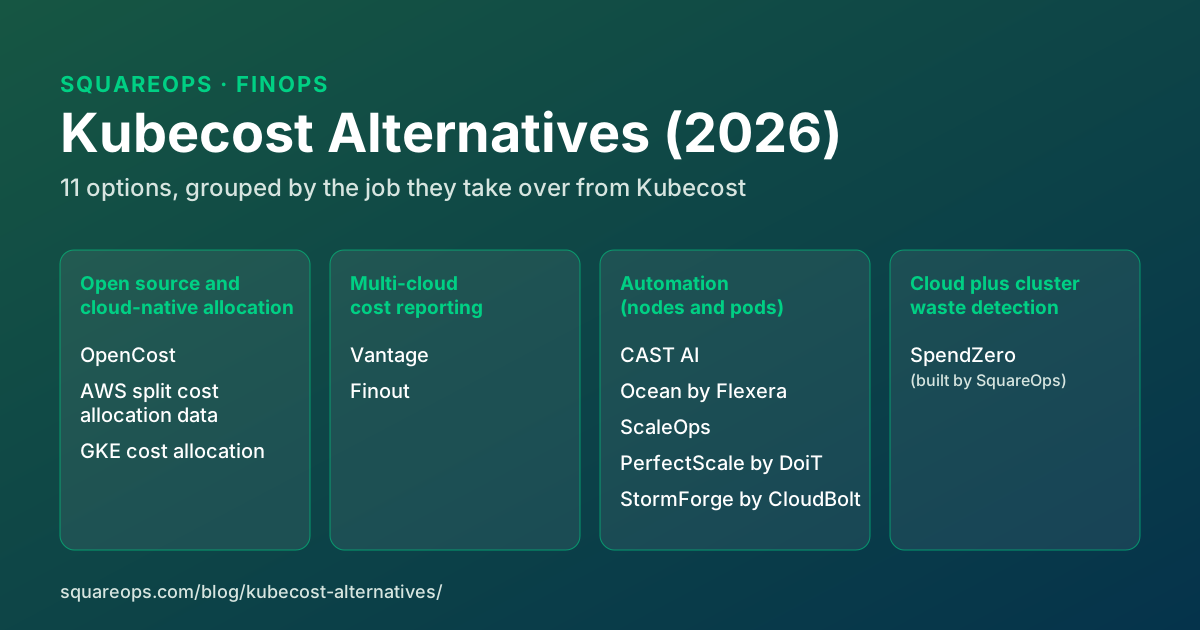
Summary: The closest Kubecost alternative is OpenCost, the free CNCF project built from Kubecost's own allocation engine, and on a single cloud the native options (AWS split cost allocation data for EKS, GKE cost allocation) give bill-accurate chargeback data at no extra charge. Teams that want a tool to change the cluster automatically pick CAST AI or Ocean for nodes, or ScaleOps, PerfectScale or StormForge for pod requests. Vantage and Finout put Kubernetes cost next to the rest of the cloud bill, and SpendZero (built by SquareOps) finds and prices waste across AWS and GCP accounts plus EKS and GKE clusters.
Written by Ankush Madaan, SquareOps · Published: November 13, 2026 · Last updated: November 13, 2026
IBM announced it was buying Kubecost on 17 September 2024. Two years later Kubecost still ships (version 3.3 came out in October 2026), but the free tier now has a spend gate, the architecture changed underneath existing installs, and the product is being folded into IBM's FinOps Suite. Those changes are the usual trigger for a look at Kubecost alternatives.
This guide is for teams deciding whether to leave or replace Kubecost: what changed, what each alternative does better and worse than Kubecost, and when staying put is the cheaper answer. For a general survey of the category instead, our comparison of 12 Kubernetes cost optimization tools covers that ground. Facts and prices below were checked against each vendor's own pages on 13 November 2026.
Disclosure: SquareOps publishes this guide and builds SpendZero, one of the tools below. The list is not ranked. Every entry is assessed on the same criteria, described in How we evaluated these tools.
In this guide:
- What changed with Kubecost after IBM bought it?
- Why do teams look for a Kubecost alternative?
- Kubecost alternatives compared
- The 11 Kubecost alternatives
- OpenCost vs Kubecost: is the open-source core enough?
- When staying on Kubecost is the right call
- How do you choose a Kubecost alternative?
- How we evaluated these tools
See what your cloud and clusters are wasting before you pick a tool
SpendZero's first scan is free and read-only. Every finding comes with a monthly dollar figure.
Run a free SpendZero scanWhat changed with Kubecost after IBM bought it?
Kubecost is still a working product with an active release train. What changed is ownership, packaging and architecture. The dated record:
- 17 September 2024: IBM announces the acquisition. IBM said Kubecost would add container cost management to the IBM FinOps Suite, next to Cloudability and Turbonomic. Two days later, Forrester principal analyst Tracy Woo wrote that Kubecost had lost ground to Finout, Vantage, CAST AI and Harness, and asked whether IBM would raise "an already high price tag".
- 30 September 2025: Kubecost 3.0. The release replaced DuckDB with ClickHouse and removed the Prometheus dependency through a new unified agent. It also added a free-tier gate based on total cloud spend ($100,000 over the last 30 days), made Automated Container Request Sizing free up to 250 cores, and brought non-Kubernetes costs in through collections, budgets, forecasting and anomaly detection. Moving from 2.x triggers a full re-ingestion of data, and Kubecost recommends running agents on 2.9 for two days before upgrading.
- 10 April 2026: Cloudability Advanced Containers. IBM launched a Cloudability add-on "powered by IBM Kubecost" that brings Kubernetes analytics, optimization and automation into Cloudability.
- 7 October 2026: Kubecost 3.3. This release added a read-only beta MCP server, a breakdown of AWS NAT Gateway network costs and the return of the Namespace Turndown action. It is also the last release that supports the v1 Enterprise license format, so v1 customers need a v2 license before upgrading further.
Current packaging, from the pricing page that kubecost.com now redirects to: Foundations is "always free" for unlimited clusters up to 250 cores, with 15-day metric retention, unlimited users and reconciliation with your cloud bill. Enterprise Self-hosted and Enterprise Cloud (the SaaS edition) carry no public price. On EKS, the Amazon EKS optimized Kubecost bundle remains free and, per AWS, is exempt from the $100,000 spend gate.
What is not known: IBM has not published Enterprise list prices, and it has not said whether standalone Kubecost and Cloudability Advanced Containers will converge. Reports of Enterprise price increases since the acquisition exist on review sites, but we found no primary source for them, so treat them as unconfirmed.
Why do teams look for a Kubecost alternative?
In our experience, the reasons fall into five groups. Most teams have two of them at once.
- Price at scale. The free tier stops at 250 cores and, from 3.0, at $100,000 of cloud spend over 30 days. Above that, Enterprise is a sales conversation with no published rate, which makes budgeting a renewal hard.
- Coverage centred on the cluster. Kubecost pulls out-of-cluster costs through billing integration, and 3.x added budgets and anomaly detection for non-Kubernetes spend. Its optimization actions (container request sizing, namespace turndown) are still about Kubernetes. If most of your waste sits in databases, storage and network outside the cluster, you need a tool built for the whole account.
- Self-hosting effort. Both Foundations and Enterprise Self-hosted run in your cluster. The 3.0 move to ClickHouse and S3-compatible storage for multi-cluster setups means an install that worked on 2.x has to be re-planned, and the v1 license cut-off in 3.3 adds another forced step for older Enterprise customers.
- Wanting actions, not just allocation. Kubecost does automate container request sizing. It is not a node autoscaler, though: spot placement and bin packing are where tools like CAST AI and Ocean work.
- Vendor direction. Some teams would rather not bet on a product whose future packaging inside IBM is still unclear. Others are simply consolidating FinOps tooling and want Kubernetes inside the platform finance already uses.
Check price first: on EKS it may have a fix that doesn't involve migrating at all (see when staying on Kubecost is the right call).
Kubecost alternatives compared
| Tool | Main job | Acts or reports | Outside the cluster | Open source | Published pricing |
|---|---|---|---|---|---|
| Kubecost (baseline) | Allocation, chargeback, request sizing | Reports; automates request sizing | Billing integration; non-K8s budgets in 3.x | Core is OpenCost; product is commercial | Foundations free (250 cores); Enterprise by quote |
| OpenCost | Cost allocation | Reports | Limited | Yes (Apache 2.0, CNCF) | Free |
| AWS split cost allocation data | Pod-level EKS cost in the CUR | Reports (raw billing data) | It is the AWS bill | No (AWS feature) | No additional cost |
| GKE cost allocation | Namespace and label cost in the billing export | Reports (raw billing data) | It is the GCP bill | No (GCP feature) | No GKE charge; BigQuery costs apply |
| Vantage | Kubernetes inside multi-cloud cost reports | Reports and recommends | Yes (AWS, Azure, GCP, Oracle and more) | No | Free to $2,500 tracked spend; $30 and $200 tiers |
| Finout | Kubernetes allocation inside a FinOps platform | Reports and recommends | Yes (cloud and SaaS bills) | No | Annual fee by spend tier, by quote |
| CAST AI | Node autoscaling, spot, bin packing, workload sizing | Acts | No | No | Monitoring free; automation by quote |
| Ocean (Flexera) | Node autoscaling, spot, bin packing, showback | Acts | No | No | Not on the product page |
| ScaleOps | Pod sizing, replicas, nodes, spot | Acts (starts read-only) | No | No | By quote |
| PerfectScale (DoiT) | Pod and node rightsizing | Acts or recommends | No | No | Free to 300 vCPU a month; paid by quote |
| StormForge (CloudBolt) | Requests, limits and HPA targets together | Acts | No | No | 30-day trial on 1 cluster; by quote |
| SpendZero | Priced waste findings across cloud and cluster | Recommends; approved one-click fixes for cloud resources | Yes (25+ AWS services, plus GCP) | No | First scan free |
The 11 Kubecost alternatives
The entries are grouped by the job they take over from Kubecost: open-source and cloud-native allocation first, then multi-cloud reporting platforms, then tools that change the cluster, then SpendZero.
1. OpenCost: the open-source core
OpenCost is the cost allocation engine Kubecost built and then open-sourced. It joined the CNCF in June 2022 and moved to Incubating on 25 October 2024. It is Apache 2.0, it computes cost per cluster, namespace, pod and label, and the project shipped 11 releases in 2025, including a built-in MCP server. It is the obvious Kubecost open source alternative and the only entry here you can run with no vendor at all.
- Best fit: teams that need allocation and showback, want it free and self-hosted, and already run Prometheus and Grafana.
- Honest limits: per the OpenCost FAQ, it prices on public on-demand rates; reconciling to your actual bill (Savings Plans, committed use, spot) is part of what Kubecost sells on top. The install docs require Prometheus; a Prometheus-less collector was in beta at the end of 2025. Expect a basic UI, no recommendations, and dashboards you build yourself.
- Pricing: free. Open source: yes.
2. AWS split cost allocation data for EKS
This is AWS's own pod-level cost feature. Once enabled from the payer account, split cost allocation data adds a cost line per pod per hour to the Cost and Usage Report, based on the amortized cost of the instance and the share of its CPU and memory each pod reserved or used. GPUs, Trainium and Inferentia are split too. Tags such as aws:eks:cluster-name, aws:eks:namespace and aws:eks:workload-name come automatically, and since 30 October 2025 up to 50 Kubernetes labels per pod can be imported as cost allocation tags.
- Best fit: EKS-only organisations that already query the CUR with Athena or a BI tool and need chargeback numbers that tie exactly to the invoice.
- Honest limits: it is data, not a product. There is no UI, no recommendations, and it does not appear in Cost Explorer. The default mode allocates by resource requests, so pods without requests get no split cost. Allocating by the higher of requests and actual usage uses Amazon Managed Service for Prometheus, which is billed separately.
- Pricing: AWS describes the feature as available with no additional cost; you pay for the storage and queries you run on the CUR. Open source: no.
3. GKE cost allocation
Google's equivalent writes cluster, namespace and Kubernetes label breakdowns into the Cloud Billing detailed usage cost export in BigQuery. It is one flag per cluster (--enable-cost-allocation), and it labels spare capacity as kube:unallocated and system reservations as kube:system-overhead, which makes idle cost visible without extra tooling.
- Best fit: GKE Standard users who already export billing to BigQuery.
- Honest limits: allocation is based on resource requests, not usage. Data starts from the day you enable it, with no backfill, and can take up to three days to appear. If a pod has more than 50 labels, none of them are exported. Committed use discounts with sharing can leave some cost unallocated.
- Pricing: enabling it does not change your GKE bill; the extra BigQuery rows add storage and query cost. Open source: no.
4. Vantage
Vantage is a multi-cloud cost platform, and its Kubernetes support puts cluster cost in the same reports as AWS, Azure, GCP and Oracle spend. Its Kubernetes agent reads the Kubernetes API and kubelet without needing Prometheus, and pod costs are derived from the instance costs in your connected cloud billing data. It reports by namespace, deployment and label, attributes network and GPU cost to pods, and gives pod rightsizing recommendations.
- Best fit: teams that want one cost tool for the whole bill and see Kubernetes as one line item among many.
- Honest limits: it reports and recommends; it does not change workloads or nodes. Kubernetes data needs the Vantage agent in every cluster, and recommendations need agent version 1.0.24 or later.
- Pricing: public. Starter is free up to $2,500 of tracked cloud spend, Pro is $30 a month up to $7,500, Business is $200 a month up to $20,000, and Enterprise is custom. Check which tier includes the Kubernetes features you need. Open source: no.
5. Finout
Finout is a FinOps platform aimed at allocation and chargeback across cloud, Kubernetes and SaaS bills. For Kubernetes it reads metrics you already collect from Prometheus, Datadog or CloudWatch rather than installing its own agent (an in-cluster agent is listed as coming soon). It drills from cluster to namespace, deployment, label and pod, splits shared cluster cost across teams with rule-based "virtual tags", and suggests request reductions from P90 or maximum usage.
- Best fit: finance-led FinOps teams that need every dollar, Kubernetes included, mapped to a team or product without retagging resources.
- Honest limits: it depends on an existing metrics source, and it recommends rather than acts. Annual, quote-based pricing suits an established FinOps function better than a small team.
- Pricing: not public; a yearly fee based on your committed cloud and AI spend tier, with Kubernetes listed as an add-on factor. Open source: no.
6. CAST AI
CAST AI takes over capacity management. It runs autoscaling, spot instance automation and bin packing for the cluster, and its workload autoscaler resizes container requests from observed usage. It supports EKS, GKE, AKS and OCI, plus other clusters through Cast AI Anywhere. Its cost monitoring, Cast Radar, is free for unlimited clusters and reports by cluster, namespace and workload.
- Best fit: teams whose biggest cost is node capacity, especially those ready to run a large share of workloads on spot.
- Honest limits: you hand node provisioning to an external control plane, which is a governance decision as much as a technical one. The free monitoring uses public pricing, not your bill, and nothing outside the cluster is covered.
- Pricing: monitoring free; automation is quoted per environment. Open source: no.
7. Ocean by Flexera (formerly Spot Ocean)
Ocean is the Kubernetes product from Spot, which Flexera bought from NetApp on 3 March 2025. It runs node autoscaling with an event-based controller, picks spot capacity or instances already covered by Reserved Instances and Savings Plans, bin-packs pods to cut wasted node capacity, and breaks cost down for showback and chargeback. It runs on EKS, AKS and GKE, and on ECS.
- Best fit: large, spot-heavy fleets, and organisations already using Flexera One for cloud cost.
- Honest limits: like CAST AI, it owns node provisioning, so adoption is a platform decision. Coverage is containers. Expect a sales-led buying process.
- Pricing: no price on the product page; sold through Flexera sales and the AWS and Azure marketplaces. Open source: no.
8. ScaleOps
ScaleOps manages pod resources continuously: workload rightsizing, replica optimization, node and spot optimization, Karpenter tuning and JVM memory sizing. It is self-hosted by design, so cost and usage data stays in your cluster, with a hosted option and an air-gapped one. It starts in read-only mode, and you switch on automation when you are ready.
- Best fit: teams where most waste is over-requested pods and nobody has time to tune requests by hand.
- Honest limits: it is not a chargeback or allocation tool, and automated changes to production workloads need sign-off from whoever owns those services. Pricing is not public.
- Pricing: custom quote; free trial after a demo. Open source: no.
9. PerfectScale by DoiT
DoiT announced its acquisition of PerfectScale on 4 February 2025, and it still sells as its own product. PerfectScale analyses workload usage, recommends or automatically applies request changes, and gives node recommendations across AWS, Google Cloud, Azure and Red Hat environments. It installs with a single Helm command and runs as SaaS.
- Best fit: teams that want rightsizing with a free starting tier, and existing DoiT customers.
- Honest limits: cluster scope only, and per-vCPU pricing grows with the cluster.
- Pricing: free up to 300 vCPU a month; paid plans are priced per vCPU by quote. Open source: no.
10. StormForge by CloudBolt
CloudBolt announced it was buying StormForge on 31 March 2025. StormForge Optimize Live uses forecast-based machine learning to set CPU and memory requests and limits, and it recalculates the HPA target utilization in the same update. That matters because sizing requests on a horizontally scaled workload changes when the HPA fires. The agent runs in your cluster; the ML control plane is SaaS.
- Best fit: HPA-scaled services where VPA-style sizing and the HPA work against each other.
- Honest limits: workload layer only, so no node management and no allocation reporting. It is being integrated into CloudBolt's FinOps platform, so check the roadmap if you buy it standalone.
- Pricing: no public price; the free trial covers full optimization on one cluster for 30 days. Open source: no.
11. SpendZero (built by SquareOps)
SquareOps builds SpendZero. The entry follows the same format as the others, including its limits.
SpendZero starts from a different question than Kubecost. Kubecost answers "who spent this?". SpendZero answers "what can we stop paying for, and how much is it worth?", across the cloud account and the cluster.
- Cloud scan: agentless and read-only, through an IAM role on AWS or a service account on GCP. It runs 37+ automated waste checks across 25+ AWS services, plus GCP, and every finding carries a monthly dollar figure. One-click remediation is available for cloud resources; each action is approved by a person and audit-logged. The first scan is free. The AWS cost optimization page lists the checks.
- Kubernetes (EKS and GKE): connects through SquareOps' read-only in-cluster agent, so this part does use an agent. Cost is broken down per cluster, namespace, workload and any label key, built from your real cloud bill (using AWS split cost allocation data for EKS when it is enabled).
- Request rightsizing: uses 7, 14 or 30 days of usage, with recent days weighted more. CPU is sized at the 95th percentile of daily peaks and memory at the 99th, plus a 15% headroom buffer, all configurable. Memory is never shrunk below the current limit for a container that was OOM-killed in the window, and CPU is never reduced while throttling is above 25%. A recommendation is only marked actionable when the change is at least 15% and both CPU and memory were measured.
- Beyond requests: node-group instance-type recommendations, idle workload and waste detection, and tracking of which recommendations were applied and the savings they realised. Kubernetes request changes are delivered as recommendations; the one-click remediation covers cloud resources.
- Best fit: teams whose waste is spread across the account and the cluster, who want a priced list of what to fix rather than a chargeback report. The SpendZero Kubernetes cost optimization page covers the cluster side in detail.
- Honest limits: SpendZero is built around finding and removing waste, not chargeback accounting. Kubecost and OpenCost remain stronger for deep in-cluster allocation, and OpenCost is the choice if you need open-source self-hosting. SpendZero does not run node autoscaling or spot placement. The head-to-head detail is on our SpendZero vs Kubecost comparison.
- Pricing: first scan free. Open source: no.
Replacing Kubecost is a good moment to look past the cluster
Connect a read-only role and get waste findings, each with a monthly dollar figure, across your AWS and GCP accounts. Add the in-cluster agent for EKS and GKE rightsizing.
See SpendZero for KubernetesOpenCost vs Kubecost: is the open-source core enough?
For many teams, yes. OpenCost and Kubecost share the allocation model, so cost per namespace, pod and label comes out the same way. What you give up when you drop to OpenCost is the commercial layer:
- Bill reconciliation. OpenCost prices on public on-demand rates by default. If you run heavily on Savings Plans, committed use discounts or spot, its numbers will sit above your invoice. You can close the gap by joining OpenCost's allocation to the AWS CUR or the GCP billing export yourself.
- One view across clusters. The OpenCost FAQ lists federated multi-cluster views as a Kubecost commercial feature. With OpenCost you aggregate per-cluster data yourself, usually in Prometheus, Thanos or a data warehouse.
- Alerts, budgets and recommendations. Kubecost ships them; with OpenCost you build them in Grafana and Alertmanager or skip them.
- Request sizing automation. Kubecost 3.x automates container request sizing. OpenCost has no equivalent, so pair it with a rightsizing tool or with the practices in our guide to data-driven Kubernetes rightsizing.
- Support. OpenCost has community support only.
One practical point: Kubecost 3.x no longer needs Prometheus, but OpenCost's standard install still does. If you dropped Prometheus when you upgraded to Kubecost 3, moving to OpenCost puts it back, unless the beta Prometheus-less collector suits you. For how the allocation then feeds showback or chargeback, see our Kubernetes showback vs chargeback guide.
When staying on Kubecost is the right call
A Kubecost replacement costs migration time, a new agent in every cluster, and lost history. Before starting one, check these:
- You run only EKS. The Amazon EKS optimized Kubecost bundle is free, has no core limit on automated request sizing, and per AWS is exempt from the $100,000 spend gate. If the gate is what pushed you to look, this may solve it.
- You fit inside Foundations. Under 250 cores and under $100,000 of spend in 30 days, the free tier includes bill reconciliation and unlimited users.
- You already pay for Cloudability. Cloudability Advanced Containers brings Kubecost's Kubernetes data into the platform your finance team already uses.
- Chargeback is the requirement. If the goal is accurate showback per team across many clusters, Kubecost Enterprise remains one of the strongest tools for that job, and switching means rebuilding reports your finance team already relies on.
How do you choose a Kubecost alternative?
Pick by situation:
- No budget, open source required: OpenCost. If you only need chargeback numbers on one cloud, add or substitute AWS split cost allocation data or GKE cost allocation, which tie to the invoice with no extra tool.
- Kubernetes cost must sit next to the rest of the bill: Vantage for a self-serve product with published prices, Finout for a finance-led allocation programme.
- You want the cluster changed automatically, at the node layer: CAST AI or Ocean. Budget time for the governance conversation about handing over node provisioning, and on AWS read our notes on Karpenter for EKS cost first, since it covers much of the same ground for free.
- You want the cluster changed automatically, at the pod layer: ScaleOps or PerfectScale for continuous request sizing; StormForge where HPA-scaled services dominate.
- Waste is spread across the cloud account and the cluster, and you want fixes with dollar amounts: SpendZero. Pair it with OpenCost if you also need chargeback.
- You would rather not run another tool: our engineers do Kubernetes cost optimization as a service, and the wider cloud cost management practice covers the account side.
Whichever you pick, run it next to Kubecost for one full billing cycle and compare the totals against the invoice before you uninstall anything. In our experience, allocation tools disagree with each other more than their demos suggest, mostly over idle cost and discounts. Our EKS pricing breakdown helps when the gap is on the AWS side.
How we evaluated these tools
Each tool was checked against the same five questions, using the vendor's own documentation, pricing page and press releases, accessed on 13 November 2026:
- Which layer does it change: nothing (reporting), pod requests, or nodes?
- Where do cost figures come from: public list prices or your actual bill?
- How is it deployed: in-cluster agent, SaaS, self-hosted, or a cloud billing feature?
- Is it open source, and under which licence?
- Is pricing published?
No vendor paid for inclusion or reviewed this article. We dropped tools whose current product or ownership we could not confirm from a primary source. Where a vendor publishes no price, we say so rather than quote third-party estimates.
Find out what you are paying for and not using
SpendZero's first scan is free, read-only and takes a single IAM role or GCP service account. You get a list of waste across your accounts, each item with its monthly cost.
Start a free scan