The way software is built, tested, and deployed has undergone significant changes in the last decade. Businesses today are expected to release features faster, ensure zero downtime, and maintain security all while controlling costs. Traditional development and operations models can no longer keep pace with this rapid growth. That's where DevOps automation comes in.
At the heart of DevOps automation are tools. These tools handle repetitive, error-prone tasks such as code integration, testing, deployment, monitoring, and scaling freeing teams to focus on innovation. Today, the DevOps tool landscape continues to evolve, with new platforms emerging and established tools becoming smarter, more integrated, and AI-driven.
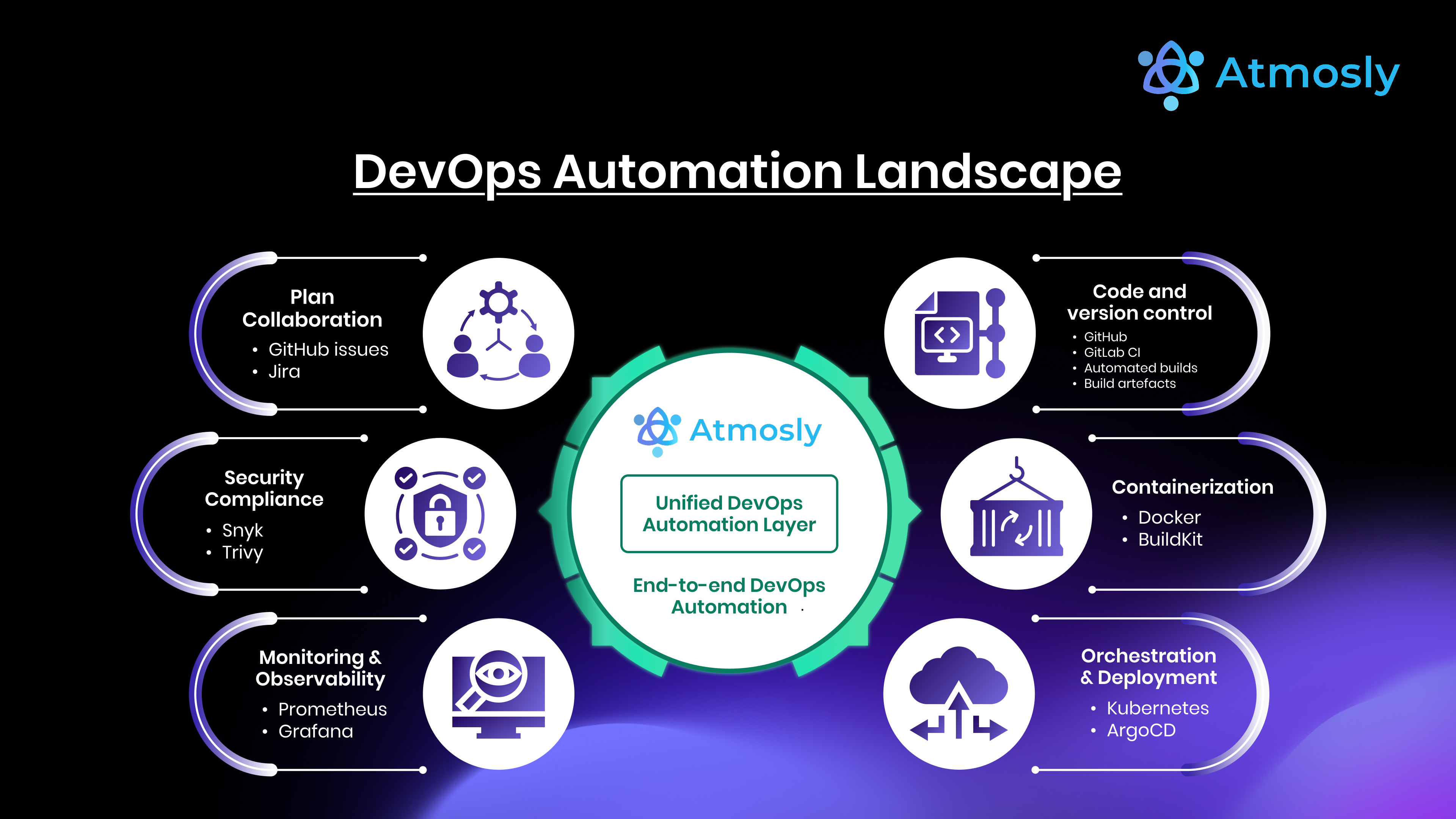
In this guide, we'll explore what top DevOps automation tools are, the criteria for selecting the right ones, and a detailed breakdown of the top tools across categories like CI/CD, Infrastructure as Code, container orchestration, security, monitoring, and integrated platforms. We'll also examine the benefits, challenges, and future of DevOps automation.
1. What Are DevOps Automation Tools?
DevOps automation tools are software solutions that automate critical processes in the software delivery lifecycle (SDLC). Instead of relying on manual scripts or human intervention, these tools streamline tasks such as:
- Continuous Integration (CI): Automatically merging and testing code.
- Continuous Delivery/Deployment (CD): Releasing applications to staging or production.
Infrastructure as Code (IaC): Provisioning servers, databases, and cloud infrastructure through code. - Monitoring & Observability: Detecting issues and triggering alerts automatically.
- Security (DevSecOps): Running automated vulnerability scans and compliance checks.
These tools are not just add-ons. They are the backbone of modern DevOps practices, enabling teams to work faster, minimize risks, and maintain consistency across environments. The difference between manual DevOps and automated DevOps is like night and day: automation removes bottlenecks and makes "continuous everything" possible.
2. Key Criteria for Choosing the Right Tool
Not every tool is right for every organization. When evaluating DevOps automation tools, consider the following factors:
2.1 Scalability
Does the tool handle growth as your team or infrastructure scales? Can it manage thousands of builds, containers, or microservices?
2.2 Ease of Integration
The best tools integrate seamlessly with your existing ecosystem version control, cloud providers, and monitoring systems.
2.3 Cost & ROI
Evaluate both licensing costs and the productivity savings. An expensive tool may pay for itself if it reduces downtime or accelerates delivery.
2.4 Cloud-Native Compatibility
With Kubernetes and multi-cloud strategies now mainstream, ensure your tools are cloud-native and container-friendly.
2.5 Security & Compliance
Security should be built-in, not bolted on. Tools should support automated scanning, policy enforcement, and compliance checks.
2.6 Community & Enterprise Support
Open-source projects thrive with strong communities, while enterprise-backed tools often provide professional support and SLAs. Choose based on your needs.
3. Top DevOps Automation Tools
Here's a breakdown of the leading DevOps tools by category, with an emphasis on why they matter today.
3.1 CI/CD Automation Tools
1. Jenkins
- Overview: The pioneer of CI/CD, Jenkins remains the most widely used open-source automation server.
- Key Features: Pipeline-as-code, plugin ecosystem, community support.
Why it stands out: Still the go-to for teams needing deep customization and flexibility, though requires significant setup and maintenance.
2. GitLab CI/CD
- Overview: Built into GitLab, offering a complete DevOps platform.
- Key Features: Built-in CI/CD pipelines, GitOps support, strong security features.
- Why it stands out: Preferred by teams seeking an all-in-one code repository + pipeline solution.
3. GitHub Actions
- Overview: Native automation for GitHub repositories.
- Key Features: Easy YAML workflows, marketplace for pre-built actions, great for open-source projects.
- Why it stands out: Ideal for teams already working in GitHub.
4. CircleCI
- Overview: A cloud-native CI/CD platform.
- Key Features: Fast builds, container-first approach, scalability.
- Why it stands out: Known for speed and reliability in cloud-native development.
3.2 Infrastructure as Code (IaC) & Provisioning
1. Terraform
- Overview: Declarative IaC tool supporting multi-cloud provisioning.
- Key Features: Provider ecosystem, state management, reusable modules.
- Why it stands out: Industry standard for managing cloud infrastructure.
2. Ansible
- Overview: Agentless automation tool for provisioning and configuration.
- Key Features: YAML playbooks, strong community, simplicity.
- Why it stands out: Great for teams seeking quick, human-readable automation.
3. Pulumi
- Overview: IaC using general-purpose programming languages.
- Key Features: TypeScript, Python, Go support, strong integration with modern stacks.
- Why it stands out: Attractive for developers who prefer coding over declarative syntax.
3.3 Configuration Management
1. Chef
- Overview: Ruby-based configuration management system.
- Key Features: Infrastructure automation, compliance, policy management.
- Why it stands out: Still trusted in large enterprises with legacy systems.
2. Puppet
- Overview: Declarative language-based configuration management.
- Key Features: State enforcement, scalability, compliance modules.
- Why it stands out: Valuable for enterprises seeking stability and governance.
3.4 Containerization & Orchestration
1. Docker
- Overview: Industry leader in containerization.
- Key Features: Lightweight containers, Docker Compose, strong ecosystem.
- Why it stands out: Still the simplest way to containerize apps.
2. Kubernetes
- Overview: Orchestration platform for containers.
- Key Features: Auto-scaling, self-healing, service discovery, rolling updates.
- Why it stands out: The standard for managing containerized applications at scale.
3. Helm
- Overview: Package manager for Kubernetes.
- Key Features: Charts for reusable configurations, easy upgrades/rollbacks.
- Why it stands out: Essential for simplifying Kubernetes deployments.
3.5 Monitoring & Observability
1. Prometheus
- Overview: Open-source monitoring and alerting toolkit.
- Key Features: Time-series database, flexible queries, alert manager.
- Why it stands out: Still the first choice for cloud-native monitoring.
2. Grafana
- Overview: Visualization and dashboarding platform.
- Key Features: Integrates with Prometheus, Loki, and many data sources.
- Why it stands out: Ubiquitous for monitoring dashboards.
3. ELK Stack (Elasticsearch, Logstash, Kibana)
- Overview: End-to-end log management and analysis solution.
- Key Features: Centralized logging, visualization, alerting.
- Why it stands out: Powerful for analyzing distributed system logs.
3.6 Security & DevSecOps Automation
1. Snyk
- Overview: Developer-first security tool.
- Key Features: Dependency scanning, container security, integrations with IDEs.
- Why it stands out: A favorite for shifting security left in pipelines.
2. Aqua Security
- Overview: Container and Kubernetes-native security platform.
- Key Features: Runtime protection, compliance enforcement, vulnerability scanning.
- Why it stands out: Crucial for cloud-native workloads.
3. HashiCorp Vault
- Overview: Secrets management and data encryption platform.
- Key Features: Dynamic secrets, key management, secure storage.
- Why it stands out: Indispensable for managing secrets in multi-cloud environments.
3.7 Integrated Platforms & All-in-One Solutions
1. Atmosly
- Overview: An internal developer platform for Kubernetes that provisions clusters, ships code and gives developers self-service environments on one control plane.
- Key Features: Governed cluster and resource provisioning, visual Pipeline Builder with GitOps and one-click rollback, preview environments per pull request, one-click environment cloning, a Helm marketplace of 200+ curated charts.
- Why it stands out: Helps startups and enterprises simplify tool sprawl by offering a unified platform for provisioning, CI/CD and developer self-service, with one permissions model and one audit trail.
2. Devtron
- Overview: Open-source Kubernetes-native DevOps platform.
- Key Features: Application deployment, monitoring, CI/CD integration.
- Why it stands out: Popular for teams looking for open-source Kubernetes solutions.
3. Port
- Overview: Internal Developer Platform (IDP).
- Key Features: Self-service developer portals, workflows, service catalogs.
- Why it stands out: Gaining traction for platform engineering adoption.
4. Benefits of Using DevOps Automation Tools
The right tools bring measurable improvements to software delivery:
- Speed: Faster builds, testing, and deployments.
- Reliability: Consistent environments reduce downtime.
- Cost Optimization: Efficient infrastructure use lowers cloud bills.
- Developer Productivity: Less repetitive work means more time for innovation.
- Customer Experience: Stable and frequent releases keep users satisfied.
- Business Agility: Organizations can pivot faster in changing markets.
5. Challenges of Managing Too Many Tools
While each tool is powerful, managing too many creates complexity. Common issues include:
- Toolchain Sprawl: Dozens of disconnected tools increase overhead.
- Integration Headaches: Ensuring smooth handoffs between tools is difficult.
- Skill Gaps: Teams may lack expertise across all tools.
- Costs: Licenses, infrastructure, and training add up.
- Governance: Security and compliance become harder to manage.
This is why many organizations are shifting toward integrated platforms like Atmosly, which reduce complexity by unifying provisioning, CI/CD and developer self-service on Kubernetes.
6. The Future of DevOps Automation Tools
Looking ahead, DevOps tools are set to become smarter, more predictive, and more integrated. Key trends include:
- AI & AIOps: Automating root cause analysis, anomaly detection, and predictive scaling.
- Self-Healing Systems: Automatic rollbacks, re-routing, and recovery without human input.
- Internal Developer Platforms (IDPs): Providing developers with self-service environments.
- Security-First Automation: Embedding compliance checks into every stage.
- GitOps & Policy-as-Code: Declarative, automated governance across infrastructure.
The future is not about more tools, but about smarter and simpler ecosystems.
7. Conclusion
Choosing the right DevOps automation tools can be the difference between slow, error-prone releases and seamless, rapid delivery. From Jenkins and Terraform to Kubernetes and Snyk, these tools cover every stage of the software lifecycle.
But with so many moving parts, toolchain complexity can quickly spiral out of control. That's why more teams are adopting integrated solutions. Atmosly brings provisioning, CI/CD and self-service environments for Kubernetes together in one platform, helping startups and enterprises alike cut through toolchain chaos and accelerate delivery.
Today, the smartest choice isn't just picking the best tools, it's choosing the right platform to simplify them.