AWS is changing its support plans. Business Support and Developer Support end on 1 January 2027, and Enterprise On-Ramp ends on 31 December 2026. The new line-up is Business Support+ from $29 a month, Enterprise Support from $5,000 and Unified Operations at the top. AWS Support helps with AWS services, but it does not run your systems. Many teams now pair Business Support+ with a partner who runs operations around the clock, instead of paying for Enterprise.
Picture a SaaS company spending $50,000 a month on AWS. It is on Enterprise On-Ramp and has just had an email saying it will move to Enterprise Support. The CTO asks a fair question. Is Enterprise what we actually need, or do we need someone to watch our systems at 3 am? This guide helps you answer that.
A note before you read. SquareOps sells 24/7 managed support, so we have an interest in this topic. We also explain when AWS Enterprise Support is the right choice on its own.
What Changed in AWS Support
AWS announced the new plans on 2 December 2025. The table shows where each plan stands now.
| Plan | Minimum per month | Critical response | Named TAM | Status |
|---|---|---|---|---|
| Developer | $29 | None | No | Ends 1 January 2027 |
| Business | $100 | 1 hour | No | Ends 1 January 2027 |
| Enterprise On-Ramp | $5,500 | 30 minutes | Pool | Ends 31 December 2026 |
| Business Support+ | $29 | 30 minutes | No | New |
| Enterprise Support | $5,000 (was $15,000) | 15 minutes | Yes | Updated |
| Unified Operations | Contact AWS | 5 minutes | Yes, plus extra engineers | New |
Above the minimum, every plan charges a share of your monthly AWS bill, with lower rates as spend grows. Business Support+ starts at 9% of the first $10,000. Check AWS's pricing page for the full bands before you budget.
What AWS Support Does, and What It Does Not
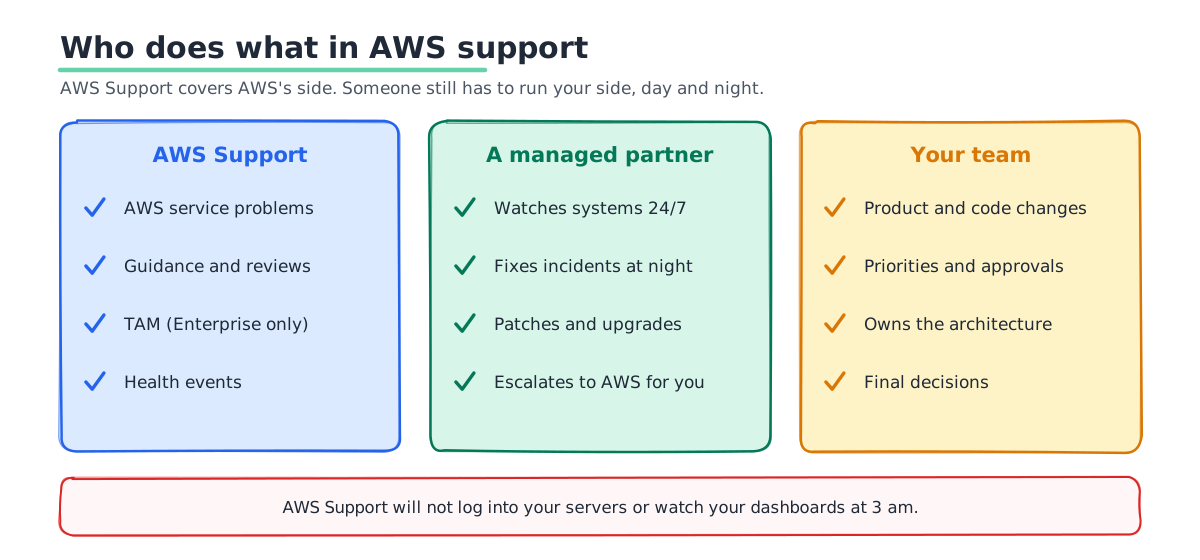
This is where most confusion comes from. AWS Support works on AWS's side of the line. Your side is still yours.
- It does help with AWS services. If EC2, RDS or an AWS API misbehaves, AWS engineers dig in.
- It does give guidance. Enterprise customers get a Technical Account Manager, or TAM, who reviews your setup and helps plan launches.
- It does not log into your servers. AWS will not patch your operating system or fix your app's code.
- It does not watch your systems. Nobody at AWS is looking at your dashboards at 3 am or waiting for your alerts.
- It does not run your changes. Deployments, upgrades and rollbacks are your team's job, or your partner's.
So the real question is not "which AWS plan?" It is "who answers when our system breaks at night?"
What Enterprise Support Costs at Your Spend
Enterprise Support charges the higher of $5,000 or a share of your bill. Advisers who track AWS pricing report these bands: 10% of the first $150,000, 7% up to $500,000, 5% up to $1 million and 3% above that. The examples below use those bands.
| Monthly AWS bill | Share of bill | You pay |
|---|---|---|
| $20,000 | $2,000 | $5,000 (the minimum) |
| $50,000 | $5,000 | $5,000 |
| $200,000 | $15,000 + $3,500 | $18,500 |
For many On-Ramp customers the move to Enterprise is a little cheaper than before. For smaller bills, $5,000 a month is a lot to pay for help that does not include running your systems.
Three Ways to Get the Support You Need
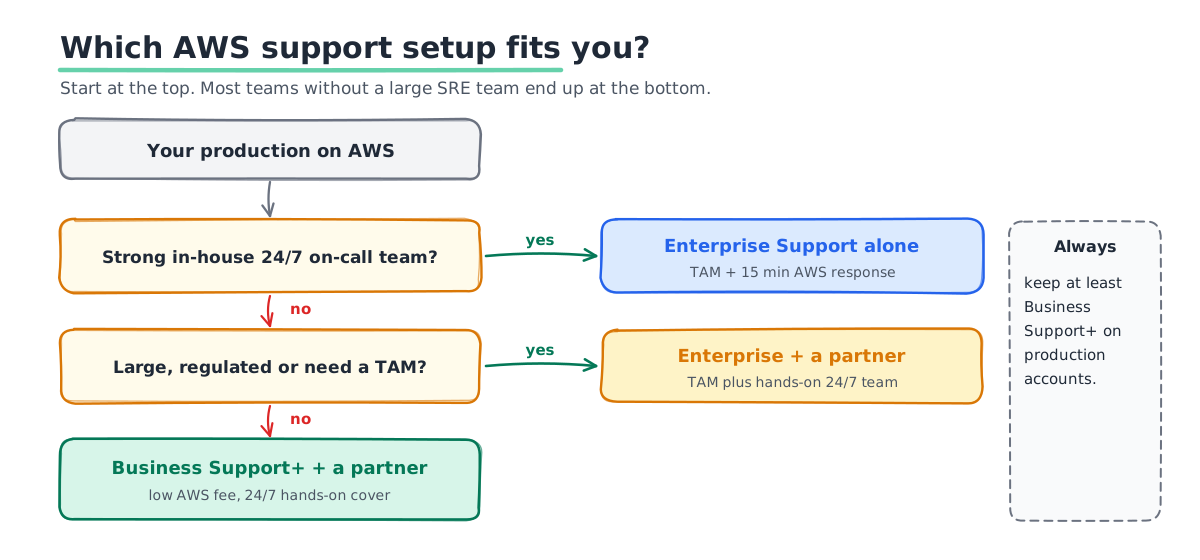
Most teams end up with one of these three setups.
- AWS Enterprise Support on its own. Good for teams with a strong in-house on-call rotation that mainly want a TAM and fast AWS escalation.
- Business Support+ plus a partner. AWS covers AWS-side issues for a low fee. A partner watches your systems 24/7, fixes problems and runs changes. This suits most teams without a large SRE group.
- Enterprise Support plus a partner. Large or regulated companies often want both: a TAM and a hands-on team. This costs the most, and covers the most.
Partner pricing works differently from AWS pricing. Most partners charge a fixed monthly fee based on scope: how many environments, which hours, and how fast they must respond. It is not usually a share of your AWS bill. That means the cost does not jump just because your AWS spend grows. Ask for a quote based on your real setup, and compare it with the Enterprise fee at your spend.
Resold Support and Partner-Led Support, Explained
Partners can also be involved in your AWS Support plan itself. There are two models, and they work differently.
- Resold Support. You buy a normal AWS plan through a partner. The partner bills you, but you still open technical cases with AWS directly.
- Partner-Led Support. The partner becomes your first line for support cases and raises cases with AWS for you. Only Advanced or Premier tier partners can offer it.
Ask any partner which model they use, if any. Then ask how a case reaches AWS when the problem really is on AWS's side.
What to Check Before You Pick a Partner
A partner that runs your systems has a lot of access and a lot of trust. Check these before you sign.
- Written response and fix times. Ask for numbers for each severity, not "best effort".
- Real people at night. Ask who is on shift at 3 am in your time zone.
- Penalties for missed targets. Service credits show the partner means it.
- A clear path to AWS. The partner should know how to escalate to AWS fast.
- Safe access. Least-privilege roles, no root login and full audit logs.
- Runbooks and root cause reports. Ask how soon you get a written report after a major incident.
- An easy exit. Your runbooks, alerts and dashboards should stay yours if you leave.
When Enterprise Support on Its Own Is the Right Call
A partner is not always the answer. Enterprise Support alone makes sense in a few cases.
- You already have a strong on-call team. If your engineers cover nights well, a TAM and 15-minute AWS response may be all you need.
- You have an AWS private pricing agreement. Some agreements require Enterprise Support, so check your contract first.
- You run big launches or migrations. A TAM helps plan capacity and reviews with AWS teams before big events.
How to Plan the Switch Before 1 January 2027
If your plan is ending, use the next few weeks well. This plan takes two to four weeks for most teams.
- List every account and its plan. Note which accounts run production and which are only for testing.
- Decide per account. Production needs at least Business Support+. Test accounts may need less.
- Price the options. Work out Enterprise at your spend, then Business Support+ plus a partner.
- Onboard the partner early. Give the partner time to learn your systems and set up alerts before you rely on them.
- Test the escalation path. Open a test case and run a practice incident, so you know it works before a real one.
Mistakes We See
- Buying Enterprise to fix an on-call problem. A TAM is valuable, but they will not wake up for your outage.
- Doing nothing before 1 January 2027. If you are on Business or Developer Support, pick your new plan before AWS's deadline.
- Dropping AWS Support completely. Keep at least Business Support+ on production accounts, so you can reach AWS when a service fails.
- Forgetting linked accounts. Support plans apply per account or organization. Check every production account is covered.
- Signing without written targets. Without numbers, you cannot hold anyone to account.
Want to go deeper? Read our guide to choosing an AWS support consultant. We also compare support consulting and managed services.
How SquareOps Runs 24/7 Support
SquareOps is an AWS Advanced Consulting Partner with the AWS Cloud Operations Competency. Our 24/7 DevOps support has written targets. For a critical issue we respond within 15 minutes and aim to fix it within 1 hour. For a high-severity issue it is 30 minutes and 4 hours. You get a root cause report within 48 hours of a major incident. If we miss a critical response target, you get a 10% service credit that month.
We work alongside whatever AWS plan you choose, and we escalate to AWS for you when the problem is on their side.
Get Support That Answers at 3 am
Tell us your AWS spend and your current support plan. We will tell you which setup fits, what it costs and what changes on 1 January 2027. Talk to our support team, or read more about our AWS managed services.