Migrating from Azure to AWS is a strategic move that thousands of enterprises undertake each year to leverage AWS's broader service catalog, deeper regional availability, and mature ecosystem. This Azure to AWS migration guide provides a complete, phase-by-phase blueprint — covering service mapping, data transfer, container migration, identity translation, and cost optimization — so your engineering team can execute a cross-cloud migration with minimal downtime and zero data loss. Whether you are consolidating multi-cloud sprawl or chasing specific AWS capabilities, this guide gives you the concrete steps, tools, and decision frameworks to get it done in 2026.
Why Organizations Move from Azure to AWS in 2026
AWS holds approximately 31% of the global cloud infrastructure market compared to Azure's 25%, and that gap reflects real differences in service depth, tooling maturity, and community ecosystem. But market share alone does not drive migration decisions. Here are the specific reasons engineering teams choose to migrate from Azure to AWS:
Service Breadth and Depth
AWS offers over 200 fully managed services, including purpose-built options like AWS Graviton-based compute, Amazon Bedrock for generative AI, and AWS App Runner for simplified container deployments. Organizations that hit the ceiling of Azure's service catalog — particularly in areas like IoT, machine learning inference, and serverless orchestration — often find AWS has a production-ready answer.
Pricing Flexibility
AWS's Savings Plans, Spot Instances, and granular Reserved Instance options give finance teams more levers to optimize spend. Organizations running large-scale compute workloads frequently report 15-30% savings after migrating equivalent workloads from Azure to AWS, particularly when leveraging Graviton instances for ARM-compatible applications.
Ecosystem and Talent Pool
The AWS partner ecosystem is the largest of any cloud provider. Terraform modules, Helm charts, open-source integrations, and community-maintained AMIs are more abundant for AWS than for any other platform. Hiring is also simpler — the pool of AWS-certified engineers significantly exceeds that of Azure-certified professionals.
Multi-Cloud Consolidation
Many enterprises that adopted Azure through Microsoft Enterprise Agreements find that their core engineering workloads run on AWS. Consolidating onto a single provider reduces operational overhead, simplifies networking, and eliminates cross-cloud data transfer costs. If your team already operates Kubernetes clusters on AWS, migrating remaining Azure workloads creates a unified operations plane.
Regional Availability
AWS operates 34 geographic regions with 108 availability zones as of mid-2026, giving organizations more options for data residency, latency optimization, and disaster recovery than Azure's 60+ region footprint.
Azure to AWS Service Mapping — Complete 2026 Reference
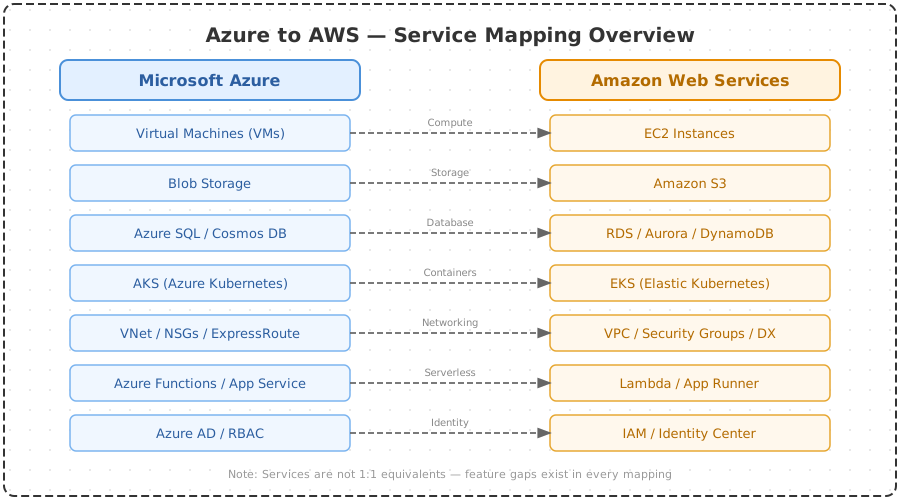
The first step in any cross-cloud migration is understanding how Azure services translate to their AWS equivalents. The following Azure to AWS service mapping tables cover the four core domains: compute, storage, databases, and networking. Pin these tables during your discovery phase — they accelerate architecture review sessions and prevent teams from picking the wrong AWS service.
Compute Services
| Azure Service | AWS Equivalent | Migration Notes |
|---|---|---|
| Azure Virtual Machines | Amazon EC2 | Use AWS MGN for lift-and-shift. Map VM sizes to EC2 instance families (e.g., D-series to m6i, F-series to c6i). |
| Azure App Service | AWS Elastic Beanstalk / App Runner | App Runner is simpler for containerized apps. Beanstalk for full PaaS parity. |
| Azure Functions | AWS Lambda | Rewrite trigger bindings. Azure Event Grid triggers become EventBridge rules. |
| Azure Kubernetes Service (AKS) | Amazon EKS | Migrate manifests, update storage classes and ingress annotations. See AKS to EKS section below. |
| Azure Container Instances | AWS Fargate | No VM management on either side. Map resource requests directly. |
| Azure Batch | AWS Batch | Near-identical API model. Update compute environment definitions. |
Storage Services
| Azure Service | AWS Equivalent | Migration Notes |
|---|---|---|
| Azure Blob Storage | Amazon S3 | Use AWS DataSync or rclone for bulk transfer. Map access tiers: Hot to S3 Standard, Cool to S3 IA, Archive to S3 Glacier. |
| Azure Files | Amazon EFS / FSx | EFS for NFS workloads, FSx for Windows for SMB/NTFS workloads. |
| Azure Managed Disks | Amazon EBS | Premium SSD maps to gp3/io2. Standard HDD maps to st1. |
| Azure Data Lake Storage Gen2 | Amazon S3 (with Lake Formation) | S3 with Lake Formation provides equivalent hierarchical namespace and fine-grained access control. |
| Azure Queue Storage | Amazon SQS | Standard queues map directly. Update SDK calls and connection strings. |
Database Services
| Azure Service | AWS Equivalent | Migration Notes |
|---|---|---|
| Azure SQL Database | Amazon RDS for SQL Server / Aurora PostgreSQL | Use AWS DMS for continuous replication. Aurora PostgreSQL for cost savings if you can refactor. |
| Azure Cosmos DB | Amazon DynamoDB | Map partition keys carefully. Use DMS or custom ETL for migration. |
| Azure Database for PostgreSQL | Amazon RDS for PostgreSQL / Aurora PostgreSQL | Use native pg_dump/pg_restore or DMS for minimal downtime. |
| Azure Database for MySQL | Amazon RDS for MySQL / Aurora MySQL | DMS supports continuous replication for near-zero downtime cutover. |
| Azure Cache for Redis | Amazon ElastiCache for Redis | Export RDB snapshot, import into ElastiCache. Update connection endpoints. |
| Azure Synapse Analytics | Amazon Redshift | Schema conversion via AWS SCT. Data migration via S3 intermediate staging. |
Networking Services
| Azure Service | AWS Equivalent | Migration Notes |
|---|---|---|
| Azure Virtual Network (VNet) | Amazon VPC | Plan non-overlapping CIDR blocks. See networking section below for subnet mapping. |
| Azure Load Balancer | AWS ALB / NLB | Standard LB maps to NLB (Layer 4). Application Gateway maps to ALB (Layer 7). |
| Azure DNS | Amazon Route 53 | Export zone files, import into Route 53. Update NS records at registrar last. |
| Azure ExpressRoute | AWS Direct Connect | Provision Direct Connect in parallel before cutover. 30-90 day lead time. |
| Azure Front Door | Amazon CloudFront | Migrate WAF rules, custom domain certificates, and routing policies. |
| Azure Network Security Groups | AWS Security Groups / NACLs | NSGs map to Security Groups. For subnet-level rules, use NACLs. |
Pre-Migration Assessment and Discovery
Before writing a single line of Terraform, you need a complete inventory of what you are migrating and a clear-eyed assessment of complexity. Skipping discovery is the single most common reason cross-cloud migrations go over budget and over schedule.
Application Discovery and Dependency Mapping
Use Azure Migrate's discovery tools to generate a full inventory of VMs, databases, and application dependencies. Export this data and feed it into AWS Migration Hub for tracking. For applications with complex interdependencies, deploy Azure Service Map or a third-party tool like Cloudamize to capture network flows and service-to-service communication patterns over a 2-4 week observation window.
Workload Classification
Classify every workload into one of four buckets:
- Retire: Applications that are no longer needed. Migrating dead workloads wastes money and time.
- Retain: Applications that must stay on Azure due to licensing, compliance, or integration constraints (e.g., Dynamics 365 backends).
- Migrate: Applications moving to AWS. Further classify by migration strategy (see next section).
- Replace: Applications that should be replaced with SaaS or AWS-native alternatives rather than migrated.
Cost Baseline
Establish your current Azure spend by service, resource group, and environment. Use Azure Cost Management exports to create a detailed baseline. This becomes your comparison benchmark for validating post-migration AWS costs. Without this baseline, you cannot prove ROI. If your organization needs help with this discovery process, SquareOps provides comprehensive cloud migration services that include full assessment and cost modeling.
Compliance and Data Residency Review
Identify data residency requirements before selecting AWS regions. Map Azure region deployments to equivalent AWS regions and confirm that your target regions meet regulatory requirements (GDPR, HIPAA, SOC 2, PCI DSS). Document any data that cannot leave specific jurisdictions — this constrains your migration sequencing.
Migration Strategies — Rehost, Replatform, Refactor
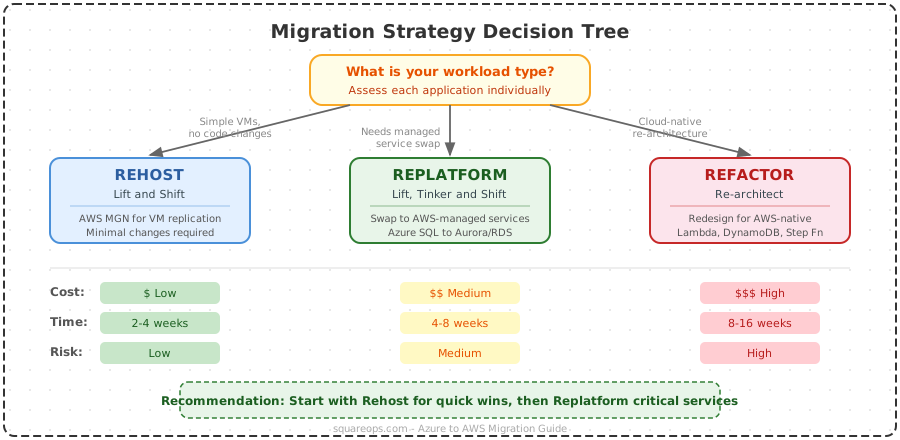
Every application in your migration portfolio needs a strategy. The right choice depends on the application's architecture, business criticality, and the team's appetite for engineering investment. Here is the decision matrix:
| Strategy | Description | Best For | Timeline | Risk Level | AWS Tools |
|---|---|---|---|---|---|
| Rehost (Lift & Shift) | Move VMs and data as-is with minimal changes | Legacy apps, tight deadlines, apps with limited engineering ownership | 2-4 weeks per app | Low | AWS MGN (Application Migration Service) |
| Replatform (Lift & Reshape) | Make targeted optimizations during migration (e.g., move to managed DB) | Apps that benefit from managed services without full refactor | 4-8 weeks per app | Medium | AWS DMS, RDS, ElastiCache |
| Refactor (Re-architect) | Redesign application to be cloud-native on AWS | Strategic apps with long lifespan, apps needing scalability improvements | 3-6 months per app | High | EKS, Lambda, Step Functions, Aurora |
How to Choose the Right Strategy
Apply this decision framework for each application:
- Is the application actively maintained? If no, rehost. Do not invest engineering effort in applications that will be retired within 18 months.
- Does the application use Azure-proprietary services? If it depends on Cosmos DB, Azure Functions with complex bindings, or Azure AD B2C, you will need to replatform or refactor those components.
- Is the application a revenue driver or competitive differentiator? If yes, refactor it to take full advantage of AWS-native services. The engineering investment pays off over the application's remaining lifespan.
- What is the team's capacity? Refactoring requires skilled engineers. If your team is stretched thin, rehost now and refactor post-migration.
For most enterprise portfolios, the split is roughly 60% rehost, 25% replatform, and 15% refactor. This mix lets you move fast on the bulk of workloads while investing engineering effort where it creates the most value.
Step-by-Step Migration Process (5 Phases)
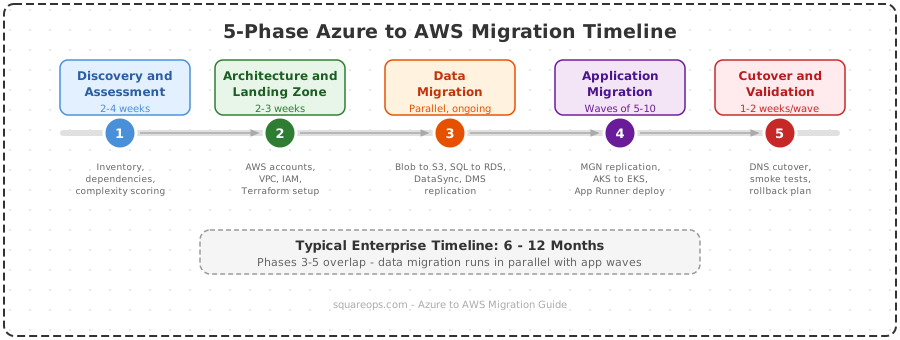
With an experienced migration partner, cross-cloud migrations typically take 2 to 4 months end to end — not the 6-12 months that in-house teams often assume. The key is running phases in parallel where possible and leveraging proven runbooks. This five-phase process provides the structure needed to keep migrations on track. The timeline below assumes a mid-size enterprise with 15-30 workloads; smaller environments can finish in as little as 6-8 weeks.
Phase 1: Assess (Week 1-2)
Build your application inventory, map dependencies, classify workloads, and establish cost baselines. With automated discovery tools and experienced consultants, this phase runs in 1-2 weeks — not a month. Deliverables: migration portfolio spreadsheet, dependency map, cost baseline report, and risk register. Exit gate: stakeholder sign-off on scope and strategy per application.
Phase 2: Foundation (Week 2-4)
Build your AWS landing zone using AWS Control Tower or a custom multi-account architecture. Provision networking (VPCs, Transit Gateway, Direct Connect if needed), configure IAM roles and policies, set up centralized logging with CloudTrail and CloudWatch, and deploy your IaC pipeline. This phase overlaps with assessment — landing zone build-out starts as soon as initial discovery is complete. Deliverables: production-ready AWS accounts, networking, security baseline, and CI/CD pipeline. Exit gate: security review passed, connectivity validated end to end.
Phase 3: Migrate (Week 3-12)
Execute migrations in waves, starting with low-risk, low-dependency applications. A typical mid-size enterprise runs 3-5 migration waves with 5-10 applications per wave. Migration waves start as soon as the landing zone is ready — there is no idle gap between phases. Deliverables: migrated and validated applications per wave. Exit gate: application passes functional testing, performance testing, and security scan in AWS.
Phase 4: Optimize (Week 10-14)
Right-size instances using AWS Compute Optimizer, implement Savings Plans based on observed usage, configure auto-scaling policies, and optimize storage tiers. Optimization begins during later migration waves — you do not wait until all workloads are migrated. Deliverables: cost optimization report, right-sizing recommendations implemented, monitoring dashboards live.
Phase 5: Decommission (Week 12-16)
Shut down Azure resources in reverse dependency order after a 1-2 week parallel-run period. Terminate VMs, delete storage accounts, remove VNets, and cancel Azure subscriptions or reserved instances. Decommissioning of early-wave resources begins while later waves are still migrating. Deliverables: Azure resources decommissioned, final cost reconciliation, migration retrospective document.
Data Migration — Azure Blob to S3, Azure SQL to RDS/Aurora
Data migration is where cross-cloud projects get expensive and risky. Azure charges $0.087 per GB for the first 10 TB of data egress, which means moving 50 TB of blob storage costs over $4,350 in egress fees alone. Plan your data migration budget accordingly and optimize transfer patterns to minimize redundant transfers.
Azure Blob Storage to Amazon S3
For datasets under 5 TB: Use AWS DataSync with an Azure Blob source agent. DataSync handles incremental transfers, verification, and scheduling. It is the simplest approach and runs at up to 10 Gbps per task.
For datasets between 5-50 TB: Use rclone or AzCopy to export from Azure Blob to a local staging area, then use S3 Transfer Acceleration or multi-part upload to push data into S3. Run multiple parallel streams to saturate available bandwidth.
For datasets over 50 TB: Consider AWS Snowball Edge devices. Ship a Snowball device to your data center, load data from Azure (via ExpressRoute or cached locally), and ship it to AWS. This avoids egress charges entirely and is faster for very large datasets.
Azure SQL Database to Amazon RDS or Aurora
AWS Database Migration Service (DMS) is the primary tool for database migration. Set up a DMS replication instance, configure the Azure SQL source endpoint and the RDS/Aurora target endpoint, and run a full-load-plus-CDC (change data capture) migration task. This approach gives you continuous replication until you are ready for cutover.
For schema conversion — especially if you are migrating from Azure SQL to Aurora PostgreSQL — use the AWS Schema Conversion Tool (SCT) first. SCT identifies incompatible SQL constructs, stored procedures, and data types, and generates conversion reports with remediation guidance. Common conversions include:
- T-SQL stored procedures to PL/pgSQL
- Azure SQL-specific data types (e.g.,
hierarchyid,geography) to PostgreSQL equivalents - Temporal tables to PostgreSQL temporal patterns
- Clustered columnstore indexes to Aurora column-oriented access patterns
Cutover process: Stop application writes to Azure SQL, let DMS drain the replication lag to zero, validate row counts and checksums, switch application connection strings to the RDS/Aurora endpoint, and monitor error rates for 30 minutes before declaring success.
Container Migration — AKS to EKS
Migrating containerized workloads from Azure Kubernetes Service to Amazon Elastic Kubernetes Service is one of the more straightforward paths in a cross-cloud migration, because Kubernetes provides a portable abstraction layer. However, there are platform-specific differences in manifests, storage classes, ingress controllers, and container registries that require attention.
Container Image Migration
Move container images from Azure Container Registry (ACR) to Amazon Elastic Container Registry (ECR). Use tools like crane or skopeo to copy images directly between registries without pulling them to a local machine:
skopeo copy \
  docker://myregistry.azurecr.io/myapp:v2.1.0 \
  docker://123456789012.dkr.ecr.us-east-1.amazonaws.com/myapp:v2.1.0
Set up ECR lifecycle policies to match your ACR retention rules, and enable ECR image scanning to replicate any Azure Defender for Containers functionality.
Manifest Changes — Before and After
Here is a representative Kubernetes deployment manifest showing the key changes required when migrating from AKS to EKS:
Before (AKS):
apiVersion: apps/v1
kind: Deployment
metadata:
  name: myapp
  annotations:
    kubernetes.azure.com/managed-by: aks
spec:
  replicas: 3
  selector:
    matchLabels:
      app: myapp
  template:
    metadata:
      labels:
        app: myapp
    spec:
      containers:
      - name: myapp
        image: myregistry.azurecr.io/myapp:v2.1.0
        ports:
        - containerPort: 8080
        volumeMounts:
        - name: data
          mountPath: /data
      volumes:
      - name: data
        persistentVolumeClaim:
          claimName: myapp-pvc
---
apiVersion: v1
kind: PersistentVolumeClaim
metadata:
  name: myapp-pvc
spec:
  accessModes:
    - ReadWriteOnce
  storageClassName: managed-premium
  resources:
    requests:
      storage: 50Gi
---
apiVersion: networking.k8s.io/v1
kind: Ingress
metadata:
  name: myapp-ingress
  annotations:
    kubernetes.io/ingress.class: azure/application-gateway
    appgw.ingress.kubernetes.io/ssl-redirect: "true"
spec:
  rules:
  - host: myapp.example.com
    http:
      paths:
      - path: /
        pathType: Prefix
        backend:
          service:
            name: myapp-svc
            port:
              number: 80
After (EKS):
apiVersion: apps/v1
kind: Deployment
metadata:
  name: myapp
  # Azure-specific annotation removed
spec:
  replicas: 3
  selector:
    matchLabels:
      app: myapp
  template:
    metadata:
      labels:
        app: myapp
    spec:
      containers:
      - name: myapp
        image: 123456789012.dkr.ecr.us-east-1.amazonaws.com/myapp:v2.1.0
        ports:
        - containerPort: 8080
        volumeMounts:
        - name: data
          mountPath: /data
      volumes:
      - name: data
        persistentVolumeClaim:
          claimName: myapp-pvc
---
apiVersion: v1
kind: PersistentVolumeClaim
metadata:
  name: myapp-pvc
spec:
  accessModes:
    - ReadWriteOnce
  storageClassName: gp3
  resources:
    requests:
      storage: 50Gi
---
apiVersion: networking.k8s.io/v1
kind: Ingress
metadata:
  name: myapp-ingress
  annotations:
    kubernetes.io/ingress.class: alb
    alb.ingress.kubernetes.io/scheme: internet-facing
    alb.ingress.kubernetes.io/ssl-redirect: "443"
    alb.ingress.kubernetes.io/certificate-arn: arn:aws:acm:us-east-1:123456789012:certificate/abc-123
spec:
  rules:
  - host: myapp.example.com
    http:
      paths:
      - path: /
        pathType: Prefix
        backend:
          service:
            name: myapp-svc
            port:
              number: 80
Key Changes Summary
- Container registry: ACR (
myregistry.azurecr.io) replaced with ECR (123456789012.dkr.ecr.us-east-1.amazonaws.com) - Storage class:
managed-premium(Azure Premium SSD) replaced withgp3(AWS EBS gp3) - Ingress controller: Azure Application Gateway Ingress Controller replaced with AWS Load Balancer Controller (ALB)
- Annotations: Azure-specific annotations removed, AWS-specific annotations added (ALB scheme, SSL redirect, ACM certificate ARN)
- Service account: If using Azure Managed Identity for pod access, replace with IAM Roles for Service Accounts (IRSA) on EKS
If your team manages complex Kubernetes environments, SquareOps offers specialized Kubernetes consulting to handle AKS-to-EKS migrations, including manifest conversion, Helm chart updates, and service mesh reconfiguration.
Identity and Access — Azure AD to AWS IAM
Identity is the most underestimated complexity in any migrate from Azure to AWS project. Azure Active Directory (now Microsoft Entra ID) and AWS IAM have fundamentally different models, and translating between them requires careful planning.
Key Differences
- Directory vs. policy-based: Azure AD is a directory service with group-based access. AWS IAM is a policy-based system with JSON policy documents attached to users, groups, and roles.
- Multi-tenancy: Azure AD uses tenants. AWS uses accounts within an Organization.
- Service principals vs. IAM roles: Azure service principals and managed identities map to AWS IAM roles. Every Azure resource with a managed identity needs an equivalent IAM role with appropriately scoped policies.
Federation Strategy
During migration, set up SAML 2.0 federation between Azure AD and AWS IAM Identity Center (formerly AWS SSO). This lets your team use existing Azure AD credentials to access AWS accounts while you migrate. Post-migration, you can either maintain Azure AD as your IdP (if your organization retains Microsoft 365) or migrate to a standalone IdP like Okta or AWS IAM Identity Center with an external identity source.
Permission Translation
Map Azure RBAC roles to AWS IAM policies:
- Owner maps to
AdministratorAccess - Contributor maps to
PowerUserAccess(with customizations) - Reader maps to
ReadOnlyAccess - Custom Azure roles require custom IAM policies. Use the principle of least privilege — do not over-provision during migration just to "get things working."
Secrets and Key Management
Migrate Azure Key Vault secrets, keys, and certificates to AWS Secrets Manager and AWS KMS. Export secrets programmatically (never manually copy-paste credentials), rotate all secrets during migration, and update application configurations to reference the new AWS endpoints. This is also a good time to audit and remove unused secrets.
Networking — VNet to VPC Translation
Azure Virtual Networks and AWS Virtual Private Clouds serve the same purpose but have architectural differences that require thoughtful translation.
CIDR Planning
If you are running Azure and AWS in parallel during migration (and you will be), ensure CIDR blocks do not overlap. This is critical if you establish VPN or Direct Connect / ExpressRoute connectivity between clouds for data replication or hybrid operation. Plan your AWS VPC CIDRs to use entirely different RFC 1918 ranges than your Azure VNets.
Subnet Architecture
Azure VNets use subnets within a single region, and subnets can span availability zones. AWS VPC subnets are tied to a single availability zone. This means a single Azure subnet typically becomes multiple AWS subnets — one per AZ. For a standard 3-AZ deployment:
- 1 Azure public subnet becomes 3 AWS public subnets (one per AZ)
- 1 Azure private subnet becomes 3 AWS private subnets (one per AZ)
- 1 Azure database subnet becomes 3 AWS private subnets in a DB subnet group
Network Security Translation
Azure NSGs are stateful and can be applied to subnets or individual NICs. AWS Security Groups are also stateful and attach to ENIs (elastic network interfaces). The key difference: AWS Security Groups only support allow rules (no explicit deny), while AWS NACLs (Network Access Control Lists) support both allow and deny rules at the subnet level. Translate Azure NSG deny rules to NACLs, and Azure NSG allow rules to Security Groups.
DNS Migration
Export Azure DNS zone files and import them into Amazon Route 53. If you use Azure Private DNS Zones for internal resolution, create equivalent Route 53 Private Hosted Zones associated with your VPCs. Update NS records at your domain registrar as the final cutover step — do this last to maintain DNS availability throughout the migration.
Connectivity During Migration
Establish a site-to-site VPN or use a service like Megaport/Equinix to bridge Azure ExpressRoute and AWS Direct Connect. This gives you private, low-latency connectivity between clouds for data replication, database synchronization, and hybrid operation during the transition period. Budget 30-90 days lead time for Direct Connect provisioning.
Cost Comparison and Post-Migration Optimization
One of the primary motivations for migrating from Azure to AWS is cost optimization. But achieving real savings requires deliberate post-migration work — simply moving workloads does not automatically reduce costs. The numbers below show exactly how much a typical microservice-based SaaS company can save, and how AWS migration credits and partner programs can make the migration itself effectively free.
Sample Cost Comparison — 20-Microservice SaaS Architecture
To put real numbers behind the cost argument, here is a side-by-side comparison for a mid-stage SaaS company running 20 microservices on Kubernetes with managed databases, caching, object storage, and full observability. This represents a typical production architecture — not a stripped-down demo.
| Infrastructure Component | Azure Configuration | Azure Cost/mo | AWS Configuration | AWS Cost/mo |
|---|---|---|---|---|
| Kubernetes Control Plane | AKS (free tier) | $0 | EKS | $73 |
| Worker Nodes (5 nodes, 4 vCPU / 16 GB) | 5 × D4s_v5 | $770 | 5 × m6i.xlarge (Savings Plan) | $510 |
| Primary Database (SQL, 8 vCores) | Azure SQL General Purpose | $1,180 | RDS SQL Server db.m6i.2xlarge (RI) | $870 |
| Secondary Database (PostgreSQL, 4 vCores) | Azure DB for PostgreSQL Flex | $440 | Aurora PostgreSQL db.r6g.xlarge (RI) | $295 |
| In-Memory Cache (Redis, 6 GB) | Azure Cache Premium P1 | $410 | ElastiCache r6g.large (RI) | $150 |
| Object Storage (5 TB active + 10 TB archive) | Blob Storage Hot + Cool | $195 | S3 Standard + Glacier Instant Retrieval | $160 |
| Load Balancer + WAF | Application Gateway WAFv2 | $335 | ALB + AWS WAF | $170 |
| Observability (10 GB/day logs + metrics) | Azure Monitor + Log Analytics | $480 | CloudWatch + CloudWatch Logs | $210 |
| Message Queue / Event Bus | Azure Service Bus Standard | $95 | Amazon SQS + EventBridge | $45 |
| Secrets + Key Management | Azure Key Vault | $25 | Secrets Manager + KMS | $20 |
| Networking (NAT Gateway + 2 TB egress) | Azure NAT Gateway | $220 | AWS NAT Gateway | $200 |
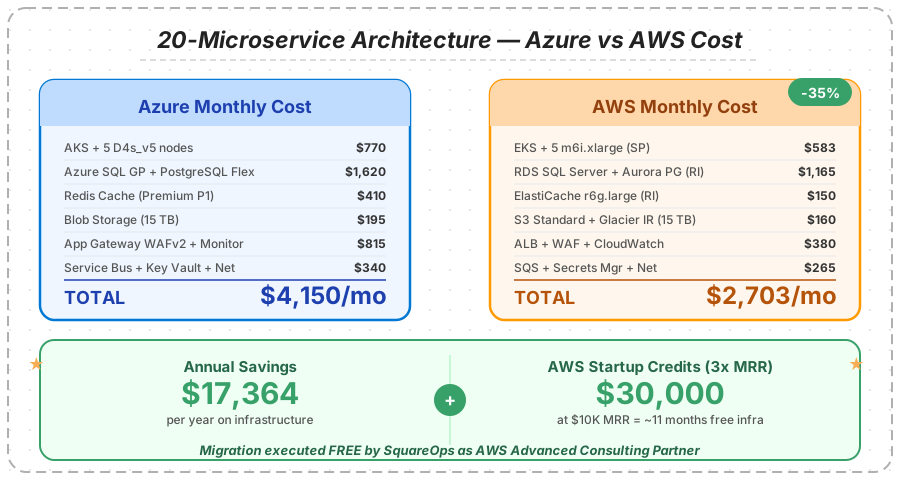
Azure total: $4,150/month ($49,800/year) vs AWS total: $2,703/month ($32,436/year) — a savings of $17,364 per year (35%).
The savings come from three primary areas. First, AWS Savings Plans and Reserved Instances offer deeper discounts than Azure's equivalent commitments, particularly on compute and database tiers. Second, AWS's pay-per-use pricing on services like SQS and EventBridge eliminates the fixed-tier pricing model that Azure Service Bus uses — for a 20-microservice architecture processing moderate message volumes, this alone saves $50-60/month. Third, Graviton-based instances (m7g, r7g) deliver 20-40% better price-performance for ARM-compatible workloads. Switching the worker nodes in the example above to m7g.xlarge brings monthly AWS spend down to approximately $2,601 — a 37% reduction versus Azure.
These are pre-credit numbers. When you factor in AWS migration credits (see below), the first-year savings become even more dramatic.
AWS Migration Credits — Up to 3x Your MRR
One of the most compelling financial incentives for migrating to AWS is the availability of substantial migration credits that effectively subsidize — and in many cases fully cover — the cost of infrastructure for months after migration.
AWS Migration Acceleration Program (MAP)
AWS MAP provides credits, tooling, and methodology support for organizations committing to a significant AWS migration. Depending on the size and scope of the migration commitment, MAP credits can cover 15-25% of your first-year AWS spend. For a company spending $5,000/month on AWS post-migration, MAP credits can return $9,000-$15,000 annually — enough to offset migration tooling costs, parallel-run expenses, and any Azure egress charges.
Startup Credits — 3x MRR
Startups migrating to AWS can access credits worth up to 3x their current Monthly Recurring Revenue (MRR) through AWS Activate and partner-facilitated credit programs. For a startup with $10,000 MRR, that translates to up to $30,000 in AWS credits — often enough to run the entire AWS infrastructure free for 6-10 months post-migration. For the 20-microservice architecture in the example above ($2,703/month on AWS), $30,000 in credits covers over 11 months of infrastructure.
These credits apply to compute, storage, database, and most other AWS services, giving startups significant runway to scale without infrastructure costs eating into burn rate. Qualification criteria typically include an active product with measurable MRR, a commitment to running primary workloads on AWS, and execution of the migration through an AWS Advanced Consulting Partner.
Free Migration Execution by SquareOps
As an AWS Advanced Consulting Partner, SquareOps executes Azure-to-AWS migrations at zero cost to the customer. The entire migration — assessment, landing zone build-out, workload migration, data transfer, Kubernetes migration, optimization, and Azure decommissioning — is delivered free of charge. This is not a limited proof-of-concept or a partial migration. SquareOps covers the full end-to-end migration from the first discovery call through production cutover and post-migration optimization.
Combined with AWS migration credits, the economics become compelling: a startup or mid-market company can migrate from Azure to AWS, receive months of free AWS infrastructure through credits, and pay nothing for the migration execution itself. Using the 20-microservice example above, a company with $10,000 MRR would save $17,364/year on infrastructure, receive up to $30,000 in AWS credits, and pay $0 for the migration — all while moving to a platform with deeper services, a larger talent pool, and more flexibility on pricing.
To explore whether your workloads qualify for AWS migration credits and a free SquareOps-led migration, schedule a call with our migration team.
Migration Cost Factors
- Data egress from Azure: $0.087/GB for the first 10 TB. Budget this upfront. For a typical enterprise with 20 TB of data, egress alone costs approximately $1,740.
- Parallel running costs: During migration, you pay for both Azure and AWS resources. Minimize this overlap by decommissioning Azure resources aggressively after each migration wave.
- Tooling and labor: Migration tools (DMS, MGN, DataSync) have per-use costs. However, if you migrate with SquareOps as your AWS partner, the labor and execution costs are fully covered — you only pay for the AWS infrastructure itself (and even that can be offset by migration credits).
Post-Migration Optimization Checklist
- Right-size instances: Use AWS Compute Optimizer to analyze 14 days of CloudWatch metrics and identify over-provisioned EC2 instances. Most rehosted workloads are over-provisioned by 30-40%.
- Adopt Graviton: For ARM-compatible workloads, migrate to Graviton-based instances (m7g, c7g, r7g) for 20-40% price-performance improvement over equivalent x86 instances.
- Implement Savings Plans: After 30-60 days of observing actual usage, purchase Compute Savings Plans to lock in discounted rates. Start with a conservative commitment and increase over time.
- Optimize storage: Implement S3 Intelligent-Tiering for variable-access data. Move infrequently accessed EBS snapshots to S3 Glacier. Delete orphaned EBS volumes and unused Elastic IPs.
- Review data transfer: Use VPC endpoints for S3 and DynamoDB to avoid data transfer charges. Deploy CloudFront for content delivery. Minimize cross-AZ traffic by co-locating dependent services.
- Set up cost governance: Configure AWS Budgets with alerts, tag all resources for cost allocation, and set up Cost and Usage Reports for detailed analysis.
For organizations seeking expert guidance on AWS cost optimization after migration, SquareOps provides AWS consulting services that include FinOps implementation, right-sizing automation, and ongoing cost governance.
Common Pitfalls and How to Avoid Them
After supporting dozens of cross-cloud migrations, these are the pitfalls that derail Azure to AWS projects most frequently:
1. Underestimating Data Egress Costs
Teams budget for AWS infrastructure but forget Azure egress charges. A 100 TB migration generates $8,700+ in egress fees. Solution: model egress costs during assessment, consider AWS Snowball for large datasets, and compress data before transfer.
2. Ignoring Azure Licensing Dependencies
Applications using Azure SQL with license-included pricing, Windows Server VMs with Azure Hybrid Benefit, or Microsoft 365 integrations may cost more on AWS if you lose those licensing benefits. Solution: audit all Microsoft licensing during assessment and factor in BYOL (Bring Your Own License) costs on AWS.
3. Migrating Without a Landing Zone
Teams that start migrating workloads before establishing a proper AWS multi-account structure, networking, and security baseline end up with a mess that takes months to remediate. Solution: invest weeks 2-4 in a proper foundation (Phase 2 above) before migrating a single workload.
4. Skipping Performance Baselines
Without pre-migration performance baselines, you cannot validate that migrated applications perform equivalently on AWS. Solution: capture latency, throughput, error rate, and resource utilization metrics for every application before migration. Compare against post-migration metrics during validation.
5. One-Big-Bang Cutover
Attempting to migrate everything at once maximizes risk and makes rollback nearly impossible. Solution: migrate in waves, starting with non-critical workloads. Each wave builds confidence, refines runbooks, and trains the team.
6. Forgetting DNS TTL Reduction
If you cut over DNS without reducing TTL in advance, stale DNS caches can send traffic to decommissioned Azure resources for hours or days. Solution: reduce DNS TTL to 60 seconds at least 48 hours before cutover. Restore normal TTL after migration is validated.
7. Neglecting Observability Migration
Teams migrate applications but forget to migrate monitoring, alerting, and logging. Solution: set up CloudWatch dashboards, alarms, and log groups before each migration wave. Migrate or rebuild Grafana dashboards, PagerDuty integrations, and runbooks in parallel with application migration.
8. Not Validating Encryption
Azure Storage Service Encryption and Azure Disk Encryption do not carry over to AWS. Data is decrypted during egress and must be re-encrypted on AWS. Solution: enable S3 default encryption (SSE-S3 or SSE-KMS), EBS encryption, and RDS encryption before loading any data. Use AWS KMS customer-managed keys for workloads requiring key rotation control.
Migrating from Azure to AWS is a significant engineering undertaking, but with the right planning, tooling, and execution framework, it is entirely achievable within a 2-4 month window with an experienced migration partner. The key is to invest in thorough discovery, build a solid AWS foundation before migrating workloads, execute in controlled waves, and optimize relentlessly after cutover. If your organization is planning a reverse migration from AWS to Azure, see our companion guide on AWS to Azure migration for the other direction.
Ready to Migrate from Azure to AWS?
SquareOps has helped enterprises across fintech, healthcare, SaaS, and e-commerce execute cross-cloud migrations with zero data loss and minimal downtime. Our team handles everything from assessment and architecture design through execution, optimization, and Azure decommissioning. Whether you need a full migration partner or targeted support for specific phases, we bring the expertise to get your workloads running on AWS efficiently and securely.
Talk to our cloud migration experts to get a customized migration plan and timeline for your Azure-to-AWS move.