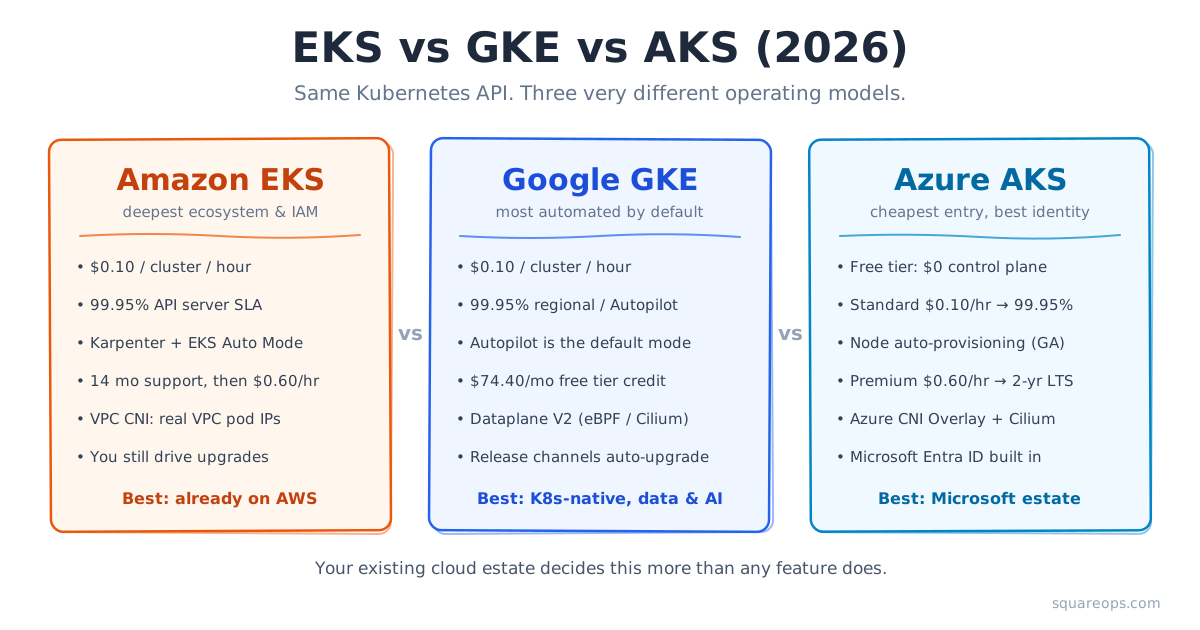
Short answer: pick EKS if AWS is already your system of record — IAM depth and ecosystem breadth outweigh everything else, and Karpenter is the best node autoscaler in the category. Pick GKE if you want the most automated Kubernetes on the market, or your workloads lean on Google’s data and AI stack; Autopilot is the default mode of operation and release channels handle upgrades for you. Pick AKS if you run a Microsoft estate — Entra ID integration is genuinely better there, and the Free tier is the only $0 control plane of the three. The honest finding in any eks vs gke vs aks evaluation is that all three are production-grade in 2026, and your existing cloud estate should decide it.
TL;DR: All three run conformant upstream Kubernetes, and control-plane pricing has converged at roughly $0.10 per cluster per hour — about $73 a month. AKS is the exception, with a genuinely free tier that carries no financially backed SLA. The real differences are operational: GKE automates the most, EKS gives the deepest IAM and ecosystem control, AKS the cheapest entry and tightest Entra ID integration. Version support differs too — 26 months on EKS, up to 24 on GKE’s Extended channel, a 2-year LTS on AKS Premium.
In this comparison:
- EKS vs GKE vs AKS at a glance
- What is the real difference between EKS, GKE and AKS?
- How much does each managed Kubernetes control plane cost in 2026?
- Autoscaling: Karpenter vs node auto-provisioning vs Autopilot
- How do EKS, GKE and AKS handle upgrades and version support?
- Networking, CNI and node options compared
- Which managed Kubernetes service should you choose?
- What EKS vs GKE vs AKS comparisons usually get wrong
Choosing the platform is the easy half. Running it — upgrades, autoscaling policy, cost control, on-call — is the part that consumes a team. Our managed Kubernetes service covers EKS, GKE and AKS under one operating model. Book a consultation.
EKS vs GKE vs AKS at a Glance
The CNCF Annual Cloud Native Survey published in January 2026 found 82% of container users now run Kubernetes in production, up from 66% in 2023. The question is no longer whether to run Kubernetes, but whose control plane to run it on.
| Dimension | Amazon EKS | Google GKE | Azure AKS |
|---|---|---|---|
| Control-plane price | $0.10/cluster/hour (~$73/mo); $0.60/hour on extended support | $0.10/cluster/hour, every mode and topology; $74.40/mo free-tier credit | Free tier: $0. Standard: $0.10/hour. Premium: $0.60/hour |
| Control-plane SLA | 99.95%; 99.99% on the provisioned control plane tier | 99.95% regional and Autopilot; 99.5% zonal Standard | 99.95% with availability zones, 99.9% without; no SLA on Free tier |
| Autoscaling | Karpenter (the reference implementation) or Cluster Autoscaler | Autopilot node auto-provisioning; Cluster Autoscaler on Standard | Node auto-provisioning (Karpenter-based, GA) or Cluster Autoscaler |
| Upgrades & version support | 26 months per minor version: 14 standard + 12 extended (paid) | Release channels; up to 24 months on the Extended channel | Community versions plus a 2-year LTS on the Premium tier |
| Networking / CNI | Amazon VPC CNI — pods get real, routable VPC IPs | Dataplane V2, an eBPF/Cilium dataplane with built-in network policy | Azure CNI Overlay, with Cilium as the eBPF dataplane option |
| Serverless / managed nodes | EKS Auto Mode (AWS-managed nodes) and Fargate | Autopilot — the default mode of cluster operation | AKS Automatic, virtual nodes on Azure Container Instances |
| Best for | Teams already deep in AWS IAM, VPC and the AWS service catalogue | Teams wanting the least Kubernetes operations, or GCP data/AI workloads | Microsoft estates: Entra ID, .NET, Azure DevOps, existing EA discounts |
Only two or three of those rows will change your decision. The rest of this article separates them from the ones that merely look decisive.
What Is the Real Difference Between EKS, GKE and AKS?
All three run upstream, CNCF-conformant Kubernetes, so your Deployments, Services and Helm charts apply cleanly on any of them. Whether you are weighing GKE vs EKS or AKS vs EKS, the differences sit in three places: how much of the platform the vendor operates, how identity works, and how opinionated the defaults are.
GKE is the most managed. Google shipped Autopilot years ahead of the AWS and Microsoft equivalents, and the maturity shows. It is now the default mode of cluster operation — you declare pods, Google provisions and operates the nodes, and you are billed for what your pods request rather than for VMs you sized yourself. Combined with release channels, a GKE cluster can genuinely be left to look after itself for long stretches.
EKS is the most configurable. AWS took the opposite position: a managed control plane, data plane largely left to you. That is why the EKS ecosystem is the richest of the three, and why IAM Roles for Service Accounts and EKS Pod Identity remain the most granular workload-identity story in managed Kubernetes. The trade-off is real: more of the platform is your job. AWS has been closing that gap with EKS Auto Mode, which takes over node lifecycle, load balancing, storage drivers and pod networking, runs on locked-down Bottlerocket AMIs with no SSH or SSM access, and enforces a 21-day maximum node lifetime so nodes are continuously recycled.
AKS is the cheapest to start and the best at identity — if you are a Microsoft shop. The Free tier is the only genuinely $0 control plane of the three, and Entra ID integration with Azure RBAC means cluster access is governed by the same groups and conditional-access policies as the rest of your estate. Per Microsoft’s pricing-tier documentation, AKS Automatic is now the recommended production default: Standard tier, up to 5,000 nodes, and a pod readiness SLA under which 99.9% of qualifying pod readiness operations complete within five minutes.
If you are still deciding whether Kubernetes is the right abstraction at all, our EKS vs ECS comparison and our look at Kubernetes vs ECS vs Fargate for AWS container platforms cover that properly.
How Much Does Each Managed Kubernetes Control Plane Cost in 2026?
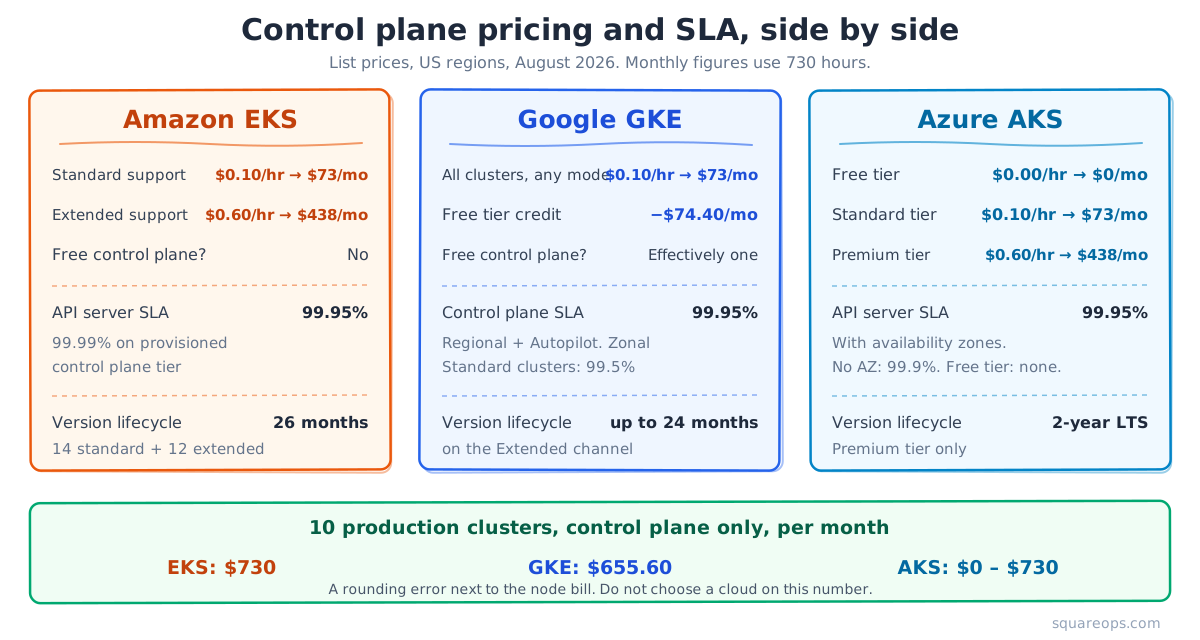
Amazon EKS charges $0.10 per cluster per hour on standard support — $73 a month at 730 hours. Once a minor version passes 14 months, the cluster moves to extended support at $0.60 per cluster per hour, or $438 a month, per the official EKS pricing page. Extended support is enabled by default, so a forgotten cluster does not break; it quietly gets six times more expensive.
Google GKE applies a flat $0.10 per cluster per hour to every cluster — zonal, regional or Autopilot — billed in one-second increments. The GKE pricing page documents a free tier of $74.40 in monthly credits per billing account, enough to cover one zonal Standard or Autopilot cluster. Those credits do not apply to regional cluster fees and do not roll over.
Azure AKS is the only one with a real $0 option. The Free tier charges nothing and supports up to 1,000 nodes, though Microsoft recommends it for dev/test and clusters under 10 nodes because it carries no financially backed uptime SLA. The Standard tier costs $0.10 per hour and enables the uptime SLA; Premium costs $0.60 per hour and adds 24-month long-term support.
Across ten production clusters that is roughly $730 a month on EKS, about $655.60 on GKE after the free-tier credit, and $0 to $730 on AKS — a rounding error against a node bill running into five figures. Compute, storage, load balancers and egress are where 90%+ of a Kubernetes bill lands, which is why we treat Kubernetes cost optimization as a workload-efficiency problem rather than a procurement one. Do not choose a cloud on the $73.
Autoscaling: Karpenter vs Node Auto-Provisioning vs Autopilot
This is where the three genuinely diverged — and then largely converged again, which most comparisons have not caught up with.
Karpenter changed the category. Built at AWS and now an open source project with providers for multiple clouds, it watches for unschedulable pods and provisions right-sized nodes directly, skipping the node-group abstraction that made Cluster Autoscaler slow and coarse. It also consolidates workloads and terminates underused nodes. On EKS it is the default recommendation, and Auto Mode is built on it.
AKS caught up by adopting Karpenter. Azure’s node auto-provisioning is Karpenter, adapted through the Azure provider and shipped as a managed add-on. It reached general availability in mid-2025. Anyone still writing that AKS autoscaling lags behind is working from a 2023 view of the product.
GKE solved it differently. Autopilot removes the node layer rather than automating it: no node pools to configure, no autoscaler to tune, billing against pod resource requests. Where average node utilisation sits well below 60%, its bin-packing frequently beats paying for provisioned VMs — and it is the most mature implementation of the idea.
All three now have credible just-in-time node provisioning, so autoscaling is no longer a reason to pick one cloud. What differs is how much tuning you own — most on EKS, least on GKE Autopilot.
Autoscaling configured badly costs more than no autoscaling at all. If your clusters are over-provisioned or consolidation is blocked by misconfigured PDBs, our Kubernetes cost optimization engagement finds it in the first week — talk to our team.
How Do EKS, GKE and AKS Handle Upgrades and Version Support?
Upgrades are the recurring operational cost of managed Kubernetes, and the dimension teams most consistently underestimate. Kubernetes ships a new minor version roughly every four months, so whatever you choose, you are signing up for a permanent cadence.
EKS gives the longest runway and charges for it. A minor version gets 14 months of standard support, then 12 months of extended support — 26 months total. At the end AWS auto-upgrades the control plane, and only the control plane: node groups stay where they are, and you update them yourself.
GKE automates the most. Release channels put your cluster on Rapid, Regular (the default), Stable or Extended, and Google upgrades control plane and nodes on that cadence. Rapid ships versions one to two weeks after upstream release but is excluded from the GKE SLA; Extended lets a cluster sit on one minor version for up to 24 months. For most teams Regular requires no upgrade project at all — the strongest operational argument for GKE.
AKS offers the longest single-version window, at a price. Community-version support tracks upstream, but Premium with the AKS long-term support plan covers a qualifying version for two years — genuinely useful for regulated environments with change-freeze windows, and the clearest case for paying $0.60 per hour rather than $0.10.
Whichever you pick, the cadence needs an owner. Version drift is the most common finding in the infrastructure audits we run, and it compounds: a cluster three versions behind is an order of magnitude harder to upgrade, not three times, because add-on compatibility matrices stop overlapping. That is the discipline our site reliability engineering practice exists to enforce.
Networking, CNI and Node Options Compared
Networking is where the three differ most architecturally, and where migrations get expensive.
EKS: the Amazon VPC CNI assigns pods real VPC IP addresses, so security groups, flow logs, PrivateLink and Transit Gateway treat pods as first-class network citizens — a genuine advantage where auditing happens at the network layer. The cost is IP planning: large clusters exhaust subnet space quickly, and bad CIDR sizing is painful to fix later.
GKE: Dataplane V2 is an eBPF dataplane built on Cilium, giving network policy enforcement and observability without kube-proxy in the datapath. It is the most modern default of the three.
AKS: Azure CNI Overlay assigns pods private CIDR IPs separate from the VNet, so address space can be reused across clusters — the opposite trade-off to the VPC CNI, and considerably easier to scale. Azure CNI Powered by Cilium adds the same eBPF dataplane and drops kube-proxy.
All three now offer a hands-off node tier: EKS Auto Mode and Fargate on AWS, Autopilot on GCP, AKS Automatic and virtual nodes on Azure. AWS documents a supported migration path from Fargate to Auto Mode, which covers a broader workload matrix. These choices shape your cloud-native architecture for years, so they belong in a design review rather than a procurement spreadsheet.
Which Managed Kubernetes Service Should You Choose?
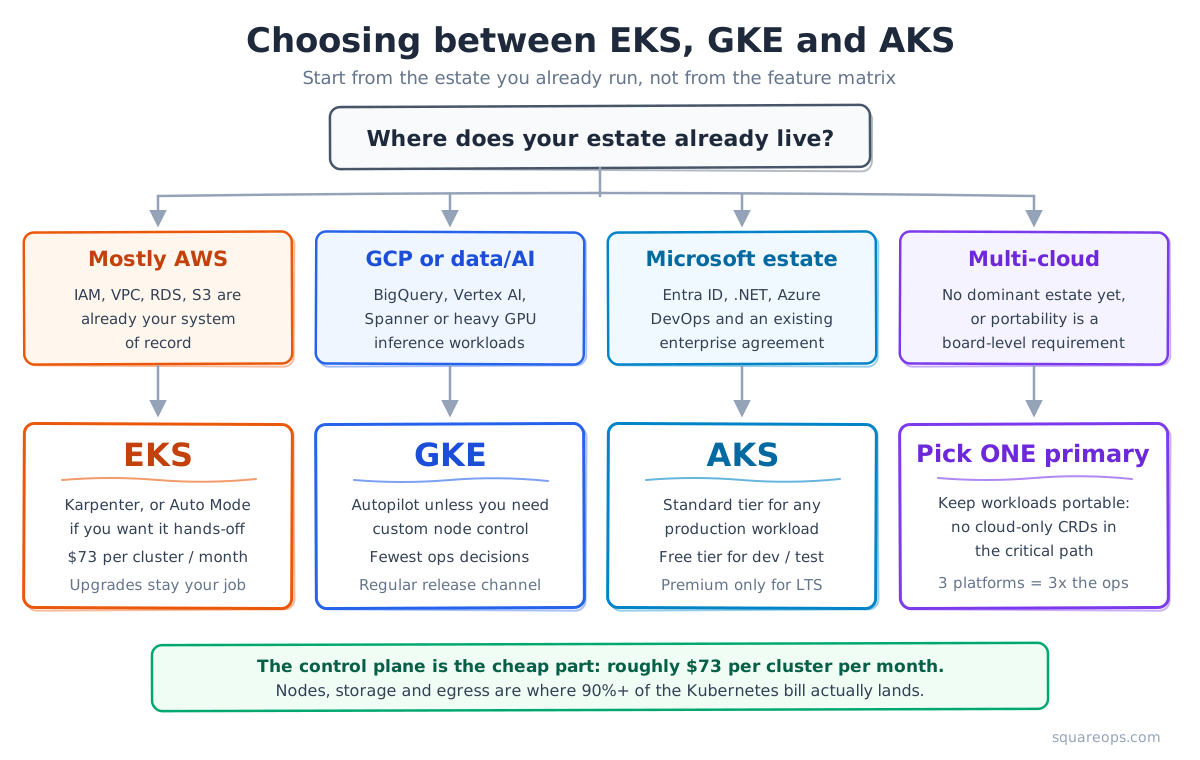
Already on AWS → EKS. The IAM, VPC, RDS and S3 integration you already depend on outweighs any single feature GKE or AKS holds over EKS. Run Karpenter, or Auto Mode if you would rather not own node lifecycle. Budget $73 per cluster per month and put a named owner on the upgrade calendar — the one thing EKS will not do for you.
GCP-native, data-heavy or AI-heavy → GKE. If BigQuery, Spanner, Vertex AI or large-scale GPU inference are in your stack, data gravity settles it before the Kubernetes comparison begins. Choose Autopilot unless you have a concrete reason to control nodes — specialised hardware, daemonsets needing host access, or licensing tied to physical cores.
Microsoft estate → AKS. Entra ID, .NET workloads, Azure DevOps and an existing enterprise agreement compound into a real advantage. Use Standard for anything in production — the Free tier’s missing SLA is not a risk worth taking for $73 a month. Reserve Premium for versions you must freeze for two years.
Genuinely multi-cloud → pick one primary anyway. Three platforms means three upgrade cadences, three IAM models, three CNI behaviours and three on-call runbooks. If portability is a board-level requirement, get it by keeping workloads portable — no cloud-specific CRDs in the critical path, infrastructure in Terraform, GitOps-driven delivery — not by running everything everywhere. Teams moving between clouds usually underestimate the data and networking work; our cloud migration practice exists largely because of that gap.
If your evaluation is really about who will operate the platform rather than which to buy, that is a different shortlist — our guide to the best managed Kubernetes service providers covers it.
What EKS vs GKE vs AKS Comparisons Usually Get Wrong
Treating control-plane price as a decision input. The spread across ten clusters is a few hundred dollars a month. One oversized node group costs more than that, which is why learning how to optimize Kubernetes costs across GKE, EKS, and AKS starts with the data plane, not the control plane.
Repeating that “AKS is free.” The Free tier is real, but carries no financially backed uptime SLA. For production the honest comparison is AKS Standard at $0.10 per hour — identical to EKS and GKE.
Claiming AKS autoscaling is behind. It was, until node auto-provisioning went GA in mid-2025. It is Karpenter. That criticism has expired.
Claiming GKE Autopilot locks you in. It runs conformant Kubernetes and your manifests stay portable. The constraints are on privileged host access and certain daemonsets, not on the API.
Ignoring the operating model. The cloud you pick determines maybe 20% of your Kubernetes outcome. The other 80% is whether someone owns upgrades, autoscaling is tuned, requests and limits reflect reality, and a real on-call rotation sits behind the cluster — a DevOps consulting question, and the same one on all three clouds.
Evaluating EKS, GKE or AKS this quarter? SquareOps runs production Kubernetes on all three as an AWS Advanced Consulting Partner and ISO 27001-certified team. We will tell you plainly when the answer is “stay where you are” — and when the real problem is not the cloud but the operating model. Start with our Kubernetes consulting services or book a free consultation.