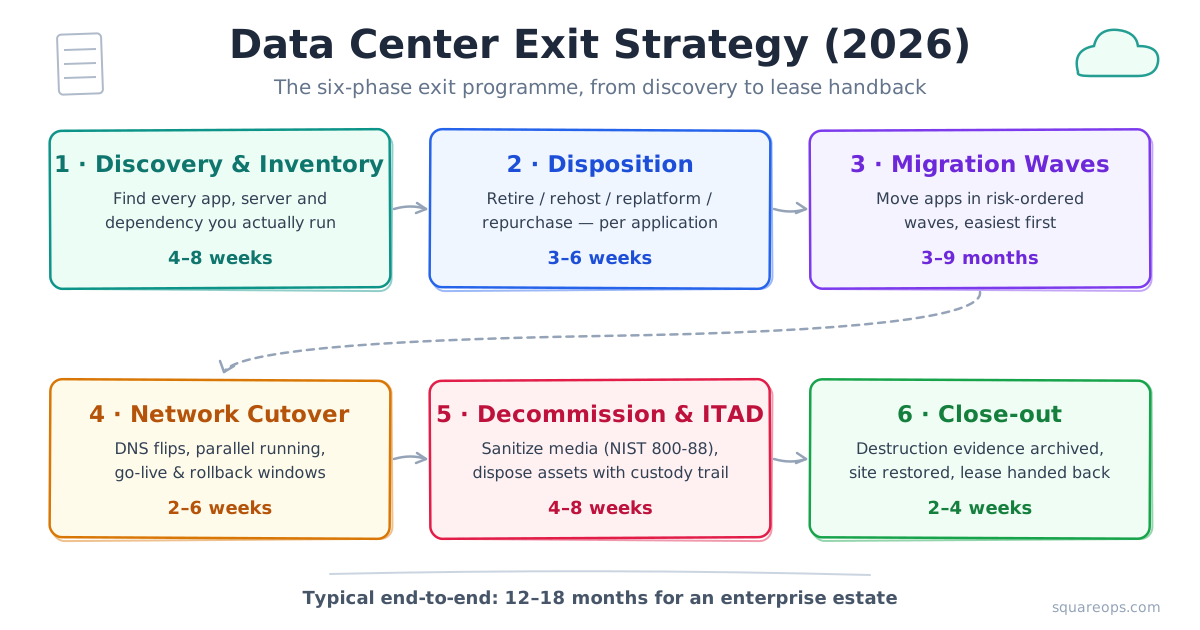
Short answer: a data center exit strategy is the end-to-end plan for leaving an owned or colocated facility for good — inventorying every workload, assigning each application a disposition (retire, rehost, replatform, repurchase, refactor or retain), migrating in risk-ordered waves, cutting the network over, sanitizing and disposing of the hardware, and handing the lease back with audit-ready destruction evidence. A typical enterprise estate needs 12–18 months from first inventory to lease handback, so planning should start at least one renewal cycle before the contract ends.
TL;DR: A data center exit is a facility-closure programme, not just a migration. It runs in six phases — discovery, disposition, migration waves, network cutover, decommissioning and close-out — scheduled backwards from lease end. The work most teams underestimate sits at the ends: a ruthless retire/repurchase pass up front (often 10–20% of the estate never moves), and NIST SP 800-88 sanitization, ITAD chain-of-custody and lease handback at the back. For the money side, our separate cloud migration cost estimation framework does the math.
In this guide:
- What is a data center exit strategy?
- Why are enterprises exiting the data center in 2026?
- The six-phase data center exit plan
- Phase 1: inventory and discovery
- How do you decide what to retire, migrate or repurchase?
- How do colo lease and contract timelines shape the exit?
- Network cutover and data egress planning
- Data center decommissioning, ITAD and asset disposal
- What compliance evidence must you keep after data destruction?
- Stakeholders, governance and the exit timeline
- How much does a data center exit cost?
- Common data center exit mistakes to avoid
Planning an exit against a hard lease deadline? SquareOps runs discovery-to-decommission exit programmes on AWS. Explore our cloud migration services or book a free consultation to pressure-test your timeline.
What Is a Data Center Exit Strategy?
A data center exit strategy is a plan to permanently vacate a data center — usually an owned server room or a colocation cage — and shut the facility relationship down completely. The destination is most often the public cloud (an on-premises to cloud exit), but the defining feature is not where workloads land. It is that the programme only finishes when the facility is empty, the hardware is disposed of, the data is provably destroyed and the lease or property is handed back.
That scope is what separates a data center exit plan from an ordinary migration plan. A migration ends at go-live. An exit continues past go-live into decommissioning, IT asset disposition (ITAD), media sanitization evidence and contractual close-out — and those closing phases carry most of the compliance risk. Data center closure planning therefore needs owners from legal, finance and facilities from day one, not just the infrastructure team.
This guide walks through the exit programme end to end. If your specific target is AWS — the destination for most of the exits we run — the companion service page on data center migration to AWS covers the landing-zone side in more depth.
Why Are Enterprises Exiting the Data Center in 2026?
The trigger is almost always a date on a contract. Colo leases and hardware support agreements expire, and renewing either locks in another three-to-five-year commitment. Facing that fork, more IT leaders are choosing to exit the data center rather than re-sign, for four reasons:
- Renewal economics have worsened. Power-constrained markets and AI-driven demand have pushed colocation pricing up sharply at renewal time, and Uptime Institute's 2025 Global Data Center Survey found cost is now the top concern for infrastructure teams.
- Hardware refresh cliffs. Servers bought during the 2020–2022 cycle are hitting end of support together, turning a gradual cost into a single large capital decision.
- Staffing. Nearly two-thirds of operators in the same Uptime survey report difficulty hiring or retaining facility staff — a risk that grows every year you keep the site.
- Security and compliance surface. Every physical site is an extra scope item in ISO 27001, SOC 2 and PCI audits.
One honest caveat: full exits are still the exception — the same Uptime survey found 45% of enterprise IT workloads still run in corporate facilities, and hybrid remains a rational end-state for many estates. The phase plan below therefore front-loads the decisions, not the moving.
The Six-Phase Data Center Exit Plan
Run the exit as six phases, scheduled backwards from the lease end date. The first two phases decide what moves and what dies; the middle two move it; the last two close the facility. The structure maps cleanly onto the assess–mobilize–migrate arc of the AWS Migration Acceleration Program (MAP), with two extra facility-closure phases MAP does not cover.
| Phase | What happens | Typical duration | Exit-critical output |
|---|---|---|---|
| 1. Discovery & inventory | Agentless discovery, dependency mapping, CMDB reconciliation, licence and contract register | 4–8 weeks | A complete, trusted inventory — apps, servers, storage, circuits, contracts |
| 2. Disposition & wave planning | Assign each app retire / retain / rehost / replatform / repurchase / refactor; group into waves | 3–6 weeks | Signed-off disposition register and wave schedule |
| 3. Migration waves | Move apps wave by wave, lowest risk first; validate each before the next | 3–9 months | Workloads live on the target platform with rollback points |
| 4. Network cutover | DNS flips, parallel running, circuit swings, go/no-go gates | 2–6 weeks | Production traffic fully off the facility |
| 5. Decommission & ITAD | Power-down runbooks, media sanitization, de-racking, certified asset disposal | 4–8 weeks | Empty racks, chain-of-custody records, destruction certificates |
| 6. Close-out | Site restoration, lease handback, evidence archive, contract terminations | 2–4 weeks | Signed handback and an audit-ready evidence pack |
End to end, a mid-size enterprise estate (200–600 servers) typically needs 12–18 months; a single small server room can close in 6–9. The durations above overlap in practice — decommissioning of early-wave racks can start while later waves are still migrating — but the sequence of gates does not change.
Phase 1: Inventory and Discovery — Finding What You Actually Run
Every failed exit we have been called into went wrong in the same place: the inventory on paper was not the estate in the racks. Budget four to eight weeks to build a trusted picture before any disposition decision. The discovery pass should capture:
- Applications and their dependencies — including the undocumented ones. Network-flow analysis regularly surfaces app-to-app calls nobody owns.
- Servers, VMs and storage — with 90 days of CPU, memory and traffic data, because utilization drives disposition.
- Everything that is not a server — DNS zones, SSL certificates, scheduled jobs, backup targets, hardware security modules, fax gateways, door controllers. These are the items that break on cutover day.
- Contracts — colo lease, network circuits, hardware support, software licences tied to physical hosts.
The utilization data pays for itself immediately. In AWS's prescriptive guidance for large migrations, servers averaging below 5% CPU and memory are classed as zombie applications and those at 5–20% over 90 days as idle — both prime retire candidates, along with anything that has had no inbound connection for 90 days. We cover discovery tooling and process in detail in our cloud migration assessment guide.
How Do You Decide What to Retire, Migrate, or Repurchase?
Disposition is the highest-leverage phase of the entire exit: every application you retire or repurchase is one you never have to migrate, test or pay to run twice. Work through the estate app by app using the 7 Rs framework from AWS — retire, retain, rehost, relocate, repurchase, replatform, refactor — collapsed here into the six decisions that matter for an exit:
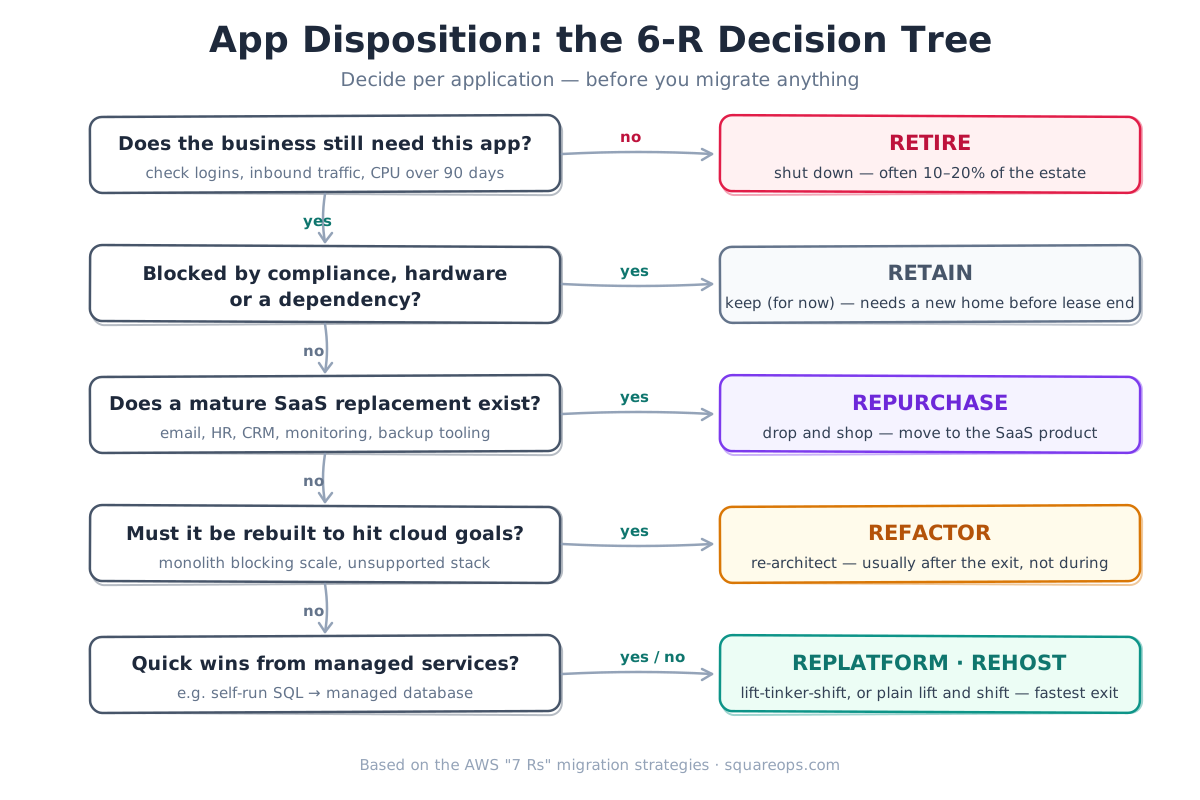
- Retire first, aggressively. In most enterprise estates, 10–20% of applications fail the "does anyone still use this?" test. Shutting them down is pure savings and shrinks every later phase.
- Repurchase where a mature SaaS exists. Exits are the natural moment to stop self-hosting email, HR, CRM, monitoring or backup software. The app moves off your books entirely instead of onto your cloud bill.
- Rehost or replatform the bulk. Lift-and-shift (or lift-tinker-and-shift into managed databases and containers) is how the majority of workloads should leave, because the clock is the constraint. AWS itself recommends against refactoring during a large migration — modernize after the exit, not during it.
- Retain deliberately, not by default. Some workloads genuinely cannot leave — data-residency rules, specialised hardware, a dependency that must move first. In an exit, retain still means finding them a new home — another facility or an edge site — before the lease ends.
One paragraph of honesty on direction: a small share of workloads that leave for the cloud later come back. Steady-state, high-throughput systems with predictable load are the usual candidates, and planning for that possibility is a strength, not a failure — our cloud repatriation strategy guide covers when the reverse move makes sense.
The destination is not always the cloud you already use. If the exit consolidates the estate onto a different platform, our Azure to AWS and AWS to Azure migration guides cover the cloud-to-cloud legs.
How Do Colo Lease and Contract Timelines Shape the Exit?
The lease is the real project manager of a data center exit. Before you schedule a single migration wave, put four contractual facts on one page:
- Notice period and auto-renewal. Colo agreements commonly require 6–12 months' written notice, and many auto-renew for a full term if you miss the window. Diarise the notice date the day the exit is approved — missing it can cost more than the entire migration.
- Restoration ("make-good") obligations. Many leases require the space returned to a defined condition — cabling removed, cages dismantled, sometimes a full "white box" restoration. This work needs weeks, contractors and budget, and it sits after your last server powers down.
- Network circuit terms. MPLS and internet circuits into the facility usually run on separate 12–36 month contracts with their own notice clauses — and new cloud connectivity such as AWS Direct Connect can take weeks to months to provision. Order new circuits early; diarise termination on the old ones.
- Licence and support entanglements. Software licensed to physical hosts, and hardware support contracts, should end with the facility — not silently renew afterwards.
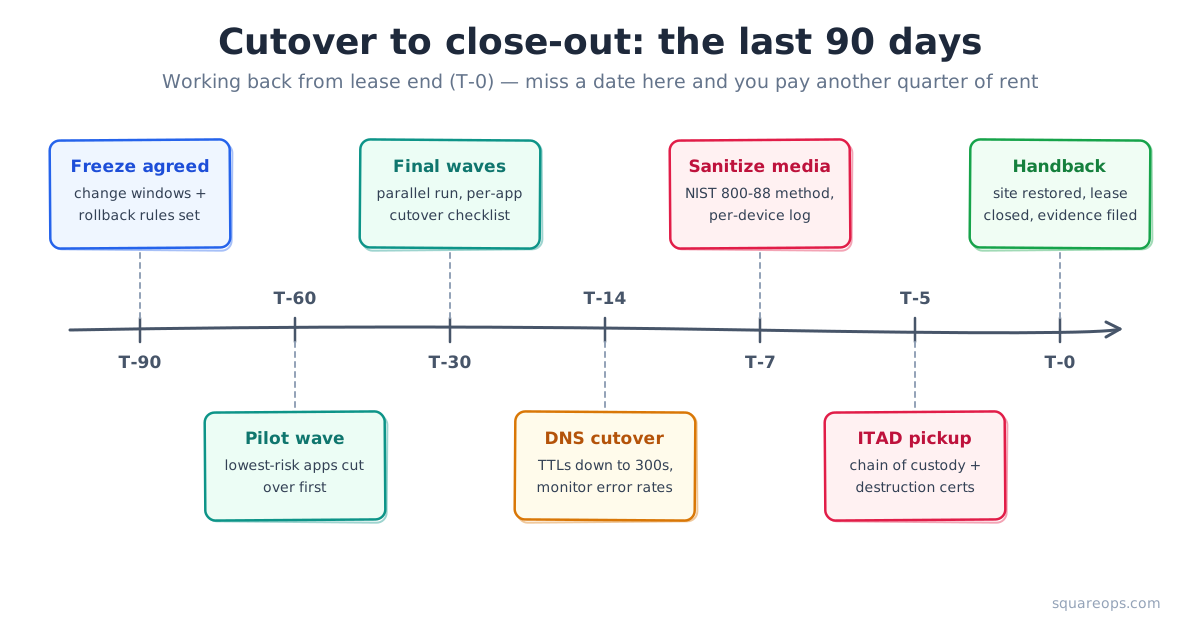
Build the plan backwards from lease end with contingency: if the lease ends in June, production traffic should be off the facility by March, because decommissioning, restoration and handback will consume the rest — and an overrun means paying for a facility you no longer use.
Network Cutover and Data Egress Planning
Cutover is where an exit succeeds or makes the news. Three planning rules keep it boring — which is the goal:
- Move data before you move traffic. Bulk data should be seeded ahead of cutover — online replication for databases, offline transfer devices for very large archives. Be realistic about bandwidth: 500 TB over a dedicated 10 Gbps link is about five days at theoretical line rate, and typically two to three weeks in practice once contention, checksums and re-runs are counted. Egress and transfer fees belong in the budget line — the cost estimation framework shows how to model them.
- Cut over in waves with a parallel run. Each wave gets its own go/no-go gate, a rollback window while the source environment still exists, and a short parallel run in which both sides stay live. Drop DNS TTLs to 300 seconds ahead of the flip and watch error rates, not just uptime — this is standard SRE practice applied to a one-way door.
- Use a per-application cutover checklist. DNS, certificates, firewall rules, monitoring, backup jobs and integration endpoints each need an owner and a tick. Our AWS cloud migration checklist is the per-app companion to this programme-level guide.
The one-way-door framing matters: in a normal migration a failed cutover means rolling back and retrying next month. In an exit, the source facility has a demolition date — so every wave you cut over early buys slack for the wave that goes wrong.
Data Center Decommissioning, ITAD, and Asset Disposal
Once traffic is off, the facility work starts — and data center decommissioning is a discipline of its own, with its own vendors and its own paper trail. As TechTarget's decommissioning guide notes, the process runs from power-down runbooks through certified recycling, and skipping steps creates legal exposure, not just mess. The sequence:
- Power down by runbook, in reverse dependency order. Databases before the storage they sit on; monitoring last, so you can see everything else die cleanly. Keep a signed shutdown log per system.
- Reconcile every asset against the Phase 1 inventory. Each server, switch and drive gets scanned out. The inventory-to-disposal reconciliation is the document that proves nothing walked out of the building.
- Sanitize media before it moves. Drives are wiped or destroyed on-site (or transported under seal) — the evidence rules are covered in the next section.
- Use a certified ITAD partner. Look for R2v3 or e-Stewards certification, serialized chain-of-custody reporting, and per-device certificates. Recent-generation hardware often has meaningful resale value — ITAD revenue share can offset a real slice of decommissioning cost.
- Restore the space to whatever the lease requires, photograph it, and get the handback countersigned.
What Compliance Evidence Must You Keep After Data Destruction?
Two years after an exit, nobody will ask how smooth the cutover was — but an auditor may well ask you to prove what happened to drive serial number X. The reference standard is NIST SP 800-88 Rev. 2, the guidelines for media sanitization, updated in September 2025 to replace the 2014 revision that most existing policies still cite. Your evidence pack should contain, per device:
- Serial number and asset tag, matched to the inventory register
- Sanitization category and method used (the clear / purge / destroy vocabulary the 800-88 line established), with tool and version where software-based
- Verification result, operator identity and date
- Certificate of destruction or recycling from the ITAD vendor, plus the chain-of-custody record if media left the site
Two pre-destruction checks protect you from the opposite failure — destroying data you were obliged to keep. Confirm legal hold status on every system before wiping, and confirm retention obligations (financial records, medical data, tax archives) have a surviving copy in the target environment. Frameworks such as ISO 27001, SOC 2, GDPR and HIPAA all treat disposal evidence as in-scope, and the exit evidence pack should be archived with the same controls as any other security record. If your team wants a second pair of eyes on the destruction workflow, our cloud security services cover exactly this kind of compliance-evidence design.
Stakeholders, Governance, and the Exit Timeline
A data center exit touches more of the company than any normal infrastructure project, and the programme structure should reflect that. The minimum viable governance we set up on client exits:
- An executive sponsor who owns the lease-end commitment and can settle disposition disputes quickly.
- One exit programme lead — the person whose calendar the T-minus dates live on.
- Named owners per lane: application owners for dispositions and cutover sign-off, network for circuits and DNS, security for sanitization evidence, facilities and legal for the lease, finance for dual-running costs, plus the ITAD vendor as a first-class participant, not an afterthought.
- A weekly cadence with a live risk register and decision log. Exits generate hundreds of small irreversible decisions; write them down.
Plan the post-exit operating model at the same time — the facility team will not map one-to-one onto cloud operations. Many clients hand steady-state running to our AWS managed services team while our DevOps consulting practice retrains in-house staff toward platform work.
How Much Does a Data Center Exit Cost?
At programme level, exit costs fall into six buckets: migration labour, dual-running (paying for the facility and the cloud at the same time — usually the biggest surprise), data transfer, decommissioning and ITAD, site restoration, and any early-termination fees. Two levers consistently improve the number: an aggressive retire pass in Phase 2, and partner funding — the AWS Migration Acceleration Program provides assessment and migration funding through partners, and AWS reports an average 31% infrastructure saving for migrated workloads. As an AWS Advanced Consulting Partner, SquareOps can scope MAP eligibility as part of an AWS consulting engagement.
We deliberately keep the full numbers in one place rather than repeating them here: the cloud migration cost estimation framework walks through estimating every one of those buckets, including the egress math and the dual-running curve, with worked examples.
Facing a lease deadline? SquareOps has run data center exits end to end — discovery, MAP funding, migration waves and audit-ready decommissioning. See how we run migrations or talk to an exit architect this week.
Common Data Center Exit Mistakes to Avoid
- Starting discovery after committing to a date. The lease-end date gets promised to the board before anyone knows how many applications exist. Run discovery first; commit second.
- Migrating everything as-is. Skipping the retire/repurchase pass means paying to move — and then run — the 10–20% of the estate nobody uses.
- Forgetting the non-server estate. Circuits, certificates, batch jobs and physical-security systems are what actually break on cutover day.
- Missing contract notice windows. An auto-renewed colo term or circuit contract can cost more than the migration itself.
- Leaving decommissioning unbudgeted. Sanitization, ITAD, restoration and handback are real money and real weeks — schedule them like a migration wave, not an afterthought.
- Declaring victory at go-live. Until the evidence pack is archived and the handback countersigned, the exit is not done — and neither is your compliance exposure.
Exit the data center without missing the lease date
Get a free exit-readiness consultation: we will review your inventory, lease timeline and disposition mix, and tell you honestly whether the date is achievable.
Planning an exit and want a second opinion on the timeline before you commit to a lease-exit date? Book a free consultation with our migration team, or read more about our data center migration to AWS services.