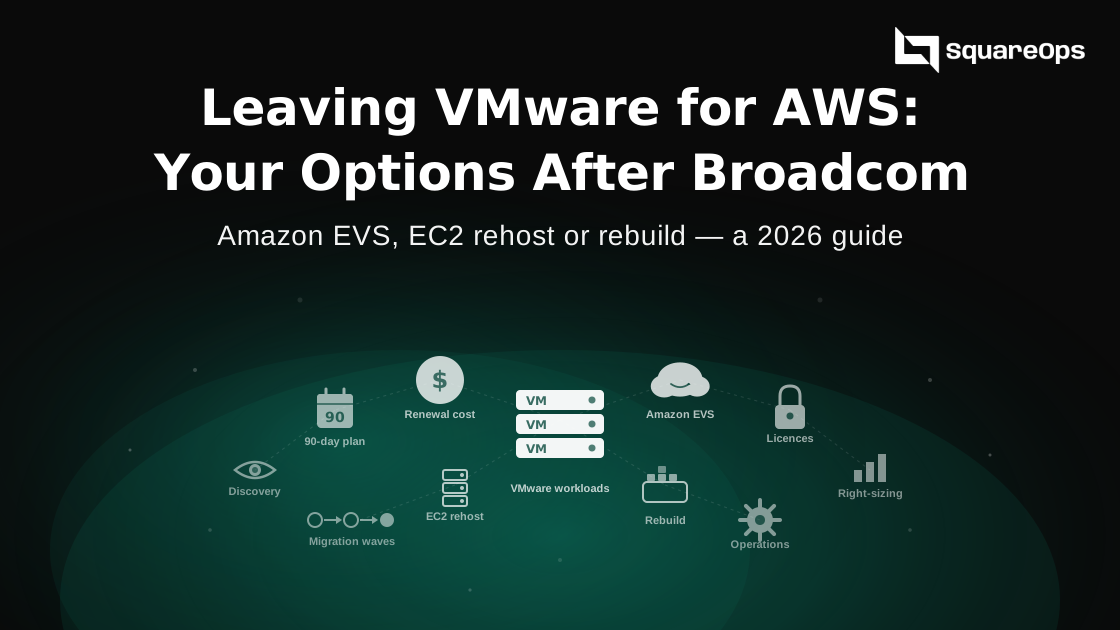
Broadcom's VMware licence changes have pushed many renewals to two to five times their old cost. If you want to move to AWS, you have three paths. You can keep VMware and run it on AWS with Amazon EVS, move your VMs onto EC2, or rebuild key apps on containers and managed services. Most companies mix all three, one workload at a time, and the order is set by their renewal date.
Picture a mid-size manufacturer with 120 VMs on a five-host cluster. Its VMware renewal quote arrives at three times last year's price, with 90 days to sign. The data centre lease ends next year. The IT head has to decide fast what moves, where it goes and what it will cost. This guide walks through that decision.
What Changed With VMware Licensing
Broadcom bought VMware in late 2023 and changed how it sells. The table shows the changes that hit renewals hardest.
| When | Change | Effect on you |
|---|---|---|
| February 2024 | Perpetual licences no longer sold | Every renewal is now a subscription. |
| 2024 | Thousands of products folded into a few bundles, such as VCF and VVF | You may pay for parts you do not use. |
| 2024 | Pricing moved from per CPU to per core | Servers with many cores cost far more to licence. |
| April 2025 | Minimum core count raised from 16 to 72, as reported by distributors | Small sites pay for cores they do not have. |
| 2025 | 20% surcharge reported for late renewals | Missing your renewal date costs extra. |
Reported increases vary a lot. One VMware-focused provider says typical renewals run two to five times the old cost, with some customers seeing much more. These figures come from vendors and advisers, not from Broadcom, so treat them as a range. Your own quote is the only number that matters.
Three Ways to Move VMware Workloads to AWS
Path 1: Keep VMware and run it on AWS with Amazon EVS
AWS launched Amazon Elastic VMware Service (EVS) on 5 August 2025. It runs VMware Cloud Foundation inside your own AWS network, on EC2 bare metal hosts. Your VMs move across without being rebuilt, and they can keep their IP addresses.
There are three catches. You must bring your own VCF licence, bought from Broadcom. EVS is self-managed, so your team still installs, patches and upgrades VMware. And Broadcom recommends at least four hosts for production. EVS gets you out of the data centre quickly. It does not get you away from Broadcom.
EVS launched in six regions, including US East (N. Virginia), Frankfurt, Ireland and Tokyo. AWS has added more regions since. Check that your target region is on the list before you plan around it.
Path 2: Move your VMs onto EC2
This is called rehosting. Each VM becomes an EC2 instance, and you stop paying for VMware on it. AWS Transform for VMware became generally available on 15 May 2025. It uses AI agents to find your VMs, map how they talk to each other, plan migration waves and convert your network setup. AWS says it built wave plans for 500 VMs in 15 minutes in testing.
The copying and cut-over usually run through AWS Application Migration Service. Our guide to AWS Application Migration Service explains how that part works. Expect work on drivers, Windows and SQL Server licences, and IP changes.
Path 3: Rebuild key apps on containers or managed services
Some apps are worth more than a lift-and-shift. A busy customer-facing app might move to Amazon EKS or ECS. A database might move to Amazon RDS, so you stop patching it yourself. This path costs the most time up front. It also cuts the most running work later.
| Amazon EVS | Rehost on EC2 | Rebuild | |
|---|---|---|---|
| Still pay Broadcom? | Yes | No | No |
| Speed | Fastest | Fast | Slowest |
| Changes to the VM | None | Some | A lot |
| Who runs VMware | You | Nobody | Nobody |
| Best for | Hard deadlines and VMware-only apps | Most standard servers | Apps you will keep and change for years |
How to Decide, Workload by Workload
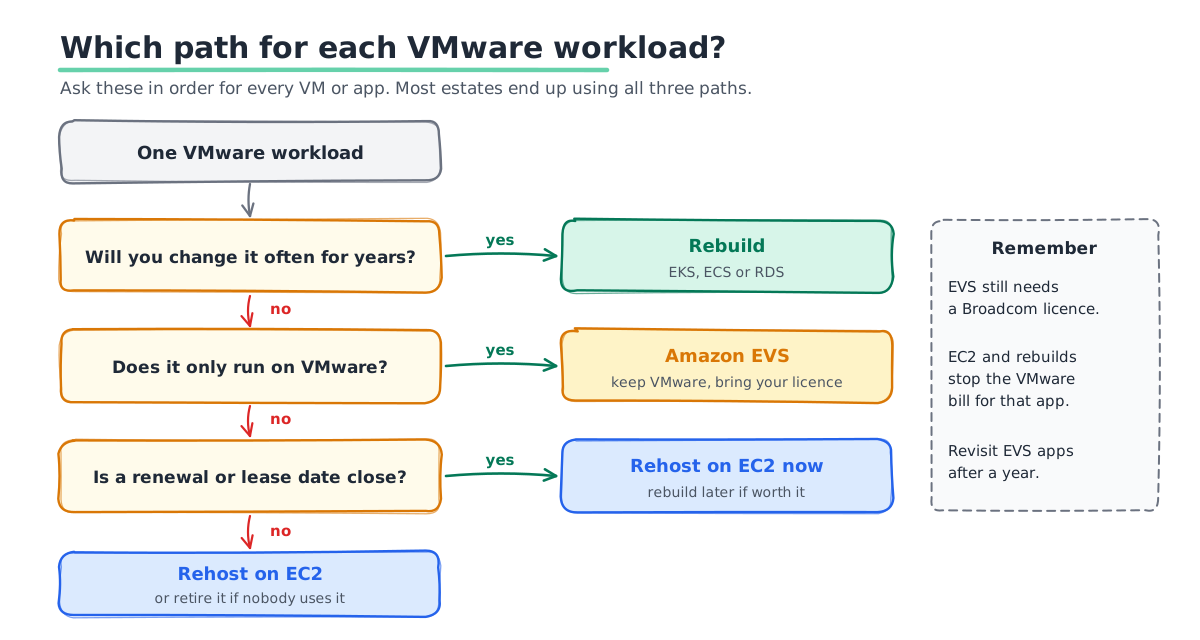
Do not pick one path for the whole estate. Sort each workload with four questions.
- Does it only run on VMware? Some vendor appliances are only certified on vSphere. These are good EVS candidates.
- Will you still run it in three years? If not, rehost it cheaply or retire it. Every estate has VMs nobody uses.
- Does it change often? Apps your team updates every week are worth rebuilding on containers.
- When must it move? If a renewal or lease date is close, rehost now and rebuild later.
A common result looks like this. A small group of VMware-only systems goes to EVS. Most servers are rehosted on EC2. Two or three important apps are rebuilt over the next year.
What the Move Costs
Nobody can give you an honest number without your inventory. The cost has five parts.
- Running cost on AWS. EC2 or EVS hosts, storage and network. Savings Plans cut this once usage settles.
- The Broadcom licence. Only if you choose EVS.
- Migration work. Discovery, testing and cut-over. Tools speed this up but do not remove it.
- Running both sides. For a few weeks you pay for the old and the new setup together.
- Funding that offsets it. AWS programs such as the Migration Acceleration Program can cover part of the cost for eligible moves.
Our cloud migration cost estimation framework shows how to build this number line by line.
A 90-Day Plan Before Your Renewal
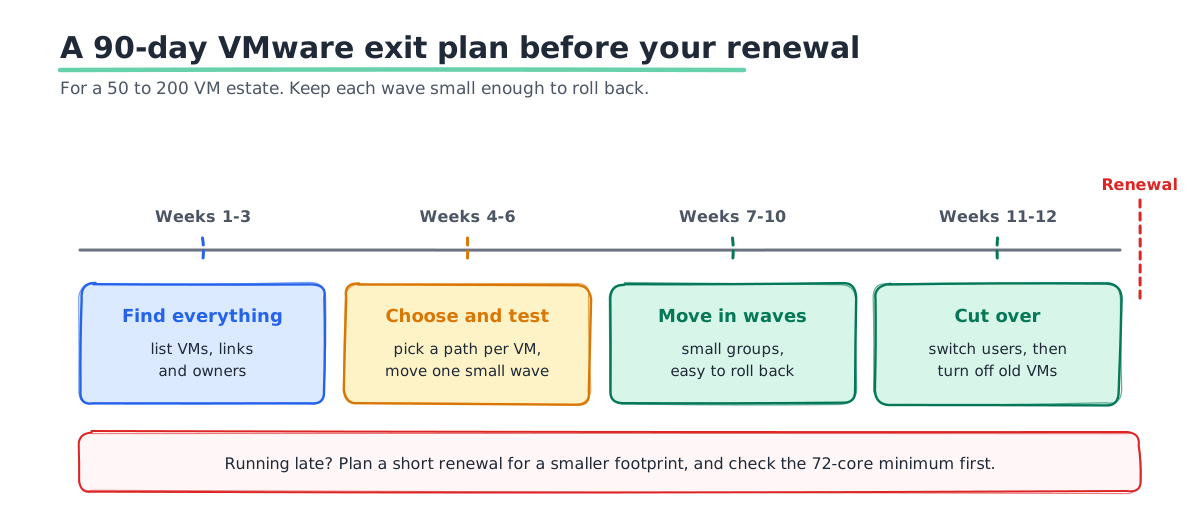
If your renewal is three months away, this is a realistic plan for a 50 to 200 VM estate.
- Weeks 1 to 3: Find everything. List every VM, what it talks to and who owns it. Mark the ones nobody can name.
- Weeks 4 to 6: Choose a path and test one wave. Sort each VM with the four questions. Move one small, low-risk group end to end.
- Weeks 7 to 10: Move in waves. Migrate the rest in groups. Keep each group small enough to roll back.
- Weeks 11 to 12: Cut over and switch off. Point users at AWS. Shut down the old VMs only after a quiet week.
If you cannot finish in time, plan a short renewal for a smaller footprint. Check the 72-core minimum first. A smaller cluster may not cost as little as you expect.
What Changes After the Move
Getting the VMs onto AWS is only half the job. The way you run them changes too, and that is where most of the savings come from.
- You pay by the hour, not by the host. Servers that sat idle in your data centre now cost money every hour they run. Switch off test and staging servers at night and at weekends.
- Right-size after a month. Most VMs were sized for peak load years ago. After a few weeks of real data, move them to smaller instances. Then buy Savings Plans for what is left.
- Backups and disaster recovery work differently. AWS Backup and cross-region copies replace your old backup appliance. Test a restore before you switch off the old system.
- Monitoring needs rebuilding. vCenter alarms do not move with you. Set up CloudWatch or your own monitoring stack before cut-over, not after.
- Your team needs new skills. VMware admins already know most of the ideas. They still need time to learn AWS networking, IAM and cost tools.
If you chose EVS for some workloads, plan a review after a year. Ask which of those VMs could now move to EC2. Each one you move can shrink your Broadcom bill at the next renewal.
Mistakes We See
- Moving everything to EVS. It is the fastest path, but you keep the Broadcom bill and the patching work.
- Forgetting other licences. Windows Server and SQL Server licences need a plan before you rehost.
- Changing IP addresses without warning. Hard-coded IPs break apps after cut-over. Find them early.
- Sizing EC2 to match old VMs. Old VMs are often too big. Right-size after a few weeks of real data.
- Missing the renewal date. A late renewal can cost 20% more. Start the plan before the quote arrives.
If VMware is part of a bigger move out of your data centre, our data center exit planning guide covers the wider plan.
How SquareOps Can Help
SquareOps is an AWS Advanced Consulting Partner with the AWS DevOps and Cloud Operations Competencies. We plan and run migrations to AWS, then operate what we move with 24/7 support. For example, we moved Indiagold's lending workloads from Google Cloud to AWS. We have not published a VMware case study yet, so ask us for references that match your setup.
Plan Your VMware Exit Before Renewal
Send us your VM count and your renewal date. We will map each workload to EVS, EC2 or a rebuild, and give you a timeline and a cost range. Talk to our cloud migration team, or read more about our cloud migration services.