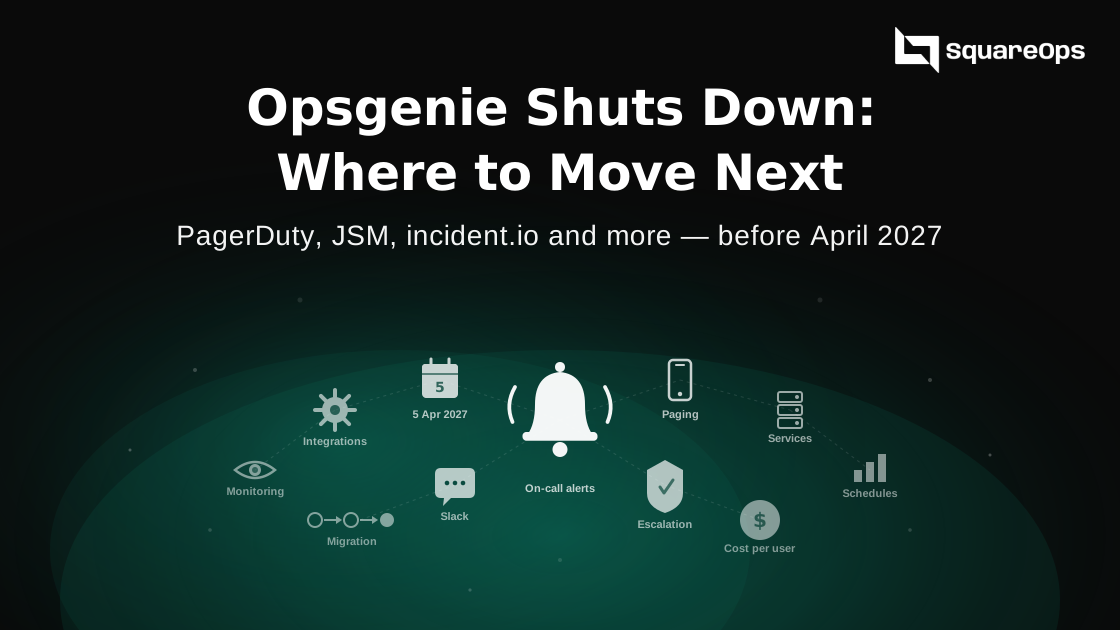
Opsgenie shuts down on 5 April 2027. On that day Atlassian turns it off and deletes any data you have not moved. Most teams will move to Jira Service Management, PagerDuty, incident.io or Grafana Cloud IRM. The right pick depends on how you pay for Atlassian today, how many people carry the pager, and whether you want to fix alert noise while you move.
Picture a 12-person platform team in March 2027. Their Opsgenie renewal is gone, the schedules still live in Opsgenie, and nobody has tested the new tool at 3 am. That is the situation this guide helps you avoid.
A note before you read. SquareOps builds Alert6, an AI incident tool that appears near the end of this post. We do not rank it against the paging tools, because it does a different job. We say plainly what it does not do. Prices below come from vendor pages and third-party reviews checked in October and November 2026. Check them again before you buy.
What Is Happening to Opsgenie
Atlassian announced the change in March 2025. New sales stopped first. Support ends two years later. Here are the dates that matter.
| Date | What happens | What it means for you |
|---|---|---|
| 4 June 2025 | End of sale | No new Opsgenie licences. No plan upgrades or downgrades. Renewals still allowed if the term ends before April 2027. |
| Now to March 2027 | Migration window | Atlassian offers an in-product tool to move to Jira Service Management. Other vendors offer their own import tools. |
| 5 April 2027 | End of support | Opsgenie is switched off. Atlassian says any data you have not moved is deleted. |
Five months sounds like plenty. It is not. You need time to rebuild schedules, rewire every alert source, and run both tools side by side for a few weeks. Teams that start in February will be testing during the last on-call rotation before the cut-off.
Your Three Real Choices
Every team ends up on one of three paths.
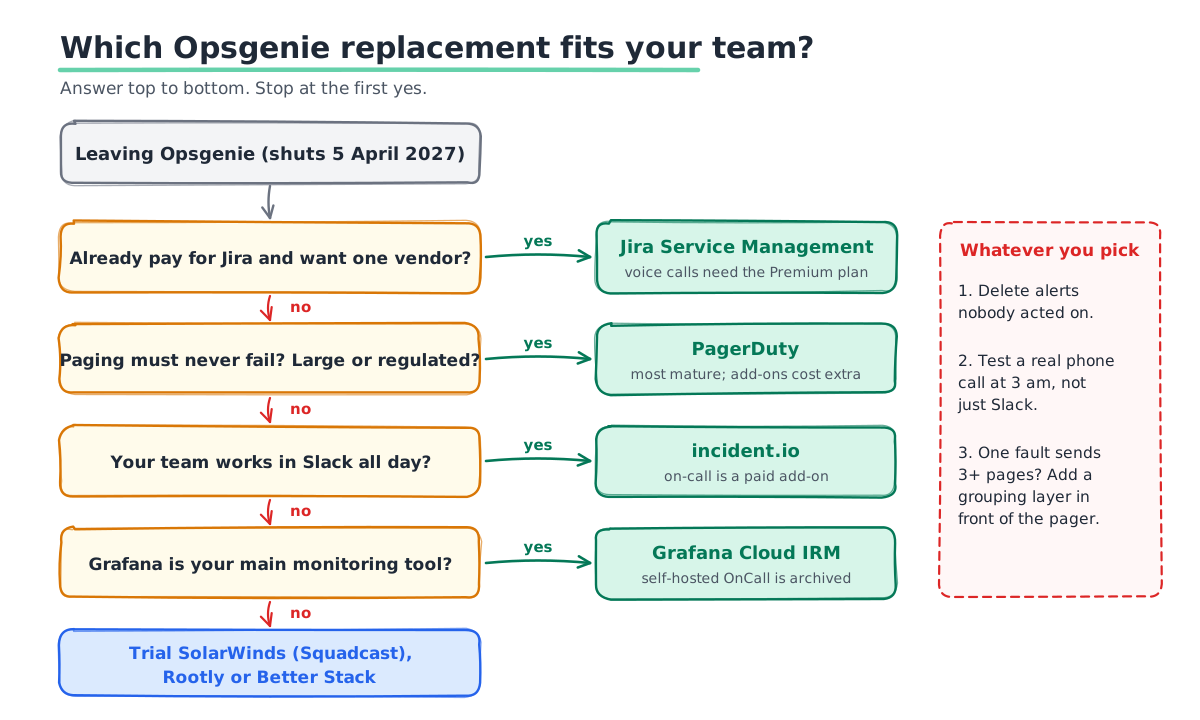
- Move to Jira Service Management. This is the path Atlassian built for you. Your alerts and on-call setup move with Atlassian's own tool. It makes sense if you already pay for Jira and want one vendor.
- Move to a dedicated on-call tool. PagerDuty, incident.io, Grafana Cloud IRM, SolarWinds (Squadcast), Rootly or Better Stack. Pick this if paging is critical and you want a tool built only for it.
- Use the move to cut alert noise. Rebuilding your setup is a rare chance to delete stale alerts and group the rest. Some teams add a correlation layer in front of their pager at the same time.
Opsgenie Alternatives Compared
The table below gives the starting point for each tool. Prices are per user per month unless noted. Most vendors charge more for phone calls, SMS volume or AI features, so treat these as entry prices.
| Tool | Best for | Entry price | Free tier |
|---|---|---|---|
| Jira Service Management | Teams already on Jira | About $19 per agent (Standard). Voice calls need Premium, about $48 to $53. | Yes, small teams |
| PagerDuty | Large or regulated teams that need proven paging | $21 per user, billed yearly (Professional) | Yes, 5 users |
| incident.io | Slack-first teams who want on-call and incident response in one place | About $25 per user yearly with on-call (Team) | Yes, 5 users |
| Grafana Cloud IRM | Teams already on Grafana | Paid tiers on Grafana Cloud; check vendor | Yes, 3 users |
| SolarWinds (Squadcast) | Cost-conscious teams that want SRE features | About $16 per user | Check vendor |
| Rootly | Teams that want strong incident workflows | About $20 per user | 14-day trial |
| Better Stack | Small teams that want uptime checks, status pages and on-call together | $29 per responder | Yes, limited |
Jira Service Management
JSM is the default path, and it has a real advantage. Atlassian's migration tool moves your setup for you, and your incidents sit next to your Jira tickets. The catch is price at scale. Phone call alerts and unlimited SMS sit on the Premium plan, not Standard. Run the numbers for everyone who carries the pager, not just your admins.
Pick it if you live in Jira and want one bill. Think twice if you only used Opsgenie for paging and do not want a full service desk.
PagerDuty
PagerDuty is the most mature on-call tool on the market. Its phone and SMS delivery is well tested, and almost every monitoring tool has a built-in integration. It also has the deepest set of add-ons. Those add-ons are where the bill grows. AIOps starts around $799 a month, and runbook automation is priced per user on top.
Pick it if paging must never fail and you have the budget. Think twice if you are a team of 10 and want simple schedules at a low price.
incident.io
incident.io runs much of its workflow inside Slack. On-call, incident channels, status pages and post-incident reviews live in one product. Teams like how fast it is to set up. On-call is an add-on on each paid plan, so check the full per-user price, not the base.
Pick it if your team already works in Slack all day. Think twice if your company does not use Slack.
Grafana Cloud IRM
If you run Grafana, this is the natural home for your alerts. One warning: the free, self-hosted Grafana OnCall project was archived on 24 March 2026. Its phone and SMS relay stopped working then too. Grafana now points users to Grafana Cloud IRM, the hosted version.
Pick it if Grafana is already your main monitoring tool. Think twice if you planned to self-host OnCall for free. That option is gone.
SolarWinds (Squadcast), Rootly and Better Stack
SolarWinds bought Squadcast in March 2025. It keeps a low entry price and SRE features like SLO tracking. Rootly focuses on incident workflows and automation. Better Stack bundles uptime checks, status pages and on-call in one product, which suits small teams. All three are worth a trial if PagerDuty feels too heavy.
PagerDuty vs Opsgenie: What Changes When You Switch
Most teams leaving Opsgenie look at PagerDuty first. The core ideas map across, but the names change. Plan for this mapping before you import anything.
| Opsgenie | PagerDuty | What to check |
|---|---|---|
| Teams | Teams and services | PagerDuty routes by service. Split big teams into the services they own. |
| Schedules and rotations | Schedules | Overrides and time zones. Test a week that crosses a daylight saving change. |
| Escalation policies | Escalation policies | Delays and repeat rules. Small differences change who wakes up. |
| Integrations (API keys) | Service integrations | Every alert source needs a new key. Make a full list first. |
| Heartbeats | May not have a direct match | Check your plan, or move these checks into your monitoring tool. |
The same checklist works for JSM, incident.io or any other target. Only the column names change.
Where Alert6 Fits, and Where It Does Not
Alert6 is not a pager. It does not ring phones or send SMS. It hands incidents off through Slack, PagerDuty, Jira and webhooks. So you still need one of the tools above to wake someone up.
What Alert6 does is sit in front of that pager. It takes alerts from Datadog, Grafana, Prometheus, CloudWatch, New Relic and others. It groups related alerts into one incident, so one fault sends one page. It then checks logs, metrics and recent deploys, and suggests a probable cause. An engineer approves any fix before it runs.
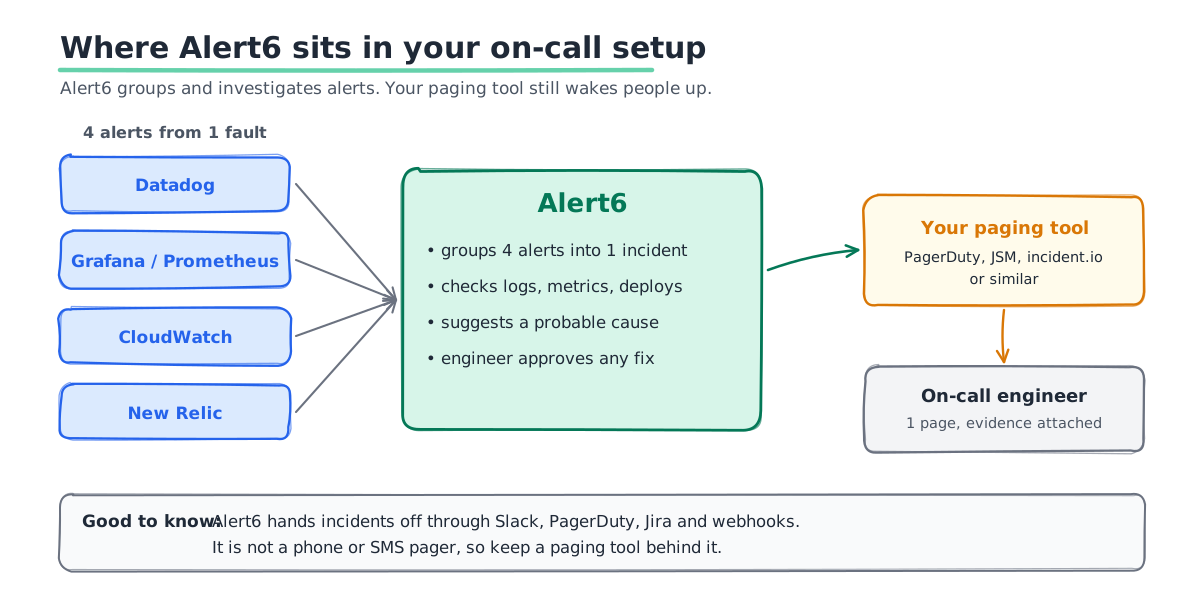
Alert6 is free for up to 5 services. The Team plan is $29 per monitored service per month. That pricing is per service, not per user, so it does not grow when more people join the rotation. If your Opsgenie setup pages people four times for one database fault, this is worth a look while you rebuild. If your alerts are already clean, you may not need it.
An 8-Week Migration Plan
This plan assumes a team of 5 to 30 people on call. Start no later than January 2027.
- Week 1: List everything. Export every schedule, escalation policy and integration from Opsgenie. Note which alerts paged someone in the last 90 days.
- Week 2: Delete the dead alerts. Any alert that fired but led to no action is a candidate to remove. Do not carry noise into a new tool.
- Week 3: Pick the tool. Run a short trial with one team. Test a real phone call at night, not just a Slack message.
- Weeks 4 to 5: Rebuild schedules and routing. Import what you can. Rebuild by hand what does not map cleanly.
- Weeks 6 to 7: Run both tools. Send alerts to Opsgenie and the new tool at the same time. Compare who got paged and when.
- Week 8: Cut over. Point every source at the new tool. Keep an Opsgenie export for your records, because the data will be deleted in April.
For the alert clean-up in week 2, our practical framework for reducing alert fatigue walks through how to decide what pages a human.
Mistakes We See Teams Make
- Waiting for the renewal date. Your renewal may land months before April 2027. Atlassian only allows renewals that end before the shutdown, so you may lose the option sooner than you think.
- Testing only in Slack. A tool that looks great in Slack can still fail to reach a phone on silent mode. Test real calls.
- Copying every alert across. The import tools make this easy. It is also how teams keep the same alert fatigue in a more expensive tool.
- Forgetting heartbeat checks. Teams often use Opsgenie heartbeats to catch silent failures, like a cron job that stopped. These are easy to miss in the move.
- Pricing only today's team. Per-user tools get expensive as the rotation grows. Price your team size for next year too.
If you are weighing AI tools for the investigation side as well, see our comparison of the best AI SRE tools in 2026.
Get Off Opsgenie Without Missing a Page
SquareOps runs 24/7 on-call for clients in India, the US, the UK, Europe and the Middle East. We can plan your Opsgenie move, rebuild your schedules and routing in the new tool, and clean up noisy alerts on the way. If you want Alert6 to group and investigate alerts in front of your pager, we can set that up too. Talk to our SRE team about moving before April 2027, or see how Alert6 works.